The "Before and After" DIY Thumbnail Niche: DIY / Home Renovation / Maker | Modern Prompt
High-quality AI-generated image. Optimized for detailed rendering, perfect for creative projects and inspiration.
421Views
0 Likes
100%Quality
FreeLicense
AI Prompt
A split-screen "Before and After" YouTube thumbnail. The left half is desaturated and gritty, showing a messy, rundown room with peeling paint and broken furniture; a "BEFORE" text graphic is implied at the top left. The right half is bright, warm, and perfectly decorated, showing the same room completely renovated into a cozy, modern farmhouse style space. A smiling DIY YouTuber stands in the middle, bridging the gap, holding a power drill and gesturing proudly toward the "After" side. The lighting on the right is golden and inviting. Aspect ratio 16:9.
Want to create this with your own face? Use this instruction:
Reference image controls facial identity. Do not override it. A split-screen "Before and After" YouTube thumbnail. The left half is desaturated and gritty, showing a messy, rundown room with peeling paint and broken furniture; a "BEFORE" text graphic is implied at the top left. The right half is bright, warm, and perfectly decorated, showing the same room completely renovated into a cozy, modern farmhouse style space. A smiling DIY YouTuber stands in the middle, bridging the gap, holding a power drill and gesturing proudly toward the "After" side. The lighting on the right is golden and inviting. Aspect ratio 16:9.
About this Prompt
Experience the visceral power of visionary storytelling through 'The "Before and After" DIY Thumbnail Niche: DIY / Home Renovation / Maker | Modern Prompt', a conceptual marvel that sets a massive new benchmark in the competitive landscape of YouTube Thumbnail imagery. Every generation acts as a profound exploration of modern art, delivering a striking aesthetic that is impossible to ignore. Intense macro details completely reveal a microscopic hidden world of fidelity, radically changing your perspective on what YouTube Thumbnail generation can achieve. The smooth, pearlescent chromatic aberration at the extreme edges gives it an incredibly premium, high-end, and highly expensive DSLR camera lens feel.
An absolutely brilliant starting point for those selling premium digital art prints, exclusive NFTs, or high-end stock photography. The staggering, raw commercial viability of the imagery generated by this prompt guarantees a highly profitable aesthetic. Stop endlessly tweaking parameters and start aggressively creating. This brilliantly structured prompt reliably handles all the heavy, complex structural lifting, leaving you with absolutely nothing but pure, unadulterated visual perfection and ultimate creative freedom.
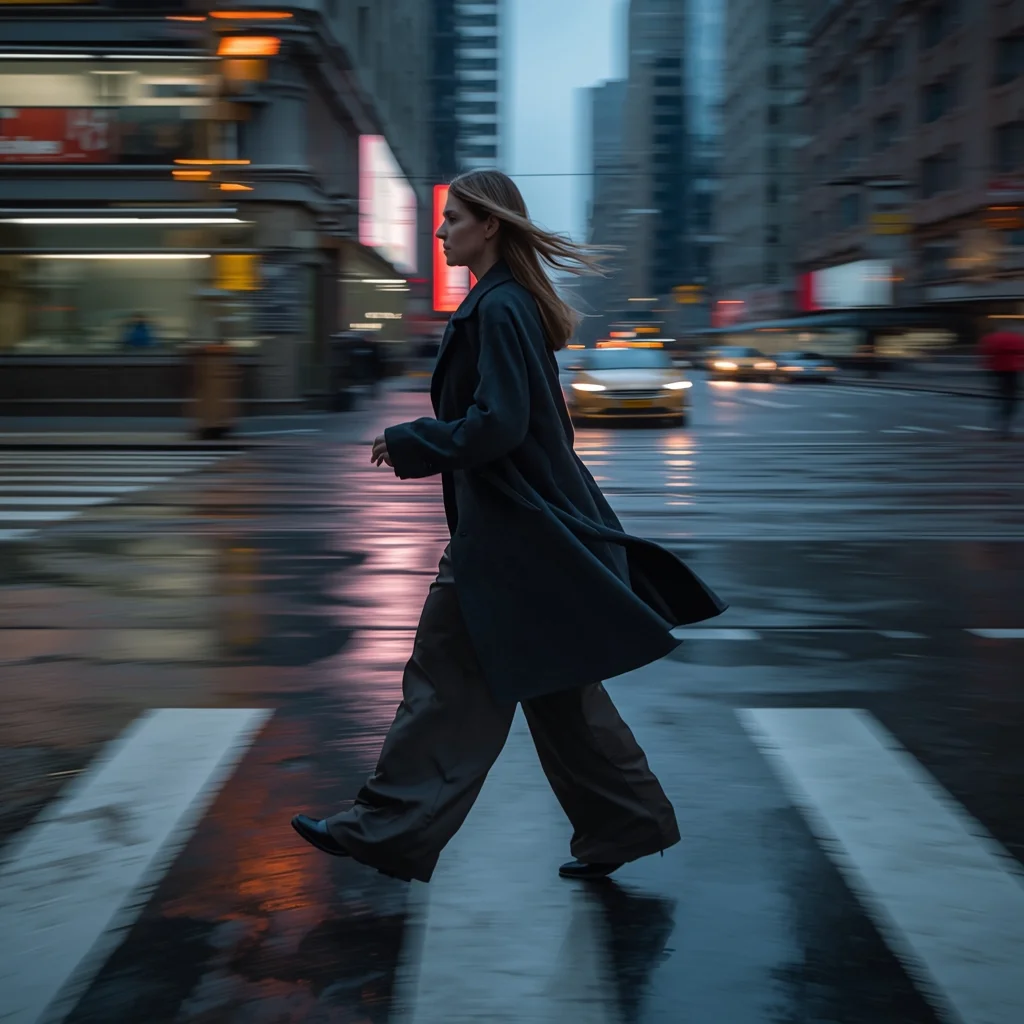
Prompt: A high-motion, 4k photorealistic shot of a woman captured mid-stride while crossing a rain-slicked city street. She is wearing a structured charcoal wool overcoat and wide-leg silk trousers that billow with her movement. Her pose is a natural, wide-stepping walk, head turned slightly as if caught by a candid photographer. The lighting is "blue hour" twilight, with realistic puddles on the ground reflecting neon city signs. Shot on a Sony A7R V with a 35mm lens, featuring slight motion blur on the background and ultra-detailed skin textures including fine lines and natural highlights.
Timeless Indian Female Cultural Portrait Pose | Ultimate Gemini Prompt
4259 mos ago
Prompt: A timeless cultural portrait of an Indian female in traditional attire, composed and elegant pose, subtle smile, dignified presence. Clean cultural backdrop, balanced studio lighting, classic Indian portrait photography style, realistic skin tones, fine facial details, ultra-high-resolution finish.
Autumn Pheran Shawl Wrap Cultural Pose | Professional Photo Prompt
4469 mos ago
Prompt: A young woman gently wrapping a patterned shawl over her autumn pheran, standing in a traditional courtyard. Soft hand movement adjusting the shawl, graceful posture, warm smile. Golden-hour autumn lighting, layered fabric textures, cultural storytelling photography, ultra-realistic folds and details, cinematic warmth.
Prompt: A lean, athletic man in grey performance gear, captured in a high-energy urban environment. He is on a rooftop with the city's skyscrapers creating a dizzying perspective in the background. Pose: Mid-air action shot: He is jumping between two concrete ledges, body perfectly tucked, one hand reaching forward. The sense of height and speed is intense. Technical: High shutter speed (1/4000s), wide-angle lens, GoPro-style perspective, vibrant colors, sharp motion.
Pose: Mid-air action shot: He is jumping between two concrete ledges, body perfectly tucked, one hand reaching forward. The sense of height and speed is intense. Technical: High shutter speed (1/4000s), wide-angle lens, GoPro-style perspective, vibrant colors, sharp motion.
Technical: High shutter speed (1/4000s), wide-angle lens, GoPro-style perspective, vibrant colors, sharp motion.
This AI Makes Money While You Sleep | Pro Ai Prompt For Creator
3359 mos ago
Prompt: Create a futuristic thumbnail showing a relaxed creator sleeping peacefully while holographic money, charts, and AI robots work in the background. Use cool night tones mixed with glowing green and blue financial graphics. The AI elements should look active and intelligent. Add soft cinematic lighting, ultra-realistic details, clean composition, depth of field, and a visually clear message that instantly communicates passive income through AI.
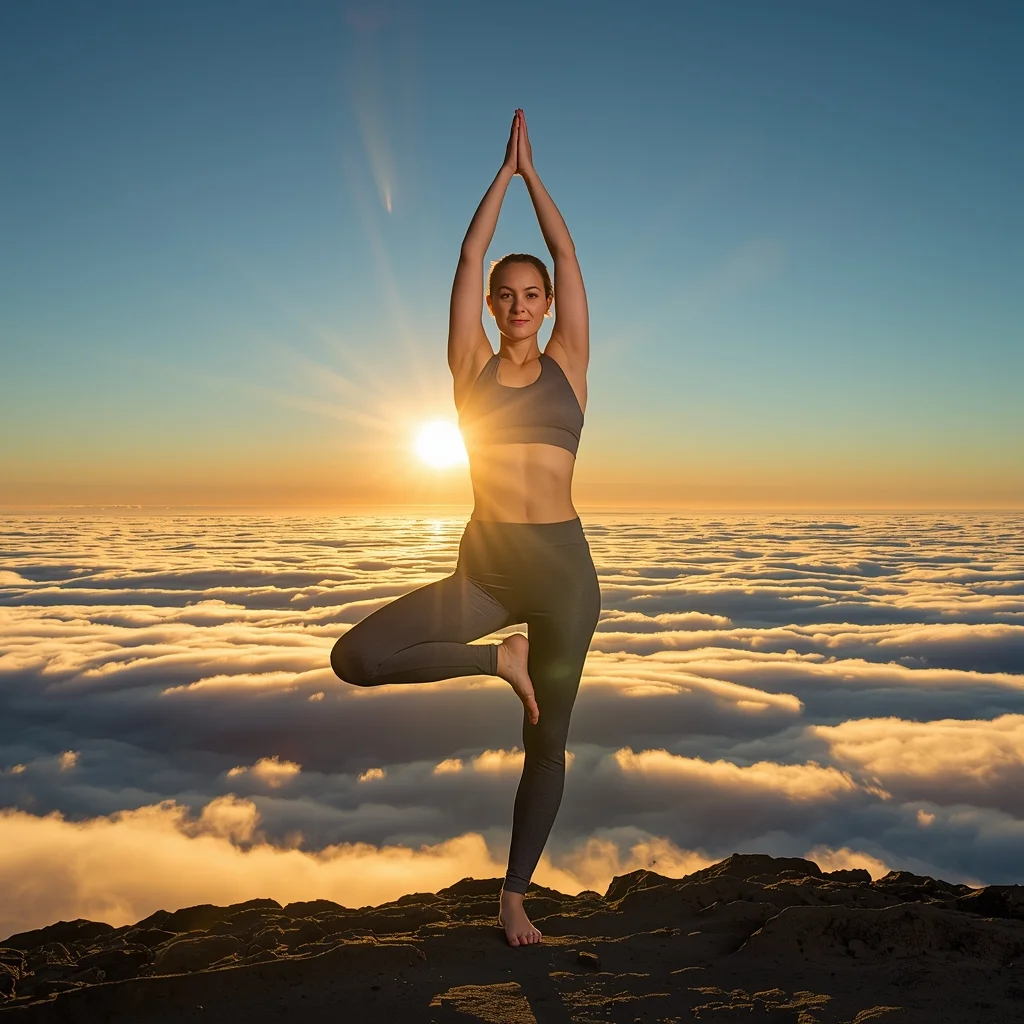
Prompt: A woman in sleek, charcoal-grey athletic wear practicing on a mountain peak at sunrise. The clouds are below her, creating an "ocean of clouds." The sun is just peeking over the horizon, creating a lens flare.
Pose: A complex and graceful yoga "Dancer’s Pose" (Natarajasana), showing perfect balance and strength.
Technical: National Geographic style, sharp focus, extreme detail on skin and fabric, 8k, vibrant morning light.
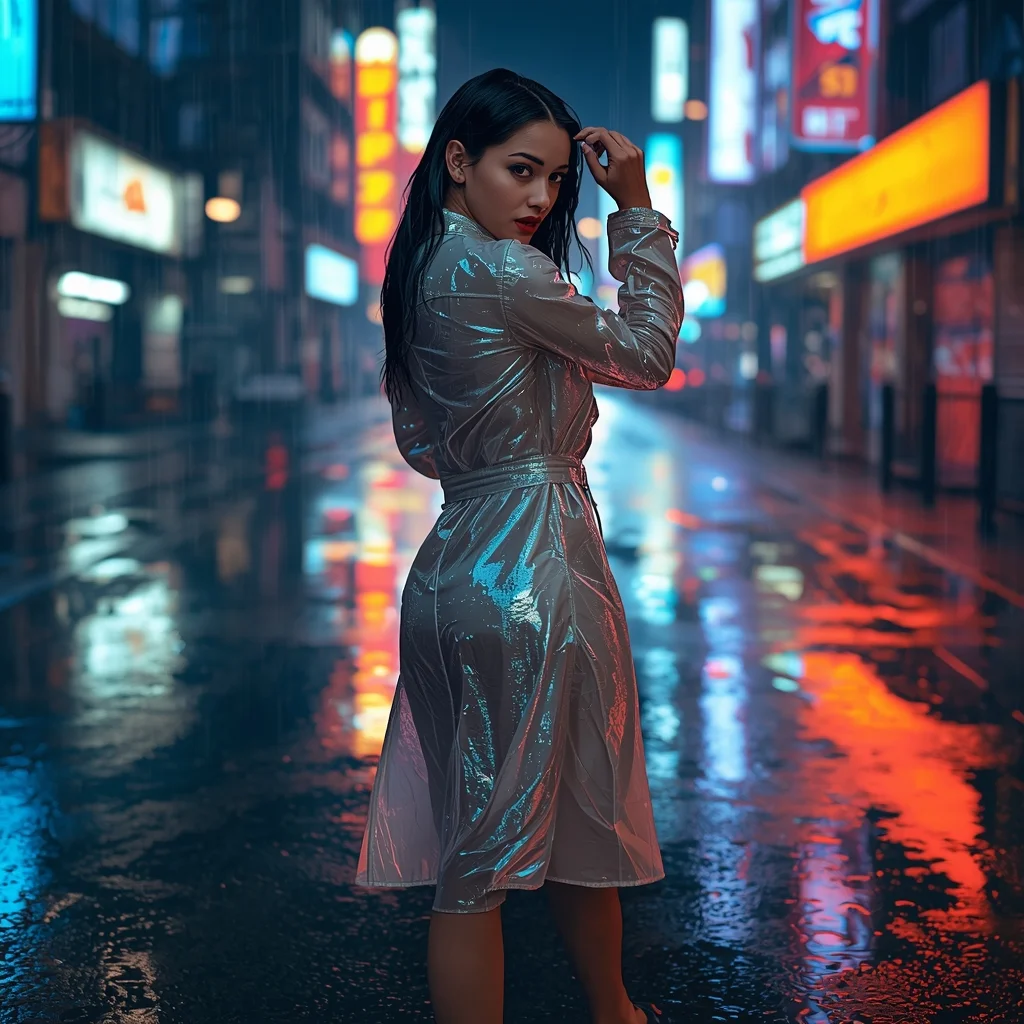
Prompt: A cinematic night scene of a woman in a translucent iridescent trench coat walking through a vibrant, rain-slicked futuristic city street. | Pose: She is captured in a dynamic mid-stride 'look-back' pose, her torso twisted toward the camera while her feet continue forward. One hand is brushing a wet strand of hair away from her face, and her eyes are locked onto the lens with an intense, mysterious expression. | Technical: 85mm lens, f/1.8 for creamy background bokeh. Ray-traced reflections of neon signs in the puddles. High-speed shutter to freeze raindrops in mid-air. 8k resolution with hyper-detailed skin texture and catchlights in the eyes.
Pokémon in Real Life Are Actually Terrifying (Photorealistic) | Ai Editing Prompt
3839 mos ago
Prompt: A gritty, realistic take on a gaming concept. A photorealistic, live-action style shot of a Charizard creature in a dark, rocky canyon. Instead of a cartoon, it is a terrifying, large reptilian dragon with detailed, leathery scales, scarred wings, and smoke curling from its snarling mouth. Real fire is burning at the tip of its tail. The lighting is dark and dramatic, casting deep shadows. In the foreground, a trainer's hand holds a weathered Poké Ball. Cinematic film grain, high detail creature design, dark fantasy aesthetic, 8k resolution.
Frequently Asked Questions
Common questions regarding this AI prompt.
What specific lighting setup is best to highlight the details of The \"Before and After\" DIY Thumbnail Niche: DIY / Home Renovation / Maker | Modern Prompt?
For maximum texture reveal, a 'three-point studio lighting' or 'Rembrandt lighting' setup works best. By incorporating keywords like 'rim light', 'key light', and 'soft fill', you instruct the AI to sculpt the YouTube Thumbnail subject out of the background, ensuring that micro-details like skin pores, fabric weaves, or metallic reflections are perfectly visible.
How can I use Inpainting to fix specific errors in the generated The \"Before and After\" DIY Thumbnail Niche: DIY / Home Renovation / Maker | Modern Prompt image?
Inpainting is essential for perfection. If 90% of the The \"Before and After\" DIY Thumbnail Niche: DIY / Home Renovation / Maker | Modern Prompt image is flawless but a hand or eye is distorted, send the image to an Inpaint tab. Mask only the flawed area, keep the original prompt, and set the denoising strength high (around 0.7). The AI will regenerate only that specific zone, seamlessly blending the fixed YouTube Thumbnail elements into the surrounding artwork.
How does the prompt establish the historical or futuristic era of The \"Before and After\" DIY Thumbnail Niche: DIY / Home Renovation / Maker | Modern Prompt?
Era-specific aesthetics are locked in using targeted chronological keywords. Whether leaning towards a neo-futuristic cyberpunk vibe or a classical Renaissance look, the prompt forces the AI to draw from specific historical datasets. This ensures that the clothing, architecture, and props within the YouTube Thumbnail scene remain historically or thematically accurate.
How can I prevent anatomical distortions or 'extra limbs' when generating characters?
While modern models have improved, complex poses in YouTube Thumbnail can still cause issues. To prevent this, use a strong negative prompt containing 'bad anatomy, extra limbs, mutated hands, deformed structure'. If generating locally via Stable Diffusion, utilizing ControlNet (specifically OpenPose or Depth) alongside this prompt will guarantee flawless anatomical structure.
What is the best Stylize (--s) value to use in Midjourney for this prompt?
The stylize parameter dictates how strongly Midjourney applies its default aesthetic. For strict adherence to the realistic details of The \"Before and After\" DIY Thumbnail Niche: DIY / Home Renovation / Maker | Modern Prompt, keep it around --s 100 to --s 250. If you want the AI to take artistic liberties and make the YouTube Thumbnail scene look more like a digital masterpiece, push the value up to --s 500 or --s 750.
Why is this prompt highly effective for generating The \"Before and After\" DIY Thumbnail Niche: DIY / Home Renovation / Maker | Modern Prompt?
Its effectiveness lies in the structured syntax. It separates the core subject definition from the style and technical parameters. This 'block structure' prevents AI confusion, ensuring that the details of The \"Before and After\" DIY Thumbnail Niche: DIY / Home Renovation / Maker | Modern Prompt remain razor-sharp while the background and artistic medium seamlessly blend to match the YouTube Thumbnail aesthetic without overpowering the main focus.
What if the AI completely ignores a specific detail I added to the The \"Before and After\" DIY Thumbnail Niche: DIY / Home Renovation / Maker | Modern Prompt prompt?
If a detail is ignored, it lacks 'weight'. Move that specific word closer to the very beginning of the prompt. Alternatively, if using Midjourney, use the double colon syntax (Keyword::2) to force the AI to pay attention. In Stable Diffusion, wrap the keyword in parentheses like (Keyword:1.5) to boost its importance in the YouTube Thumbnail scene.
What are the recommended parameters for generating The \"Before and After\" DIY Thumbnail Niche: DIY / Home Renovation / Maker | Modern Prompt in Stable Diffusion XL (SDXL)?
For optimal results in SDXL, we recommend pairing this prompt with a high-quality checkpoint like Juggernaut XL. Use the DPM++ 2M Karras sampler with approximately 35-40 steps and a CFG scale between 6.5 and 8.0. This combination strikes the perfect balance between adhering strictly to the The \"Before and After\" DIY Thumbnail Niche: DIY / Home Renovation / Maker | Modern Prompt description and allowing the model's creative freedom.
How do I achieve an extreme close-up or macro shot of The \"Before and After\" DIY Thumbnail Niche: DIY / Home Renovation / Maker | Modern Prompt?
Modify the perspective by heavily weighting keywords like 'extreme macro photography', '100mm macro lens', 'microscopic detail', and 'extreme close up'. This forces the AI engine to ignore the broader YouTube Thumbnail environment and dedicate all of its rendering power to the microscopic textures, fibers, or surface imperfections of the primary subject.
Can I simulate bioluminescence or neon lighting in this prompt?
Yes, you can easily shift the scene into a sci-fi or fantasy realm by adding terms like 'bioluminescent glow', 'neon tube lighting', 'emissive materials', or 'fluorescent accents'. These modifiers will cause the objects within the YouTube Thumbnail scene to act as their own light sources, casting incredibly realistic colored reflections onto surrounding surfaces.