Pokémon in Real Life Are Actually Terrifying (Photorealistic) | Ai Editing Prompt
High-quality AI-generated image. Optimized for detailed rendering, perfect for creative projects and inspiration.
168Views
0 Likes
100%Quality
FreeLicense
AI Prompt
Prompt: A gritty, realistic take on a gaming concept. A photorealistic, live-action style shot of a Charizard creature in a dark, rocky canyon. Instead of a cartoon, it is a terrifying, large reptilian dragon with detailed, leathery scales, scarred wings, and smoke curling from its snarling mouth. Real fire is burning at the tip of its tail. The lighting is dark and dramatic, casting deep shadows. In the foreground, a trainer's hand holds a weathered Poké Ball. Cinematic film grain, high detail creature design, dark fantasy aesthetic, 8k resolution.
Want to create this with your own face? Use this instruction:
No face swapping, no face enhancement, no retouching, and no AI beautification. Original face only. Prompt: A gritty, realistic take on a gaming concept. A photorealistic, live-action style shot of a Charizard creature in a dark, rocky canyon. Instead of a cartoon, it is a terrifying, large reptilian dragon with detailed, leathery scales, scarred wings, and smoke curling from its snarling mouth. Real fire is burning at the tip of its tail. The lighting is dark and dramatic, casting deep shadows. In the foreground, a trainer's hand holds a weathered Poké Ball. Cinematic film grain, high detail creature design, dark fantasy aesthetic, 8k resolution.
About this Prompt
Harness the raw, untamed energy of artificial intelligence with 'Pokémon in Real Life Are Actually Terrifying (Photorealistic) | Ai Editing Prompt', a prompt explicitly tailored to completely dominate the YouTube Thumbnail digital art scene. From casual weekend projects to high-stakes commercial campaigns, it provides a robust, stunning foundation for unparalleled visual success. Visually, it is an absolute powerhouse, utilizing a hyper-detailed, incredibly saturated palette that vibrates with intense, radiant, and almost radioactive energy. The vibrant saturation levels are perfectly calibrated; it pops intensely while maintaining a highly sophisticated, strictly professional YouTube Thumbnail color grade.
Whether you are currently working in Midjourney v6, Stable Diffusion XL, or the latest Gemini models, this highly structured prompt heavily optimizes your creative workflow, reliably delivering jaw-dropping, professional-grade outputs on the very first try. Embrace the highly anticipated, bleeding-edge absolute future of pixel generation. This text string is widely considered the undisputed, heavily relied-upon heavyweight champion of modern prompts, guaranteeing an absolute visual ecstasy for your eager viewers' retinas.
Sunset Beach Yoga Flow | Next Level Ai Prompt Idea
1814 mos ago
Prompt: A fit woman in charcoal-colored athletic wear on a secluded tropical beach. The sun is a giant orange ball touching the horizon. The waves are gently lapping at her feet on the wet, reflective sand. The sky is a gradient of purple and gold.
Pose: Performing a perfect "Dancer's Pose" (Natarajasana)—balancing on one leg, holding her other foot behind her head, creating a beautiful silhouette against the setting sun.
Technical: Silhouette photography style, high contrast, wide-angle 16mm lens, f/8.0, crisp edges, vibrant sky colors, National Geographic style.
Modern Indian Viral Reel Pose – Bold Still Frame Look | Hd Image Prompt
2074 mos ago
Prompt: An Indian woman dressed in a bold modern Indian dress, captured in a strong still-frame pose as if the reel pauses dramatically. Feet grounded, shoulders squared, chin slightly raised. Body language confident and commanding. Hair neatly styled with subtle volume. Expression intense yet composed. Makeup clean glam with sharp features. Lighting crisp and studio-clean. Background minimal. Ultra-realistic textures, cinematic influencer framing, high-impact viral composition.
A low-angle shot of a glass skyscraper reflecting the clouds and the building opposite to it. The sky is a deep polarized blue. Geometric lines and sharp contrast between light and shadow. Shot on a wide-angle 24mm lens, architectural photography, hyper-realistic.
Timeless Heritage Grace Woman Pose | Latest Ai Prompt Idea Free
1854 mos ago
Prompt: A traditionally dressed woman standing with calm elegance, her posture upright and balanced, one hand gently holding the edge of her flowing cultural attire while the other rests naturally by her side. Her expression is serene and confident, reflecting deep cultural roots and timeless beauty. The fabric features intricate traditional patterns with rich textures and layered details. Jewelry is minimal yet authentic, complementing her look without overpowering it. Soft warm lighting highlights her skin tone and the craftsmanship of the outfit. Background is subtle and heritage-inspired, slightly blurred to keep focus on the subject. Ultra-realistic textures, cinematic depth of field, professional cultural portrait photography, high-resolution artistic style.
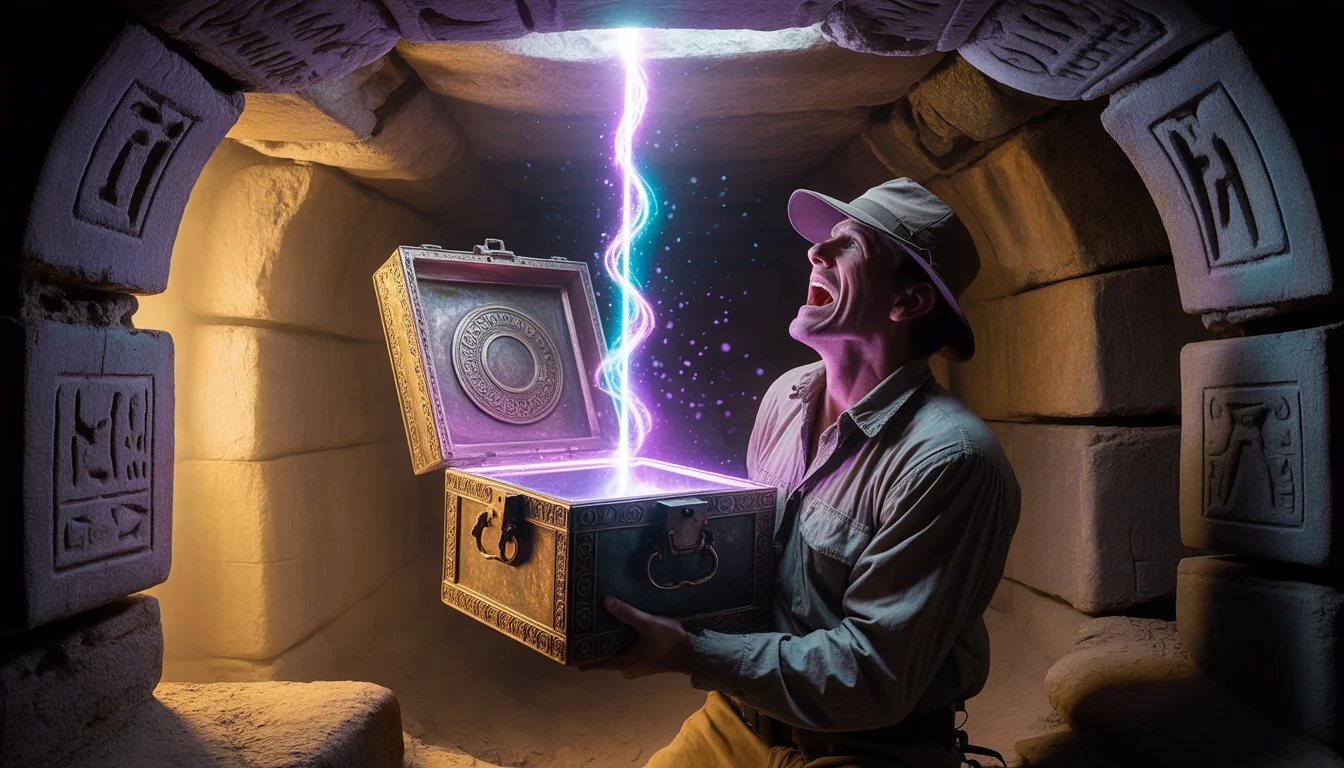
Prompt: A mysterious, Indiana Jones-style adventure thumbnail. Deep inside a dusty, cobweb-filled ancient stone tomb, an explorer in dusty field gear holds an ornate, heavily corroded bronze chest. The lid is cracked open just an inch, and a blinding, supernatural purple and blue energy beam is shooting upwards, illuminating the terrified face of the explorer. Ancient hieroglyphs on the tomb walls are glowing faintly in response to the box. Dust motes dance in the light beams. Cinematic lighting, high suspense, rich textures of aged metal and stone, 8k resolution.
Prompt: A dynamic, "candid-walk" pose of a woman crossing a rainy metropolitan street during the blue hour. She wears a semi-transparent, neon-lined trench coat that catches the reflections of city lights. The image features realistic motion blur on her legs and the background traffic, while her face remains in sharp, detailed focus. The style is "New Realistic Action," showing rain droplets on her hair and a slight dampness on her skin. High-speed shutter effect, Sony A7R V aesthetic, moody teal and orange color grading.
Modern Indian Viral Reel Pose – Soft Hair Toss Moment | Pro Level Image Prompt
2054 mos ago
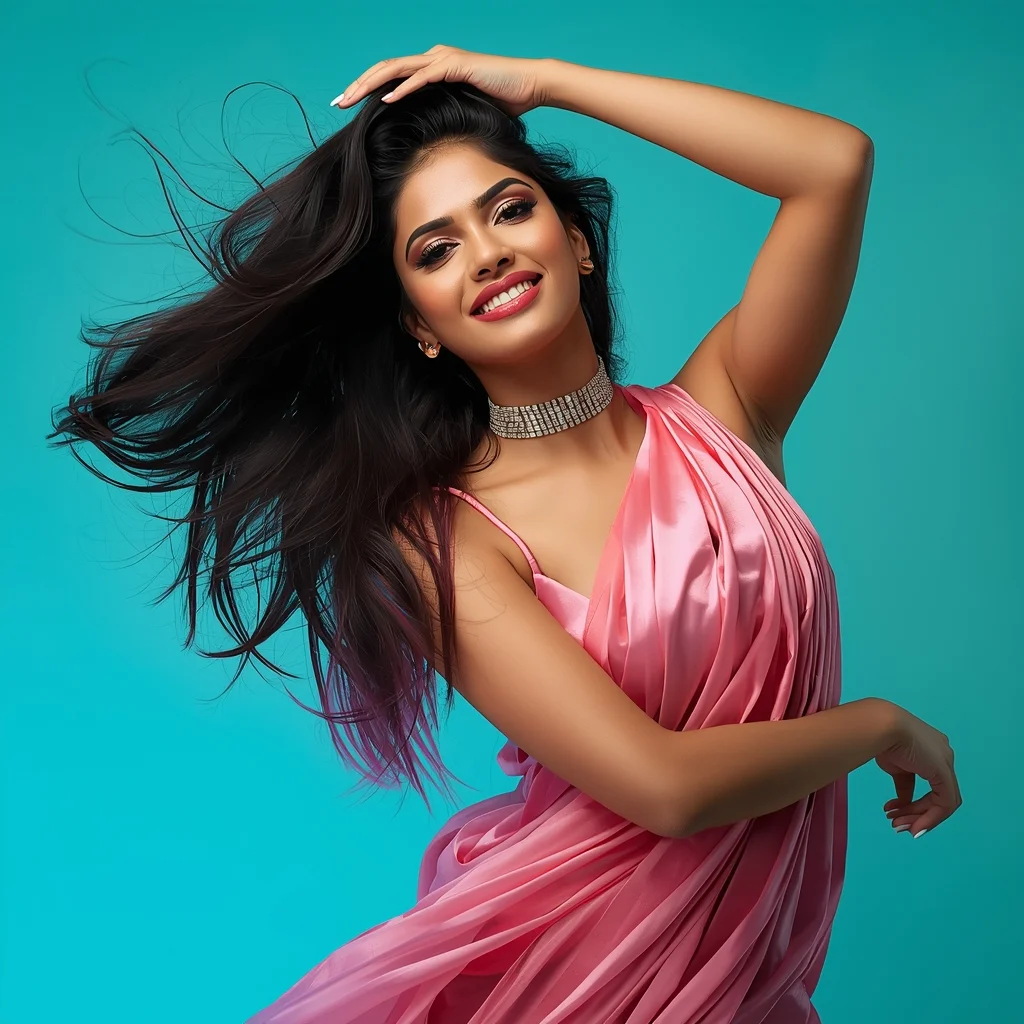
Prompt: An Indian woman in a modern Indian party dress, captured mid soft hair toss during a reel-style moment. Hair frozen in gentle motion creating elegance. Body posture fluid and stylish. Expression playful yet confident. Makeup glossy and camera-ready. Lighting vibrant and clean, enhancing sharpness. Background minimal or colorful. High clarity, cinematic influencer aesthetic, ultra-realistic textures, optimized for viral reels.
Frequently Asked Questions
Common questions regarding this AI prompt.
Can I simulate bioluminescence or neon lighting in this prompt?
Yes, you can easily shift the scene into a sci-fi or fantasy realm by adding terms like 'bioluminescent glow', 'neon tube lighting', 'emissive materials', or 'fluorescent accents'. These modifiers will cause the objects within the YouTube Thumbnail scene to act as their own light sources, casting incredibly realistic colored reflections onto surrounding surfaces.
What is the best way to force an ultra-wide or panoramic view?
To force a panoramic composition, you must combine aspect ratio parameters with specific camera descriptors. In Midjourney, use '--ar 21:9'. Within the prompt text itself, include 'ultra-wide panoramic landscape, 14mm lens, expansive horizon, sweeping view'. This ensures the Pokémon in Real Life Are Actually Terrifying (Photorealistic) | Ai Editing Prompt subject matter is distributed correctly across a massive, cinematic canvas.
Can I use Image-to-Image (Img2Img) techniques with the Pokémon in Real Life Are Actually Terrifying (Photorealistic) | Ai Editing Prompt prompt?
Absolutely. Using a rough sketch or a reference photo alongside this prompt in an Img2Img workflow is highly effective. We recommend setting your Denoising Strength between 0.45 and 0.65. This range is the 'sweet spot' that allows the AI to apply the high-quality textures and lighting of the Pokémon in Real Life Are Actually Terrifying (Photorealistic) | Ai Editing Prompt prompt while strictly respecting the structural layout of your reference image.
What should I do if the background of Pokémon in Real Life Are Actually Terrifying (Photorealistic) | Ai Editing Prompt becomes too cluttered?
If the AI over-complicates the background, you need to assert control over the depth of field. Add strict modifiers like 'clean minimalist background, studio backdrop, heavy bokeh, blurred environment' to the prompt. Additionally, placing the subject-specific keywords at the very front of the prompt ensures the AI prioritizes the main Pokémon in Real Life Are Actually Terrifying (Photorealistic) | Ai Editing Prompt element.
How does this prompt handle lighting and atmospheric effects?
This prompt utilizes a sophisticated combination of cinematic lighting descriptors and atmospheric keywords tailored for YouTube Thumbnail. By specifying light direction, diffusion, and volumetric properties like 'god rays' or 'softbox lighting', it forces modern AI engines like Midjourney v6 and Flux to calculate highly realistic light bounces, creating a deeply immersive environment.
How do I create a surreal, dream-like version of Pokémon in Real Life Are Actually Terrifying (Photorealistic) | Ai Editing Prompt?
To break the laws of physics, use keywords like 'surrealism, dreamscape, floating objects, defying gravity, Salvador Dali style, mind-bending geometry, ethereal'. The AI will take the familiar elements of Pokémon in Real Life Are Actually Terrifying (Photorealistic) | Ai Editing Prompt and arrange them in illogical, fascinating ways, creating a truly unique YouTube Thumbnail art piece.
Can I convert the scene into a post-apocalyptic wasteland?
Yes, by adding 'post-apocalyptic, overgrown ruins, rusted metal, decayed urban environment, survival aesthetic, cinematic fallout style'. The AI will take the core structure of Pokémon in Real Life Are Actually Terrifying (Photorealistic) | Ai Editing Prompt and age it by decades, adding immense weathering and environmental storytelling to the YouTube Thumbnail image.
How do I ensure the skin textures in Pokémon in Real Life Are Actually Terrifying (Photorealistic) | Ai Editing Prompt look photorealistic and not plastic?
AI often defaults to overly smooth, airbrushed skin. To counter this, you must explicitly demand imperfections. Add 'subsurface scattering, visible skin pores, peach fuzz, micro-wrinkles, highly detailed skin texture, raw unedited photograph' to the prompt. This forces the model to render the human elements of the YouTube Thumbnail scene with authentic, biological realism.
Why is this prompt highly effective for generating Pokémon in Real Life Are Actually Terrifying (Photorealistic) | Ai Editing Prompt?
Its effectiveness lies in the structured syntax. It separates the core subject definition from the style and technical parameters. This 'block structure' prevents AI confusion, ensuring that the details of Pokémon in Real Life Are Actually Terrifying (Photorealistic) | Ai Editing Prompt remain razor-sharp while the background and artistic medium seamlessly blend to match the YouTube Thumbnail aesthetic without overpowering the main focus.
Can I make the image look like vintage, degraded film?
Absolutely. To strip away the ultra-modern crispness, inject phrases like 'shot on Kodak Portra 400', 'heavy film grain', 'light leaks', 'chromatic aberration', and 'vintage 1970s polaroid'. This introduces beautiful, nostalgic imperfections into the YouTube Thumbnail scene, making the Pokémon in Real Life Are Actually Terrifying (Photorealistic) | Ai Editing Prompt generation look like a discovered relic rather than a digital creation.
How can I use Inpainting to fix specific errors in the generated Pokémon in Real Life Are Actually Terrifying (Photorealistic) | Ai Editing Prompt image?
Inpainting is essential for perfection. If 90% of the Pokémon in Real Life Are Actually Terrifying (Photorealistic) | Ai Editing Prompt image is flawless but a hand or eye is distorted, send the image to an Inpaint tab. Mask only the flawed area, keep the original prompt, and set the denoising strength high (around 0.7). The AI will regenerate only that specific zone, seamlessly blending the fixed YouTube Thumbnail elements into the surrounding artwork.
What are the recommended parameters for generating Pokémon in Real Life Are Actually Terrifying (Photorealistic) | Ai Editing Prompt in Stable Diffusion XL (SDXL)?
For optimal results in SDXL, we recommend pairing this prompt with a high-quality checkpoint like Juggernaut XL. Use the DPM++ 2M Karras sampler with approximately 35-40 steps and a CFG scale between 6.5 and 8.0. This combination strikes the perfect balance between adhering strictly to the Pokémon in Real Life Are Actually Terrifying (Photorealistic) | Ai Editing Prompt description and allowing the model's creative freedom.
What is the best way to shift the artistic medium of Pokémon in Real Life Are Actually Terrifying (Photorealistic) | Ai Editing Prompt to an oil painting?
To completely transform the medium, append powerful style modifiers. Injecting phrases like 'intricate oil painting on canvas, thick impasto strokes, palette knife technique, classical fine art, museum masterpiece' will completely override the default realism, offering a traditional artistic variation for your YouTube Thumbnail project.
What architectural composition techniques are embedded in the Pokémon in Real Life Are Actually Terrifying (Photorealistic) | Ai Editing Prompt prompt?
The Pokémon in Real Life Are Actually Terrifying (Photorealistic) | Ai Editing Prompt prompt utilizes advanced compositional frameworks such as the golden ratio and leading lines. By strategically placing the core YouTube Thumbnail subject matter at intersection points, it guides the viewer's eye naturally through the scene. This mathematical approach to AI generation ensures the final output feels balanced and visually arresting without requiring post-crop adjustments.