High-quality AI-generated image. Optimized for detailed rendering, perfect for creative projects and inspiration.
293Views
0 Likes
100%Quality
FreeLicense
AI Prompt
Prompt: A man captured mid-step while walking down modern concrete stairs, one foot in motion, natural body balance, relaxed shoulders, wearing layered streetwear with clean sneakers, urban architecture background, crisp daylight, motion frozen sharply, cinematic perspective, ultra-realistic clothing folds, high-end fashion editorial look.
Want to create this with your own face? Use this instruction:
Maintain perfect facial consistency with the reference image. The identity, expression style, realism, and skin details must match exactly, with zero deviation. Prompt: A man captured mid-step while walking down modern concrete stairs, one foot in motion, natural body balance, relaxed shoulders, wearing layered streetwear with clean sneakers, urban architecture background, crisp daylight, motion frozen sharply, cinematic perspective, ultra-realistic clothing folds, high-end fashion editorial look.
About this Prompt
Embrace the bleeding-edge allure of tomorrow's technology today with 'Dynamic Step-Down Motion Pose | Ultra Realistic Prompt', a brilliant intersection of modern algorithmic power and classic Man Pose Art beauty. The instant, striking visual impact of this prompt is undeniable, effortlessly pulling viewers directly into its mesmerizing trance. Massively overexposed, brilliantly blown-out highlights create a deeply dreamy, almost ethereal wash, bathing the entire composition in a blinding, incredibly pure holiness. Deep, crushing shadows simultaneously hide profound secrets, forcing the viewer to actively engage with the mysterious Man Pose Art narrative.
A heavily relied-upon secret weapon for digital marketing agencies running high-conversion ad campaigns. The sheer psychological stopping power of this highly optimized Man Pose Art aesthetic dramatically lowers acquisition costs and massively boosts viewer click-through rates. Your incredible journey to absolute generative perfection starts exactly right here. Seamlessly blend color, digital code, and raw creativity by confidently utilizing this ultimate prompt to bring your boldest, most ambitious Man Pose Art visions to reality.
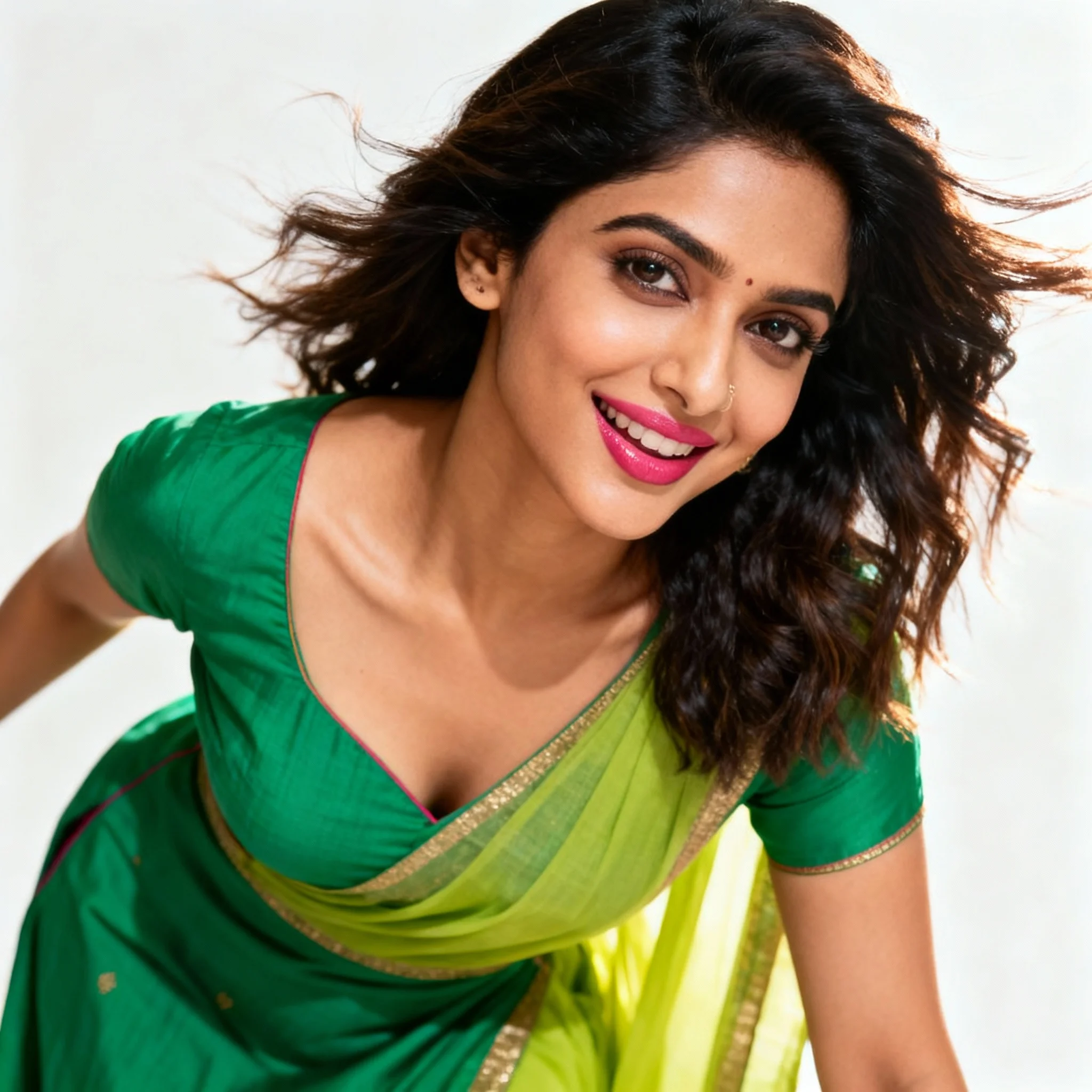
Modern Indian Viral Reel Pose – Lean-In Engagement Shot | Ai Prompt For Realistic Look
3408 mos ago
Prompt: An Indian woman wearing a trendy modern Indian dress, captured leaning slightly toward the camera as if engaging viewers in a reel. Body language expressive and inviting. Hair textured with subtle motion. Expression confident, playful, and magnetic. Makeup fresh and camera-ready. Lighting bright with controlled contrast. Background minimal to keep focus on subject. Ultra-high realism, cinematic reel composition, influencer-grade polish, designed for viral engagement.
AI Influencer Hands Lightly Clasped Pose | Powerful Prompt For Hd Image
3318 mos ago
Prompt: A modern AI influencer male standing in a clean studio, hands lightly clasped at waist level, straight relaxed posture, confident neutral expression, minimal stylish outfit, soft diffused lighting, seamless background, refined social media aesthetic, hyper-realistic portrait.
Prompt: A moody, black-and-white fashion portrait in a "low-crouch" pose against a raw, brutalist concrete wall. The woman wears a sharp-shouldered black velvet power suit. The pose is edgy and non-traditional—one hand resting on the ground, the other adjusting her sunglasses. High-contrast "Chiaroscuro" lighting defines the sharp jawline and the heavy grain of the concrete. The "new realistic" style includes a subtle film grain and deep blacks, giving it the feel of a 35mm film scan.
This Simple Change Boosted Everything | High Quality Ai Prompt List
2618 mos ago
Prompt: Design a bold thumbnail with a creator confidently flipping a switch labeled “ON.” As the switch flips, the scene transforms with bright colors, glowing arrows, and growth symbols. Use energetic lighting, vivid saturation, cinematic contrast, ultra-realistic details, sharp focus, strong visual motion, and a clean yet powerful composition optimized for instant attention.
Prompt: A man sitting casually on a chair, one elbow resting on knee, chin slightly tilted, confident cool attitude, soft natural light, minimal background, influencer reel-style composition, candid yet stylish look, ultra-realistic social media portrait.
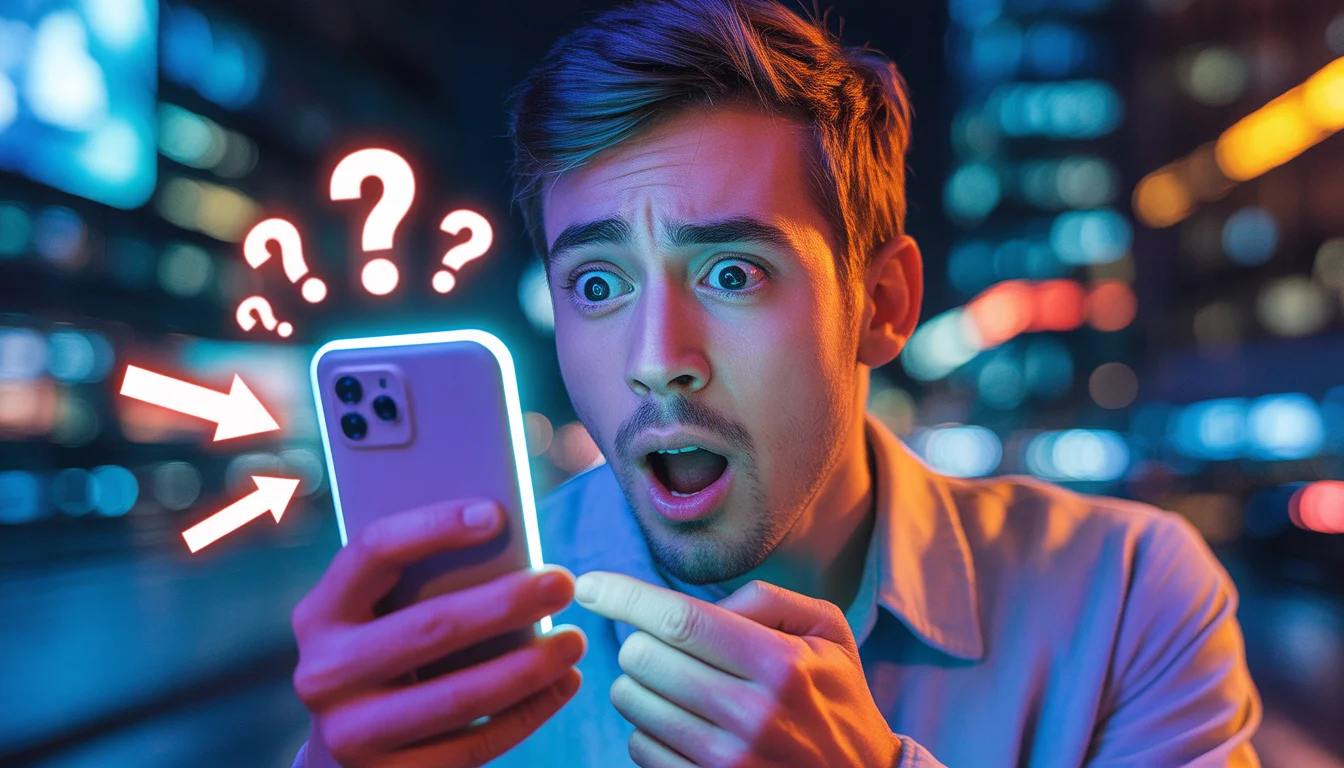
This Secret Changed Everything Overnight | Ai Prompt For High Engagement
2568 mos ago
Prompt: Ultra-realistic YouTube thumbnail showing a shocked young man holding a glowing smartphone, eyes wide open, mouth slightly open in disbelief, neon blue and orange lighting, dramatic cinematic shadows, blurred city background at night, floating question marks and glowing arrows pointing toward the phone screen, bold contrast, high saturation, emotional facial expression, sharp focus on face, shallow depth of field, professional studio quality, viral YouTube thumbnail style, 4K resolution, perfect lighting for small-screen visibility, modern digital aesthetic.
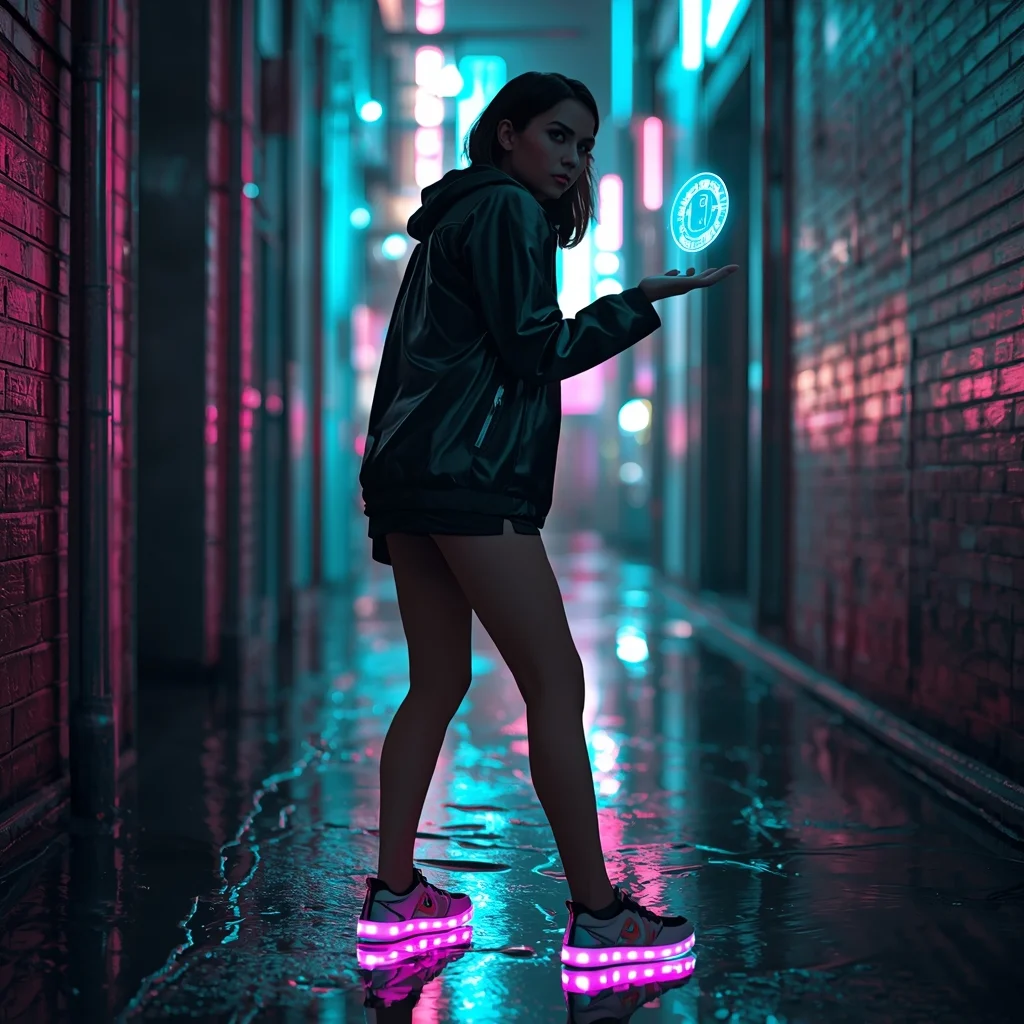
The Cyberpunk Urbanite (Futuristic) | Expert Level Ai Prompt
3178 mos ago
Prompt: A cinematic shot of a woman standing in a narrow, rain-slicked alleyway in a neon-lit futuristic city. She wears a matte black techwear jacket and glowing LED-embedded sneakers.
Pose: Slightly hunched forward in a defensive yet curious stance, looking over her shoulder with a mysterious expression while her hand interacts with a floating blue holographic interface.
Technical: Hyper-realistic, ray-tracing reflections in puddles, vibrant teal and magenta neon lighting, sharp focus on the face with a blurred busy city background.
Frequently Asked Questions
Common questions regarding this AI prompt.
What if the AI completely ignores a specific detail I added to the Dynamic Step-Down Motion Pose | Ultra Realistic Prompt prompt?
If a detail is ignored, it lacks 'weight'. Move that specific word closer to the very beginning of the prompt. Alternatively, if using Midjourney, use the double colon syntax (Keyword::2) to force the AI to pay attention. In Stable Diffusion, wrap the keyword in parentheses like (Keyword:1.5) to boost its importance in the Man Pose Art scene.
What is the best way to force an ultra-wide or panoramic view?
To force a panoramic composition, you must combine aspect ratio parameters with specific camera descriptors. In Midjourney, use '--ar 21:9'. Within the prompt text itself, include 'ultra-wide panoramic landscape, 14mm lens, expansive horizon, sweeping view'. This ensures the Dynamic Step-Down Motion Pose | Ultra Realistic Prompt subject matter is distributed correctly across a massive, cinematic canvas.
How can I transform Dynamic Step-Down Motion Pose | Ultra Realistic Prompt into a vector graphic or logo style?
To strip away the photorealism, replace the camera keywords with 'flat vector illustration, minimalist design, UI/UX asset, Adobe Illustrator style, solid colors, clean crisp lines, no gradients'. This transforms the Man Pose Art subject into a scalable, graphic-design-ready asset perfect for web design or branding.
How can I use Inpainting to fix specific errors in the generated Dynamic Step-Down Motion Pose | Ultra Realistic Prompt image?
Inpainting is essential for perfection. If 90% of the Dynamic Step-Down Motion Pose | Ultra Realistic Prompt image is flawless but a hand or eye is distorted, send the image to an Inpaint tab. Mask only the flawed area, keep the original prompt, and set the denoising strength high (around 0.7). The AI will regenerate only that specific zone, seamlessly blending the fixed Man Pose Art elements into the surrounding artwork.
What specific lighting setup is best to highlight the details of Dynamic Step-Down Motion Pose | Ultra Realistic Prompt?
For maximum texture reveal, a 'three-point studio lighting' or 'Rembrandt lighting' setup works best. By incorporating keywords like 'rim light', 'key light', and 'soft fill', you instruct the AI to sculpt the Man Pose Art subject out of the background, ensuring that micro-details like skin pores, fabric weaves, or metallic reflections are perfectly visible.
How does this prompt handle lighting and atmospheric effects?
This prompt utilizes a sophisticated combination of cinematic lighting descriptors and atmospheric keywords tailored for Man Pose Art. By specifying light direction, diffusion, and volumetric properties like 'god rays' or 'softbox lighting', it forces modern AI engines like Midjourney v6 and Flux to calculate highly realistic light bounces, creating a deeply immersive environment.
What is the best Stylize (--s) value to use in Midjourney for this prompt?
The stylize parameter dictates how strongly Midjourney applies its default aesthetic. For strict adherence to the realistic details of Dynamic Step-Down Motion Pose | Ultra Realistic Prompt, keep it around --s 100 to --s 250. If you want the AI to take artistic liberties and make the Man Pose Art scene look more like a digital masterpiece, push the value up to --s 500 or --s 750.
How does the prompt simulate physical camera lenses for Dynamic Step-Down Motion Pose | Ultra Realistic Prompt?
The prompt acts as a virtual director of photography by explicitly stating lens focal lengths and aperture settings. By including phrases like 'shot on 35mm lens' or 'f/1.4 aperture', the AI mathematically simulates the optical distortion, compression, and background blur (bokeh) characteristic of high-end photography, elevating the Man Pose Art image from a flat digital render to a lifelike photo.
Why is this prompt highly effective for generating Dynamic Step-Down Motion Pose | Ultra Realistic Prompt?
Its effectiveness lies in the structured syntax. It separates the core subject definition from the style and technical parameters. This 'block structure' prevents AI confusion, ensuring that the details of Dynamic Step-Down Motion Pose | Ultra Realistic Prompt remain razor-sharp while the background and artistic medium seamlessly blend to match the Man Pose Art aesthetic without overpowering the main focus.
Can I easily integrate the Dynamic Step-Down Motion Pose | Ultra Realistic Prompt output into a professional design workflow?
Absolutely. The outputs generated by this prompt are designed with commercial and professional workflows in mind. Because it emphasizes crisp edges, balanced contrast, and high-resolution keywords, the resulting Man Pose Art images are perfect for immediate use in UI/UX design, marketing materials, or further post-processing in software like Adobe Photoshop.
How does Midjourney v6 process the intricate details of Dynamic Step-Down Motion Pose | Ultra Realistic Prompt?
Midjourney v6 excels at understanding natural language nuances. This prompt is specifically written to take advantage of v6's semantic comprehension. You do not need to use 'prompt salad' (randomly throwing words). The detailed, descriptive sentences regarding the Man Pose Art elements are parsed accurately, giving you photographic or highly illustrative perfection.
Does this prompt work with DALL-E 3 inside ChatGPT?
Yes, it works exceptionally well. DALL-E 3 thrives on conversational, highly descriptive text. Because this prompt for Dynamic Step-Down Motion Pose | Ultra Realistic Prompt is structured with clear nouns and adjectives, DALL-E 3 will translate it almost perfectly into an image, ensuring that multiple complex elements within the Man Pose Art scene interact logically.
How do I achieve an extreme close-up or macro shot of Dynamic Step-Down Motion Pose | Ultra Realistic Prompt?
Modify the perspective by heavily weighting keywords like 'extreme macro photography', '100mm macro lens', 'microscopic detail', and 'extreme close up'. This forces the AI engine to ignore the broader Man Pose Art environment and dedicate all of its rendering power to the microscopic textures, fibers, or surface imperfections of the primary subject.
What architectural composition techniques are embedded in the Dynamic Step-Down Motion Pose | Ultra Realistic Prompt prompt?
The Dynamic Step-Down Motion Pose | Ultra Realistic Prompt prompt utilizes advanced compositional frameworks such as the golden ratio and leading lines. By strategically placing the core Man Pose Art subject matter at intersection points, it guides the viewer's eye naturally through the scene. This mathematical approach to AI generation ensures the final output feels balanced and visually arresting without requiring post-crop adjustments.
Can I change the material composition of objects in the Dynamic Step-Down Motion Pose | Ultra Realistic Prompt prompt?
Yes, AI handles material transformation brilliantly. If you want to change a standard object into something surreal, use explicit material descriptors like 'made of translucent frosted glass', 'brushed anodized aluminum', 'woven carbon fiber', or 'wet shimmering obsidian'. This will completely recalculate the reflections and refractions in the Man Pose Art output.