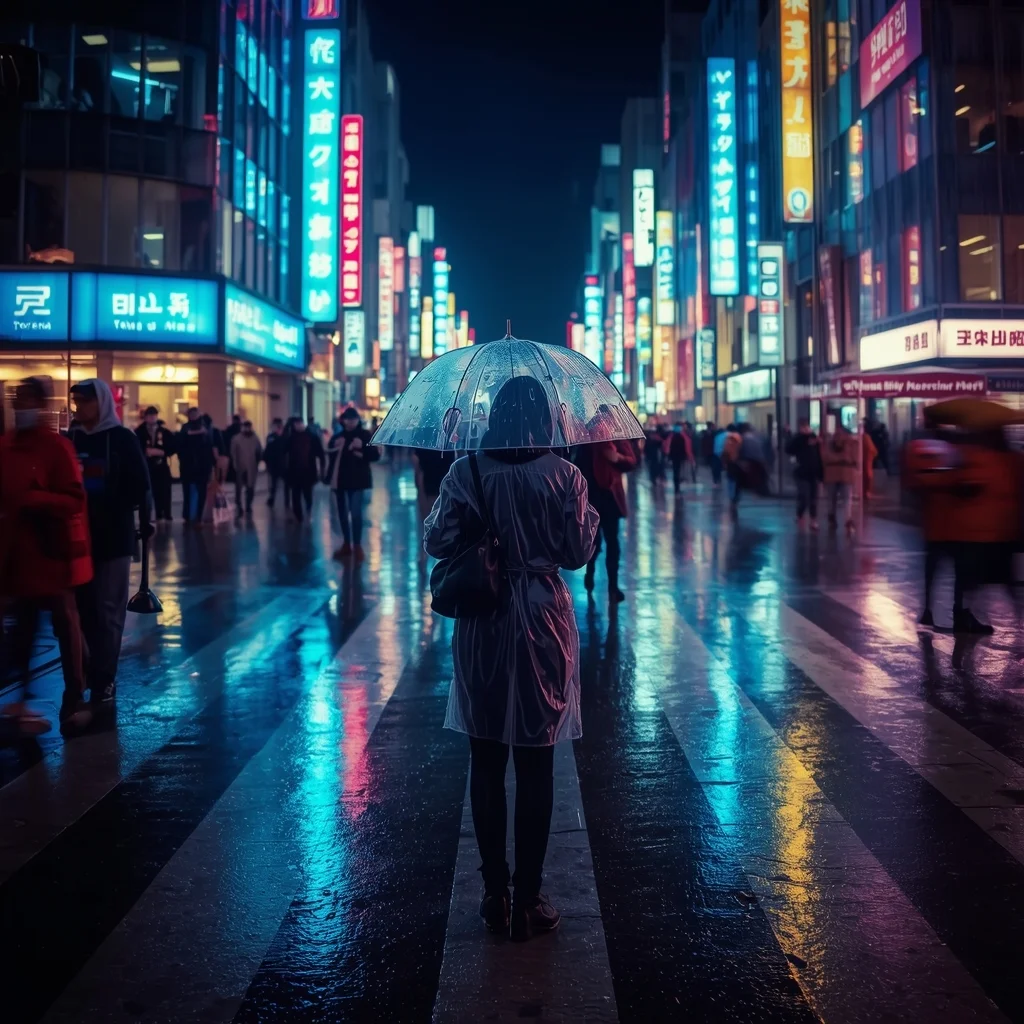
High-quality AI-generated image. Optimized for detailed rendering, perfect for creative projects and inspiration.
102Views
0 Likes
100%Quality
FreeLicense
AI Prompt
A busy Tokyo street crossing at night during heavy rain. Neon signs reflect vividly on the wet asphalt. A person in a clear raincoat holds a transparent umbrella, standing in focus while the crowd around them is slightly blurred (motion blur). Cinematic lighting, cool blue and cyberpunk pink tones, 35mm lens, 4k.
Want to create this with your own face? Use this instruction:
Keep eyes, nose, lips, jawline, and skin exactly as in reference image. A busy Tokyo street crossing at night during heavy rain. Neon signs reflect vividly on the wet asphalt. A person in a clear raincoat holds a transparent umbrella, standing in focus while the crowd around them is slightly blurred (motion blur). Cinematic lighting, cool blue and cyberpunk pink tones, 35mm lens, 4k.
About this Prompt
Unlock a revolutionary new paradigm of digital generation with 'Rainy Street Photography | Ai Design Prompt'. Carefully crafted for creators who demand absolute perfection in Realistic Photos aesthetics, this prompt leverages cutting-edge AI capabilities to generate hyper-realistic, awe-inspiring visuals that instantly grab attention and refuse to let go. Notice exactly how the prompt naturally forces the AI to enhance volumetric lighting and subtle, diffuse shadows, creating a true, deeply convincing 3D illusion. Every micro-detail is sharply defined, ensuring the artwork holds up beautifully even when upscaled to extreme 8k or 16k resolutions.
Highly recommended for elite creative agencies, passionate digital hobbyists, and professional AI prompt engineers who strictly demand absolute visual perfection, supreme reliability, and flawless consistency in their daily, high-volume generative rendering workflows. Command the full, staggering power of modern generative algorithms with absolute confidence. Render this specific prompt right now to rapidly unlock the deepest secrets of professional digital art, aesthetic brilliance, and highly viral visual creation.
Powerful Editorial Standing Pose Woman with Bold Expression | Ai Prompt For Stunning Portrait
983 mos ago
Prompt: A highly detailed editorial-style portrait of a confident woman standing upright with a strong yet elegant posture, shoulders relaxed, one hand resting naturally at her side and the other gently touching her waist. Her head is slightly tilted, eyes focused forward with a bold, self-assured expression. She wears a modern high-fashion outfit with clean lines and subtle textures. Professional studio lighting creates soft highlights and controlled shadows, emphasizing facial contours and realistic skin texture. Ultra-realistic proportions, cinematic depth of field, sharp focus on eyes, smooth background blur, fashion magazine quality, 8K resolution, natural makeup, refined color grading, professional photography aesthetics.
THIS ONE HABIT MAKES YOU SUCCESSFUL 🔥 | Sora Video Prompt
1013 mos ago
Prompt: Cinematic YouTube thumbnail featuring a confident creator standing tall with focused expression, soft golden light illuminating the face, blurred background with glowing light rays, warm and cool color contrast, ultra-sharp facial features, realistic skin detail, shallow depth of field, professional studio photography look, inspirational mood, bold clean composition, emotional storytelling, high saturation, 4K ultra-HD, optimized for maximum click-through rate.
This AI Tool Is Too Powerful | Trending Ai Art Prompt
893 mos ago
Prompt: Futuristic YouTube thumbnail showing a creator amazed while looking at a holographic AI interface floating in front of them, neon purple and blue cyber lighting, digital particles, tech UI elements, glowing lines, high contrast, intense emotions, cinematic sci-fi style, sharp focus on face, ultra-detailed environment, professional thumbnail design, 4K resolution, modern AI aesthetic.
I Drove The First "Teleporting" Car (It Actually Worked!) | Professional Photo Prompt
1393 mos ago
Prompt: A futuristic automotive tech thumbnail. A sleek, chrome and LED-accented concept hypercar is partially dematerializing into shimmering blue energy particles on a test track. Half the car is solid, the other half is a swirling vortex of light. In the driver's seat, a creator is wearing a futuristic racing suit with a look of absolute shock and thrill. The background is a high-tech testing facility at twilight, with warp-speed light trails blurring behind the car. Cinematic lighting, high contrast, 8k resolution, sharp focus on the teleportation effect.
The Tech Billionaire Casual Candid | Lighting Prompt Idea
1133 mos ago
Prompt: A documentary-style photo of a young tech billionaire (similar vibe to Elon Musk or Jack Dorsey) in a candid moment. He is sitting on a modern concrete bench outside a minimalist Silicon Valley office building, wearing a plain but expensive grey t-shirt, dark jeans, and sneakers. He is looking down at a tablet and smiling genuinely. A security guard is blurred in the distance. The lighting is diffused natural daylight. The photo has a raw, unposed reality to it, showing real skin pores and fabric textures.
Young Woman Walking Candid Lifestyle Pose | Dall-e Prompt Idea
943 mos ago
Prompt: A young woman captured mid-walk in a candid pose, natural body movement, one foot forward, arms relaxed, gentle smile. Casual outfit flowing naturally with motion. Urban outdoor setting, golden hour light, cinematic lifestyle photography, realistic motion blur, ultra-realistic textures, high clarity.
I Tested 30 AI Tools So You Don’t Have To | Instagram Image Prompt
933 mos ago
Prompt: Generate a dynamic thumbnail with a creator sitting at a desk surrounded by floating AI app logos, holographic screens, and futuristic interfaces. The person looks tired but amazed, with messy hair and glowing screens reflecting on the face. Include digital charts, robotic icons, and neon UI elements. Use cyberpunk color tones, blue and purple neon lighting, cinematic depth, ultra-realistic details, sharp focus, energetic composition, and bold visual hierarchy perfect for a tech-focused YouTube thumbnail.
I Survived a Night in the World's Most Haunted Forest | Shadow Effect Prompt
1113 mos ago
Prompt: A gritty, high-suspense horror survival thumbnail. A first-person "POV" perspective of a handheld camera shaking, with the lens partially covered in rain droplets. The flashlight beam is hitting a twisted, ancient tree trunk where a strange, occult symbol has been freshly carved. In the dark, blurry background among the thick fog and dead trees, a tall, pale, humanoid silhouette with glowing white eyes is barely visible, watching from the shadows. The color palette is cold, desaturated greens and deep blacks, with a high-contrast white light from the flashlight. Cinematic film grain, 8k, ultra-realistic, terrifying atmosphere, and high-detail textures of wet bark and mist.
Frequently Asked Questions
Common questions regarding this AI prompt.
How do I add realistic weather effects like rain or snow to the scene?
Weather completely alters the physics of light. If you add 'torrential rain, wet asphalt reflecting neon, water droplets clinging to surfaces', the AI will not just draw rain; it will change the specularity of the Rainy Street Photography | Ai Design Prompt subject. For snow, use 'heavy blizzard, frost-covered edges, soft diffused winter light' to change the entire atmosphere of the Realistic Photos generation.
What specific lighting setup is best to highlight the details of Rainy Street Photography | Ai Design Prompt?
For maximum texture reveal, a 'three-point studio lighting' or 'Rembrandt lighting' setup works best. By incorporating keywords like 'rim light', 'key light', and 'soft fill', you instruct the AI to sculpt the Realistic Photos subject out of the background, ensuring that micro-details like skin pores, fabric weaves, or metallic reflections are perfectly visible.
How can I prevent anatomical distortions or 'extra limbs' when generating characters?
While modern models have improved, complex poses in Realistic Photos can still cause issues. To prevent this, use a strong negative prompt containing 'bad anatomy, extra limbs, mutated hands, deformed structure'. If generating locally via Stable Diffusion, utilizing ControlNet (specifically OpenPose or Depth) alongside this prompt will guarantee flawless anatomical structure.
Can I make the characters or subjects in Rainy Street Photography | Ai Design Prompt look like cyborgs?
Easily. Append 'cybernetic enhancements, robotic limbs, glowing optical sensors, biomechanical plating, android'. The AI seamlessly blends biological flesh with metallic machinery, maintaining the high-quality rendering of the original Realistic Photos prompt while shifting the character design.
How do I achieve an extreme close-up or macro shot of Rainy Street Photography | Ai Design Prompt?
Modify the perspective by heavily weighting keywords like 'extreme macro photography', '100mm macro lens', 'microscopic detail', and 'extreme close up'. This forces the AI engine to ignore the broader Realistic Photos environment and dedicate all of its rendering power to the microscopic textures, fibers, or surface imperfections of the primary subject.
What architectural composition techniques are embedded in the Rainy Street Photography | Ai Design Prompt prompt?
The Rainy Street Photography | Ai Design Prompt prompt utilizes advanced compositional frameworks such as the golden ratio and leading lines. By strategically placing the core Realistic Photos subject matter at intersection points, it guides the viewer's eye naturally through the scene. This mathematical approach to AI generation ensures the final output feels balanced and visually arresting without requiring post-crop adjustments.
How customizable are the character and environment details in the Rainy Street Photography | Ai Design Prompt prompt?
Highly customizable. The prompt serves as a robust architectural framework. You can easily swap out specific nouns or color palettes while retaining the core Realistic Photos style. For example, changing the time of day or the primary clothing material will seamlessly adapt the scene while maintaining the high-definition rendering quality originally intended for Rainy Street Photography | Ai Design Prompt.
Can I convert the scene into a post-apocalyptic wasteland?
Yes, by adding 'post-apocalyptic, overgrown ruins, rusted metal, decayed urban environment, survival aesthetic, cinematic fallout style'. The AI will take the core structure of Rainy Street Photography | Ai Design Prompt and age it by decades, adding immense weathering and environmental storytelling to the Realistic Photos image.
How do I modify Rainy Street Photography | Ai Design Prompt to fit into a dark fantasy or gothic horror setting?
Change the environmental descriptors. Add 'dark fantasy concept art, gothic architecture, eerie volumetric fog, corrupted ruins, ominous atmosphere, Bloodborne aesthetic'. This forces the AI to reinterpret the Rainy Street Photography | Ai Design Prompt prompt through a grim, terrifying lens, drastically altering the mood of the Realistic Photos output.
How do I give Rainy Street Photography | Ai Design Prompt a retro, 1980s synthwave aesthetic?
Inject keywords that define that specific era's pop culture. Use 'vaporwave aesthetic, 1980s synthwave, neon grid background, cyan and magenta color palette, VHS glitch effect, retro-futurism'. This overrides the standard lighting and wraps the Rainy Street Photography | Ai Design Prompt subject in a highly stylized, nostalgic digital atmosphere.
What if the AI completely ignores a specific detail I added to the Rainy Street Photography | Ai Design Prompt prompt?
If a detail is ignored, it lacks 'weight'. Move that specific word closer to the very beginning of the prompt. Alternatively, if using Midjourney, use the double colon syntax (Keyword::2) to force the AI to pay attention. In Stable Diffusion, wrap the keyword in parentheses like (Keyword:1.5) to boost its importance in the Realistic Photos scene.
Why is this prompt highly effective for generating Rainy Street Photography | Ai Design Prompt?
Its effectiveness lies in the structured syntax. It separates the core subject definition from the style and technical parameters. This 'block structure' prevents AI confusion, ensuring that the details of Rainy Street Photography | Ai Design Prompt remain razor-sharp while the background and artistic medium seamlessly blend to match the Realistic Photos aesthetic without overpowering the main focus.
What are the recommended parameters for generating Rainy Street Photography | Ai Design Prompt in Stable Diffusion XL (SDXL)?
For optimal results in SDXL, we recommend pairing this prompt with a high-quality checkpoint like Juggernaut XL. Use the DPM++ 2M Karras sampler with approximately 35-40 steps and a CFG scale between 6.5 and 8.0. This combination strikes the perfect balance between adhering strictly to the Rainy Street Photography | Ai Design Prompt description and allowing the model's creative freedom.