Nobody Is Talking About This AI Feature | Best Ai Prompt For Beginner
High-quality AI-generated image. Optimized for detailed rendering, perfect for creative projects and inspiration.
288Views
0 Likes
100%Quality
FreeLicense
AI Prompt
Prompt: Create a mysterious YouTube thumbnail featuring a creator whispering with a finger on their lips. Behind them, a hidden glowing AI interface emerges from shadows. Use dark background with neon highlights, secretive mood, cinematic lighting, sharp subject focus, blurred background, glowing symbols, and a sense of curiosity and exclusivity. The overall look should be modern, sleek, and highly clickable.
Want to create this with your own face? Use this instruction:
Keep eyes, nose, lips, jawline, and skin exactly as in reference image. Prompt: Create a mysterious YouTube thumbnail featuring a creator whispering with a finger on their lips. Behind them, a hidden glowing AI interface emerges from shadows. Use dark background with neon highlights, secretive mood, cinematic lighting, sharp subject focus, blurred background, glowing symbols, and a sense of curiosity and exclusivity. The overall look should be modern, sleek, and highly clickable.
About this Prompt
Crafted exclusively for the digital connoisseur, 'Nobody Is Talking About This AI Feature | Best Ai Prompt For Beginner' offers a highly sophisticated, multi-layered approach to YouTube Thumbnail generation. Experience the pure thrill of digital discovery as every single render reveals breathtaking new nuances and micro-details that standard prompts simply cannot achieve. It masterfully combines dreamy, soft-focus bokeh effects with razor-sharp, macro-level subject focus. The specific lighting parameters mimic high-budget professional studio environments perfectly, bringing out the intricate fabric details, flawless skin tones, and deeply vibrant colors of the overall YouTube Thumbnail composition.
Perfectly tailored for premium commercial weddings, high-end festive celebrations, elite influencer content, and professional mood boards, it helps ambitious creators effortlessly establish a deeply classy, highly refined, and consistently viral digital style. Make a massive, highly authoritative statement with your very next creative project. Instantly copy, paste, and render this phenomenal prompt to aggressively upgrade your personal aesthetic and entirely captivate your dedicated, global online audience.
Playing Super Mario Bros in Photorealistic Unreal Engine 5 | Gemini Ai Image Prompt
2788 mos ago
Prompt: A mind-bending gaming thumbnail that blends iconic retro imagery with hyper-realism. A photorealistic rendering of a classic Super Mario level. A realistic Italian plumber character (Mario) in denim overalls is jumping over a hyper-detailed green warp pipe. The "goomba" enemy is a realistic, textured mushroom creature. The background is a stunning, photorealistic landscape of rolling hills and detailed brick structures under a bright sun. The textures of dirt, brick, and denim are incredibly sharp. 8k resolution, cinematic game art style.
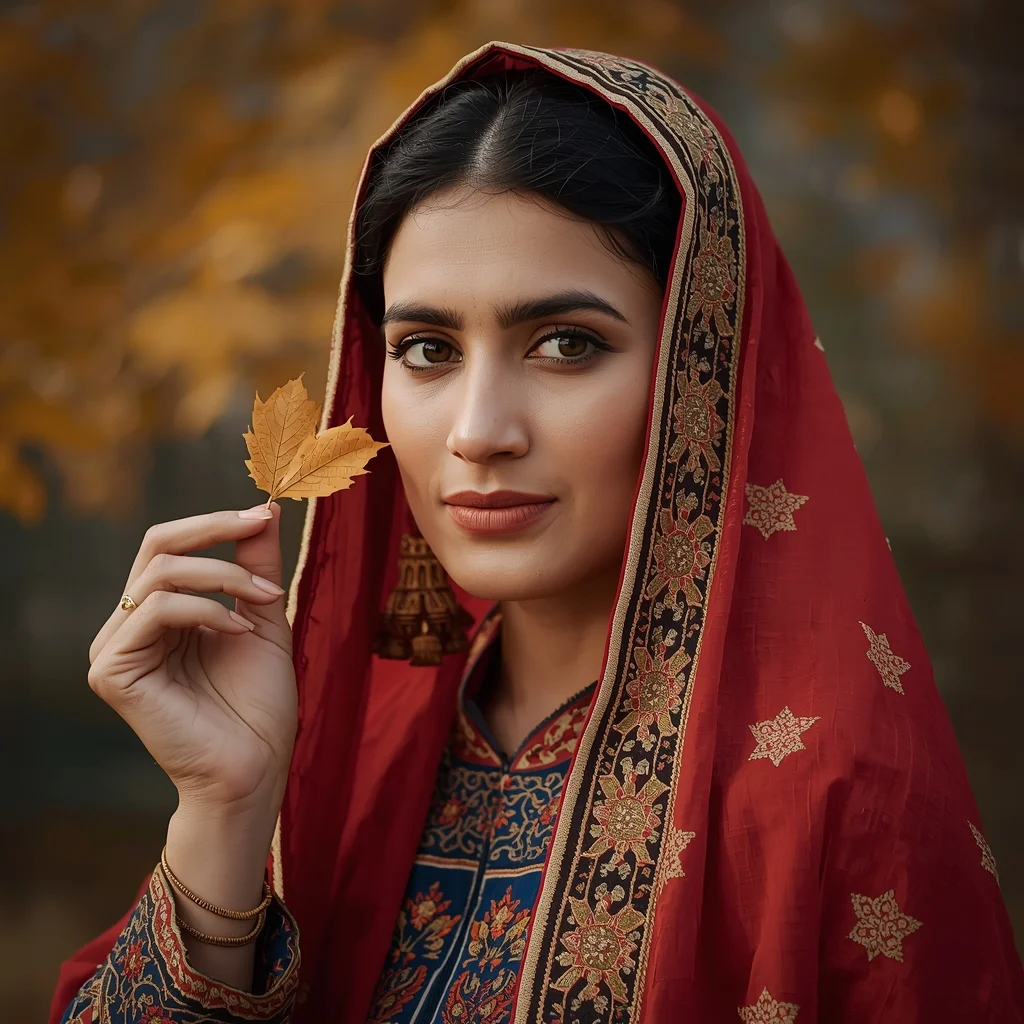
Kashmiri Cultural Pose with Autumn Leaf | Ai Prompt For Realistic Look
3158 mos ago
Prompt: A close-up cultural portrait of a Kashmiri woman holding a single chinar leaf, dressed in a richly textured pheran with traditional embroidery in autumn colors. Her pose is gentle and expressive, face calm and reflective. Background softly blurred with autumn foliage. Natural makeup, traditional accessories, professional lighting, ultra-detailed skin texture, cinematic color grading, 8K quality.
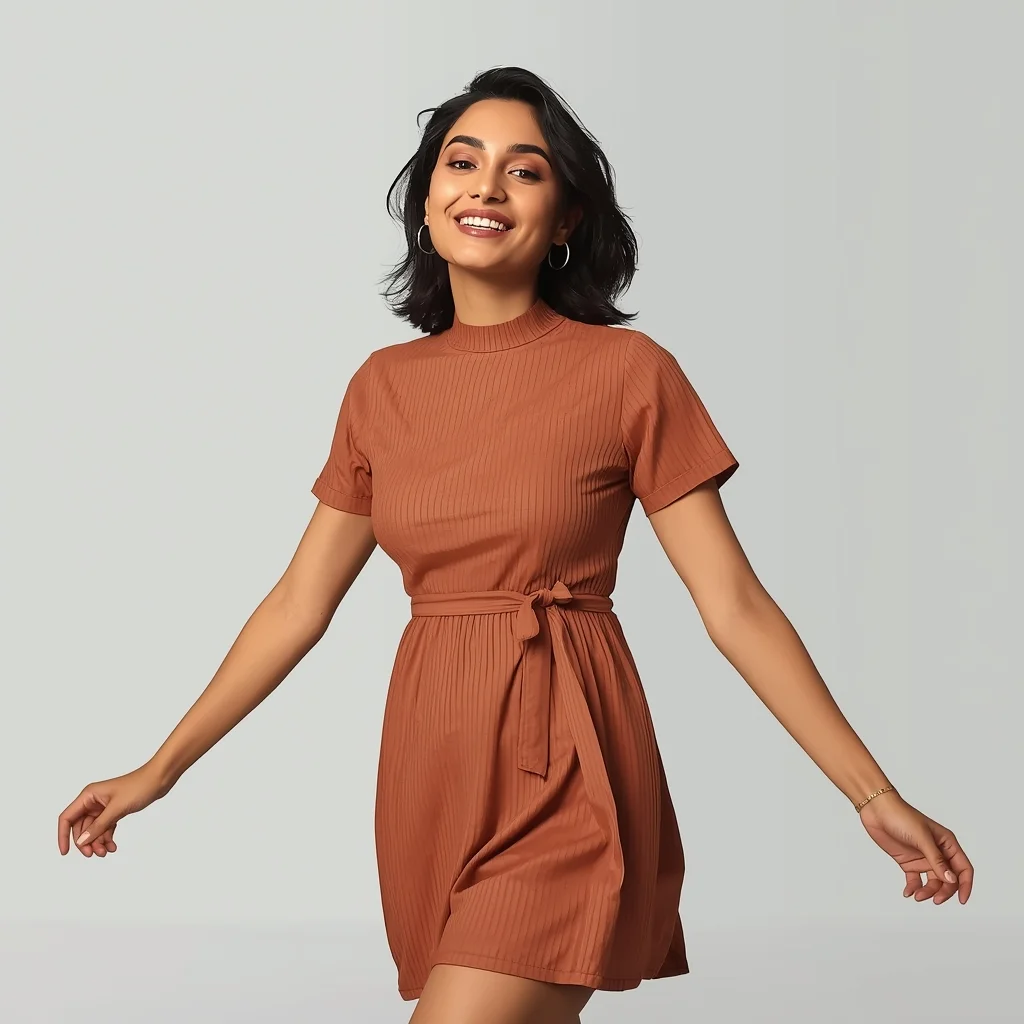
Modern Indian Viral Reel Pose – Relaxed Lifestyle Step | Top Secret Ai Prompt
3118 mos ago
Prompt: An Indian woman wearing a modern Indian casual dress, captured mid-step in a relaxed lifestyle reel pose. Body language effortless, arms naturally positioned. Hair slightly tousled for realism. Expression warm, confident, and approachable. Makeup minimal glam with natural glow. Lighting soft and bright, lifestyle-inspired. Background clean and modern. Ultra-high resolution, cinematic softness, influencer lifestyle aesthetic, designed for social media virality.
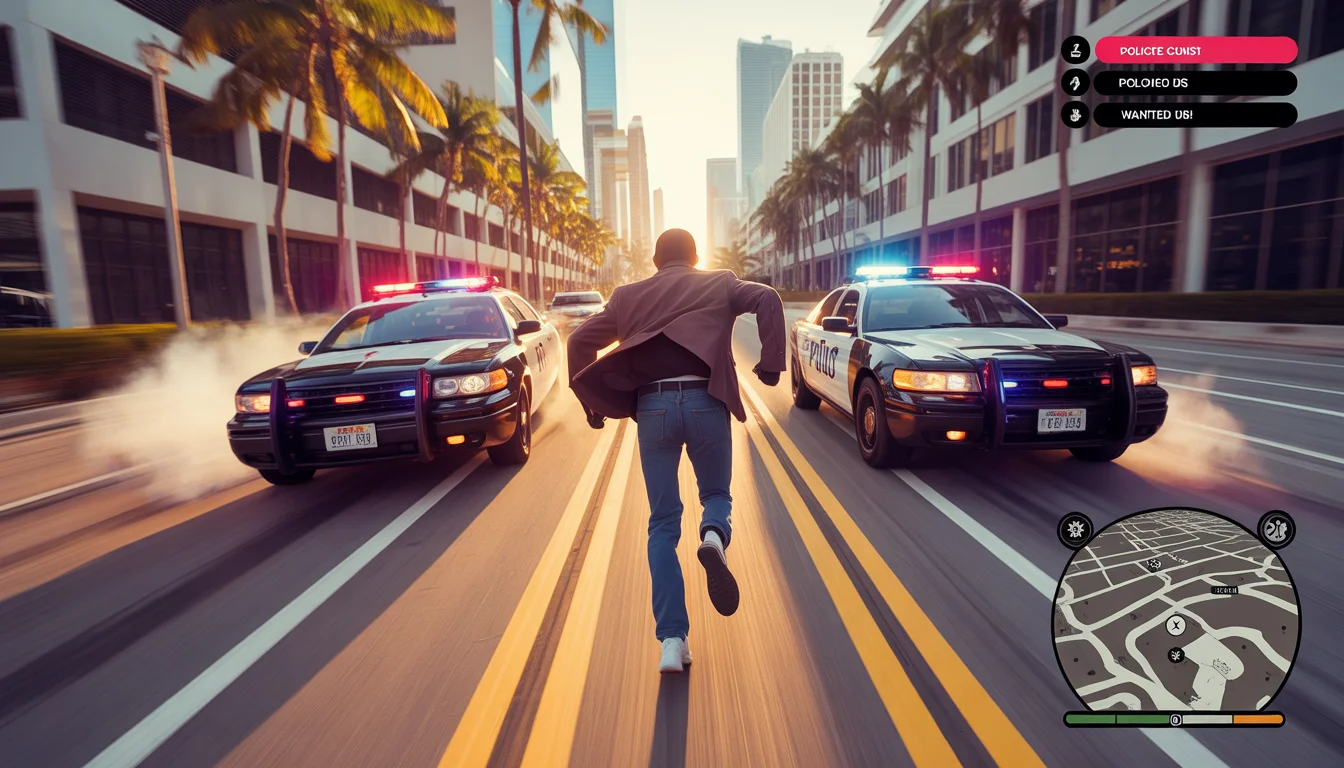
Playing GTA 6 in Real Life (Police Chased Us!) | Gemini Ai Image Prompt
3128 mos ago
Prompt: A high-energy, action-packed thumbnail blurring the line between a video game and reality. A third-person perspective shot behind a person dressed like a stylish video game protagonist, running full sprint down a sun-drenched Miami street. Behind them, two real police cruisers with lights and sirens blaring are in hot pursuit, kicking up smoke from their tires. A hyper-realistic, transparent GTA-style user interface (HUD) with a mini-map and five flashing red "wanted stars" is overlaid on the screen. Golden hour lighting, motion blur to convey speed, cinematic color grading, 8k resolution.
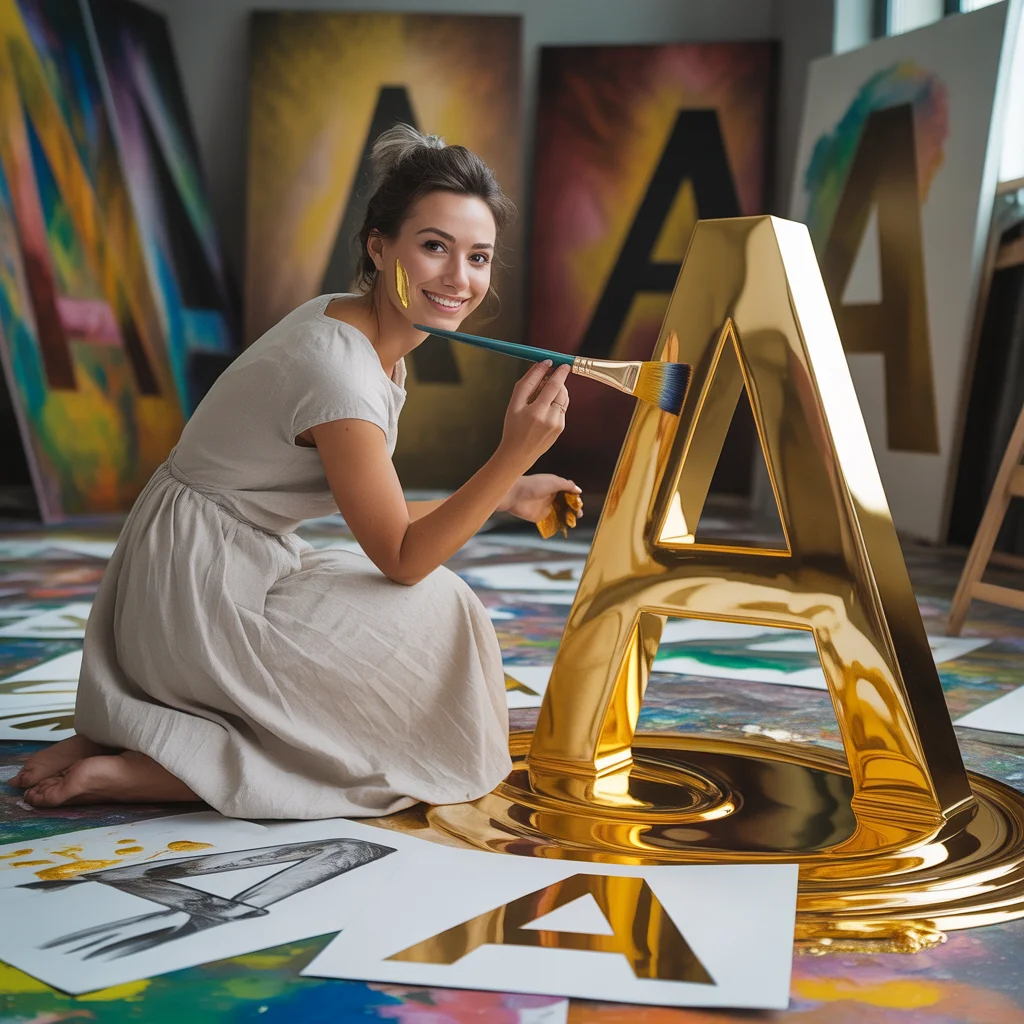
The Golden "A" Calligrapher | Ai Prompt Generation
3778 mos ago
Prompt: An artistic woman in a simple white linen dress, working in a sunlit studio filled with giant canvases. She is painting a massive, 3D golden letter "A" that is dripping with glowing gold paint. The floor is covered in colorful paint splashes and sketches of the letter "A" in various fonts. Pose: Crouched on the floor, holding a large paintbrush, looking back at the camera with a smudge of gold paint on her cheek and a proud smile. Technical: Soft studio lighting, macro detail on paint drips, 50mm lens, shallow depth of field, warm color palette, 8k resolution.
Pose: Crouched on the floor, holding a large paintbrush, looking back at the camera with a smudge of gold paint on her cheek and a proud smile. Technical: Soft studio lighting, macro detail on paint drips, 50mm lens, shallow depth of field, warm color palette, 8k resolution.
Technical: Soft studio lighting, macro detail on paint drips, 50mm lens, shallow depth of field, warm color palette, 8k resolution.
SHOCKING TRUTH REVEALED 😱 | Viral Prompt Idea For Creator
2948 mos ago
Prompt: Ultra-realistic YouTube thumbnail showing a shocked young creator with wide eyes and open mouth, dramatic facial expression of disbelief, pointing toward bold glowing text that says “SHOCKING TRUTH”, dark blurred background with red and yellow neon light streaks, cinematic high contrast lighting, sharp focus on face, exaggerated emotion, vibrant colors, studio-quality photography, 4K ultra-detailed skin texture, rim lighting around face, dramatic shadows, viral YouTube thumbnail style, professional color grading, eye-catching composition, thumbnail optimized framing, high saturation, emotional storytelling.
Luxury Indian Woman High-End Fashion Portrait | High Quality Ai Prompt List
3358 mos ago
Prompt: An elegant Indian woman posing in a luxury high-end fashion shoot, wearing a designer silk gown inspired by Indian motifs, minimal gold jewelry, sleek hair bun, soft glam makeup. Standing near a marble staircase in a luxury hotel lobby, calm and powerful expression, graceful pose with one hand on waist. Soft diffused lighting, premium fashion photography, cinematic tones, ultra-detailed textures, glossy skin finish, luxury editorial style, ultra-realistic, 8K.
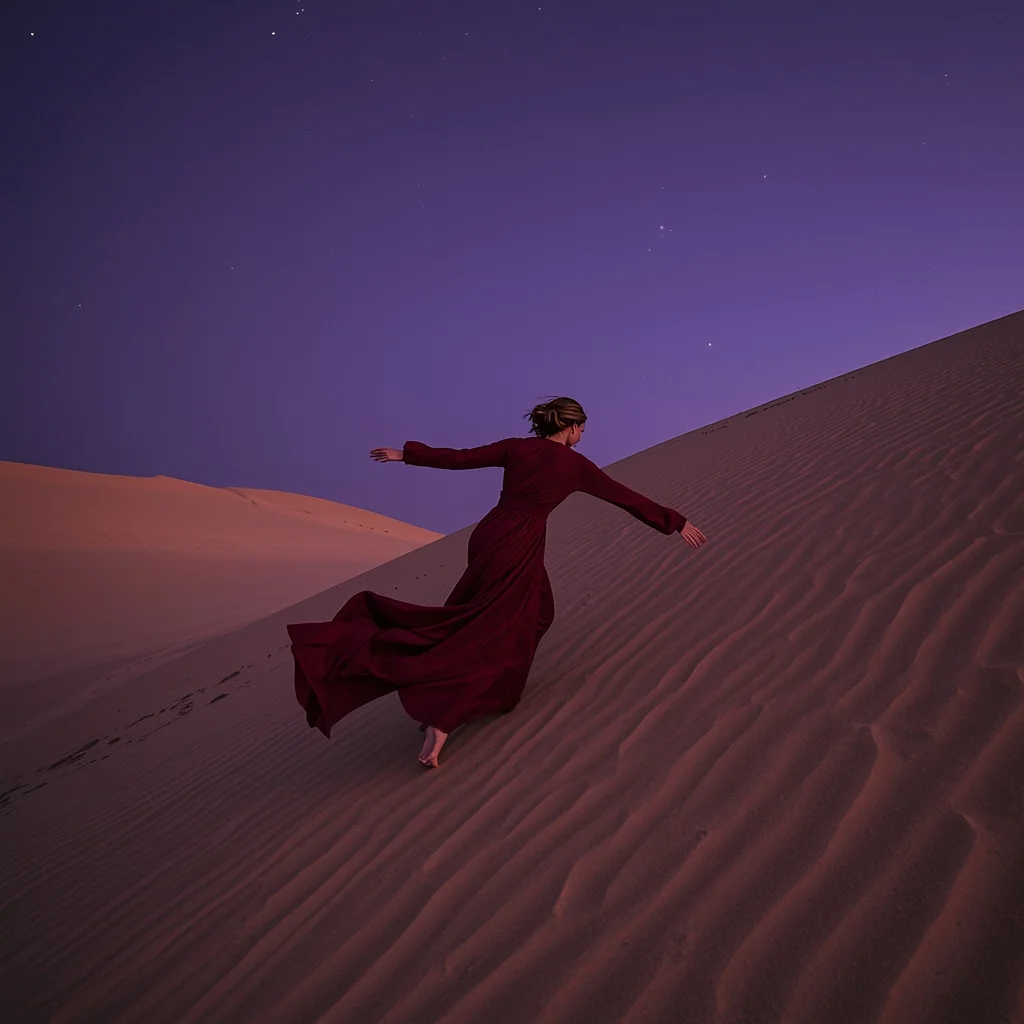
Prompt: A woman in a desert landscape during twilight. She wears a long, deep red linen wrap that billows in the wind. The sand dunes are perfectly rippled. The sky is a deep violet with the first few stars beginning to appear.
Pose: Running down the slope of a sand dune, body leaning forward, capturing a sense of freedom and motion, arms spread wide.
Technical: Wide-angle shot (24mm), motion blur on the dress, high dynamic range (HDR), deep color saturation, 8k.
Frequently Asked Questions
Common questions regarding this AI prompt.
How does the prompt establish the historical or futuristic era of Nobody Is Talking About This AI Feature | Best Ai Prompt For Beginner?
Era-specific aesthetics are locked in using targeted chronological keywords. Whether leaning towards a neo-futuristic cyberpunk vibe or a classical Renaissance look, the prompt forces the AI to draw from specific historical datasets. This ensures that the clothing, architecture, and props within the YouTube Thumbnail scene remain historically or thematically accurate.
Can I make the image look like vintage, degraded film?
Absolutely. To strip away the ultra-modern crispness, inject phrases like 'shot on Kodak Portra 400', 'heavy film grain', 'light leaks', 'chromatic aberration', and 'vintage 1970s polaroid'. This introduces beautiful, nostalgic imperfections into the YouTube Thumbnail scene, making the Nobody Is Talking About This AI Feature | Best Ai Prompt For Beginner generation look like a discovered relic rather than a digital creation.
Can I simulate bioluminescence or neon lighting in this prompt?
Yes, you can easily shift the scene into a sci-fi or fantasy realm by adding terms like 'bioluminescent glow', 'neon tube lighting', 'emissive materials', or 'fluorescent accents'. These modifiers will cause the objects within the YouTube Thumbnail scene to act as their own light sources, casting incredibly realistic colored reflections onto surrounding surfaces.
How can I use Inpainting to fix specific errors in the generated Nobody Is Talking About This AI Feature | Best Ai Prompt For Beginner image?
Inpainting is essential for perfection. If 90% of the Nobody Is Talking About This AI Feature | Best Ai Prompt For Beginner image is flawless but a hand or eye is distorted, send the image to an Inpaint tab. Mask only the flawed area, keep the original prompt, and set the denoising strength high (around 0.7). The AI will regenerate only that specific zone, seamlessly blending the fixed YouTube Thumbnail elements into the surrounding artwork.
How can I dictate the camera angle to make the subject look more powerful?
Camera angle completely changes the psychological impact. To make the subject of Nobody Is Talking About This AI Feature | Best Ai Prompt For Beginner appear dominant or towering, insert 'low angle shot' or 'worm's-eye view'. Conversely, to make the YouTube Thumbnail scene feel vast and the subject small, use 'drone shot', 'bird's-eye view', or 'extreme high angle'.
How does the prompt simulate physical camera lenses for Nobody Is Talking About This AI Feature | Best Ai Prompt For Beginner?
The prompt acts as a virtual director of photography by explicitly stating lens focal lengths and aperture settings. By including phrases like 'shot on 35mm lens' or 'f/1.4 aperture', the AI mathematically simulates the optical distortion, compression, and background blur (bokeh) characteristic of high-end photography, elevating the YouTube Thumbnail image from a flat digital render to a lifelike photo.
How do I give Nobody Is Talking About This AI Feature | Best Ai Prompt For Beginner a retro, 1980s synthwave aesthetic?
Inject keywords that define that specific era's pop culture. Use 'vaporwave aesthetic, 1980s synthwave, neon grid background, cyan and magenta color palette, VHS glitch effect, retro-futurism'. This overrides the standard lighting and wraps the Nobody Is Talking About This AI Feature | Best Ai Prompt For Beginner subject in a highly stylized, nostalgic digital atmosphere.
How do I deal with unwanted text or watermarks appearing in the image?
AI models are trained on stock photos which often contain watermarks. To aggressively filter this out, ensure words like 'text, watermark, signature, username, website url, copyright stamp' are heavily weighted in your negative prompt box. This is especially crucial when generating commercial-grade YouTube Thumbnail content.
Can I convert the scene into a post-apocalyptic wasteland?
Yes, by adding 'post-apocalyptic, overgrown ruins, rusted metal, decayed urban environment, survival aesthetic, cinematic fallout style'. The AI will take the core structure of Nobody Is Talking About This AI Feature | Best Ai Prompt For Beginner and age it by decades, adding immense weathering and environmental storytelling to the YouTube Thumbnail image.
What architectural composition techniques are embedded in the Nobody Is Talking About This AI Feature | Best Ai Prompt For Beginner prompt?
The Nobody Is Talking About This AI Feature | Best Ai Prompt For Beginner prompt utilizes advanced compositional frameworks such as the golden ratio and leading lines. By strategically placing the core YouTube Thumbnail subject matter at intersection points, it guides the viewer's eye naturally through the scene. This mathematical approach to AI generation ensures the final output feels balanced and visually arresting without requiring post-crop adjustments.
How customizable are the character and environment details in the Nobody Is Talking About This AI Feature | Best Ai Prompt For Beginner prompt?
Highly customizable. The prompt serves as a robust architectural framework. You can easily swap out specific nouns or color palettes while retaining the core YouTube Thumbnail style. For example, changing the time of day or the primary clothing material will seamlessly adapt the scene while maintaining the high-definition rendering quality originally intended for Nobody Is Talking About This AI Feature | Best Ai Prompt For Beginner.
How does Midjourney v6 process the intricate details of Nobody Is Talking About This AI Feature | Best Ai Prompt For Beginner?
Midjourney v6 excels at understanding natural language nuances. This prompt is specifically written to take advantage of v6's semantic comprehension. You do not need to use 'prompt salad' (randomly throwing words). The detailed, descriptive sentences regarding the YouTube Thumbnail elements are parsed accurately, giving you photographic or highly illustrative perfection.