High-quality AI-generated image. Optimized for detailed rendering, perfect for creative projects and inspiration.
358Views
0 Likes
100%Quality
FreeLicense
AI Prompt
Prompt: A cinematic portrait of a powerful CEO standing on the terrace of a Manhattan penthouse apartment at dusk. The New York City skyline is lit up behind him. He is wearing a sharp, charcoal grey three-piece suit and is adjusting one of his silver cufflinks. His pose is strong and commanding, feet apart, looking directly into the camera with an intense gaze. The ambient city lights provide dramatic, colorful lighting tones mixed with the fading blue sky. Ultra-realistic, architectural photography style.
Want to create this with your own face? Use this instruction:
All facial landmarks must stay in the same relative positions as in the reference image. Prompt: A cinematic portrait of a powerful CEO standing on the terrace of a Manhattan penthouse apartment at dusk. The New York City skyline is lit up behind him. He is wearing a sharp, charcoal grey three-piece suit and is adjusting one of his silver cufflinks. His pose is strong and commanding, feet apart, looking directly into the camera with an intense gaze. The ambient city lights provide dramatic, colorful lighting tones mixed with the fading blue sky. Ultra-realistic, architectural photography style.
About this Prompt
Let your creative journey soar to unprecedented heights with 'The Penthouse Power Pose | Ai Prompt Guide', an exceptional digital masterpiece that radically elevates the standard of Man Pose Art generation. This prompt acts as a pure conduit for raw artistic energy, transforming simple concepts into extraordinary visual spectacles. Visually, it is an absolute powerhouse, utilizing a hyper-detailed, incredibly saturated palette that vibrates with intense, radiant, and almost radioactive energy. The vibrant saturation levels are perfectly calibrated; it pops intensely while maintaining a highly sophisticated, strictly professional Man Pose Art color grade.
Utilize this prompt to completely revolutionize your digital product mockups, ensuring that your e-commerce listings, promotional banners, and visual advertisements look undeniably expensive, highly trustworthy, and professionally produced by a top-tier design agency. Do not ever settle for average, generic generation. Actively utilize this incredibly powerful text string to radically elevate your personal design standards and produce staggering visual masterpieces that truly stand out in the heavily crowded digital space.
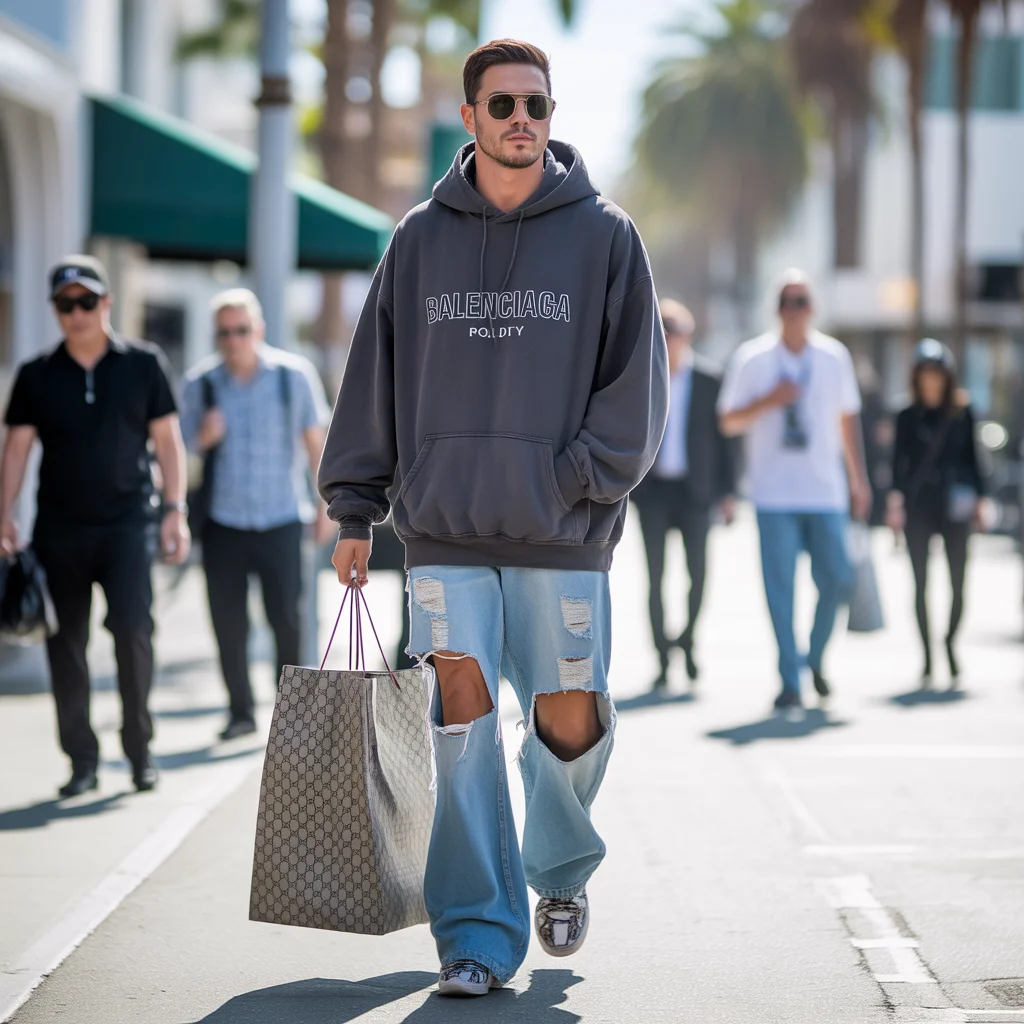
The Luxury Shopping District Stroll | Gemini Image Prompt
3408 mos ago
Prompt: A "street style" paparazzi photograph of a male celebrity musician walking through Beverly Hills' Rodeo Drive. He is wearing expensive, designer streetwear: an oversized Balenciaga hoodie, distressed Saint Laurent jeans, and limited-edition sneakers. He wears dark sunglasses and is trying to ignore the camera, looking straight ahead with a stoic expression. He carries a large shopping bag from Gucci. The street is sunny, and pedestrians are looking at him. Shot with a long lens, creating a compressed depth of field.
Modern Indian Viral Reel Pose – Bold Forward Lean Shot | Gemini Ai Image Prompt
3008 mos ago
Prompt: An Indian woman in a bold modern Indian dress, leaning slightly toward the camera in a dynamic reel-style pose. Body language engaging and expressive. Hair styled with texture and subtle movement. Expression confident and intense. Makeup is bold-glam yet clean. Lighting is bright with controlled contrast. Background minimal to keep focus on subject. Ultra-sharp realism, cinematic reel framing, influencer-grade polish, viral visual energy.
Indian Female Dupatta Flow Cultural Pose | Best Prompt For Photo Realism
3548 mos ago
Prompt: An Indian female posing gracefully with a flowing dupatta, wearing a regional traditional dress, subtle body movement, elegant expression. Outdoor heritage background, golden hour lighting, cultural fashion photography, natural motion effect, ultra-detailed fabric flow, high resolution.
Modern Indian Viral Reel Pose – Shoulder Drop Attitude | Viral Image Generator Prompt
2878 mos ago
Prompt: An Indian female model wearing a modern Indian statement dress, captured in a stylish shoulder-drop pose mid-reel. One shoulder lowered, body leaning slightly, creating a fashion-forward silhouette. Hair styled sleek or softly waved. Expression bold, relaxed, and self-assured. Makeup emphasizes glowing skin and defined lips. Lighting is crisp and modern. Background clean and minimal. Ultra-realistic detail, cinematic depth, influencer fashion aesthetic, designed for viral reels.
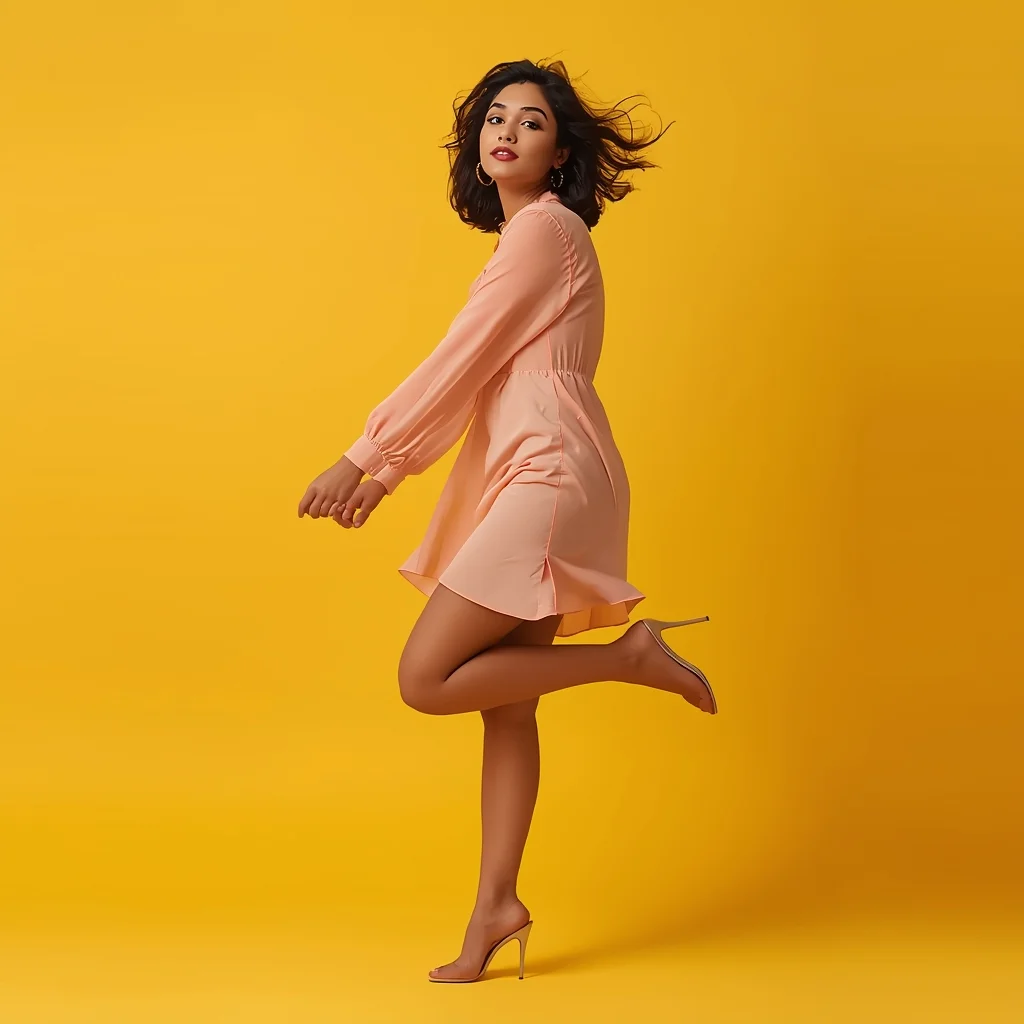
Modern Indian Viral Reel Pose – Bounce Walk Transition | Best Ai Prompt Trick
3148 mos ago
Prompt: An Indian woman wearing a trendy modern Indian dress with a lightweight contemporary design, captured mid-bounce walk as if transitioning between reel clips. One foot lifted slightly, body leaning forward with energetic motion. Hair softly bouncing with movement, adding realism. Expression playful, confident, and lively. Makeup is fresh, glowing, and camera-ready. Lighting is vibrant and clean, enhancing sharpness and fabric detail. Background minimal or colorful, optimized for social media. High clarity, modern influencer aesthetic, cinematic framing, ultra-realistic textures, designed for viral impact.
Rural Cultural Beauty Woman Pose | Best Ai Prompt Trick
3758 mos ago
Prompt: A traditionally dressed woman standing naturally in a rural or village-inspired environment, posture relaxed yet graceful. One hand gently holds a cultural accessory while the other rests freely. Her expression is peaceful and authentic, reflecting cultural roots. Natural sunlight enhances earthy tones and realistic skin texture. Documentary-style cultural portrait, cinematic realism, emotional depth.
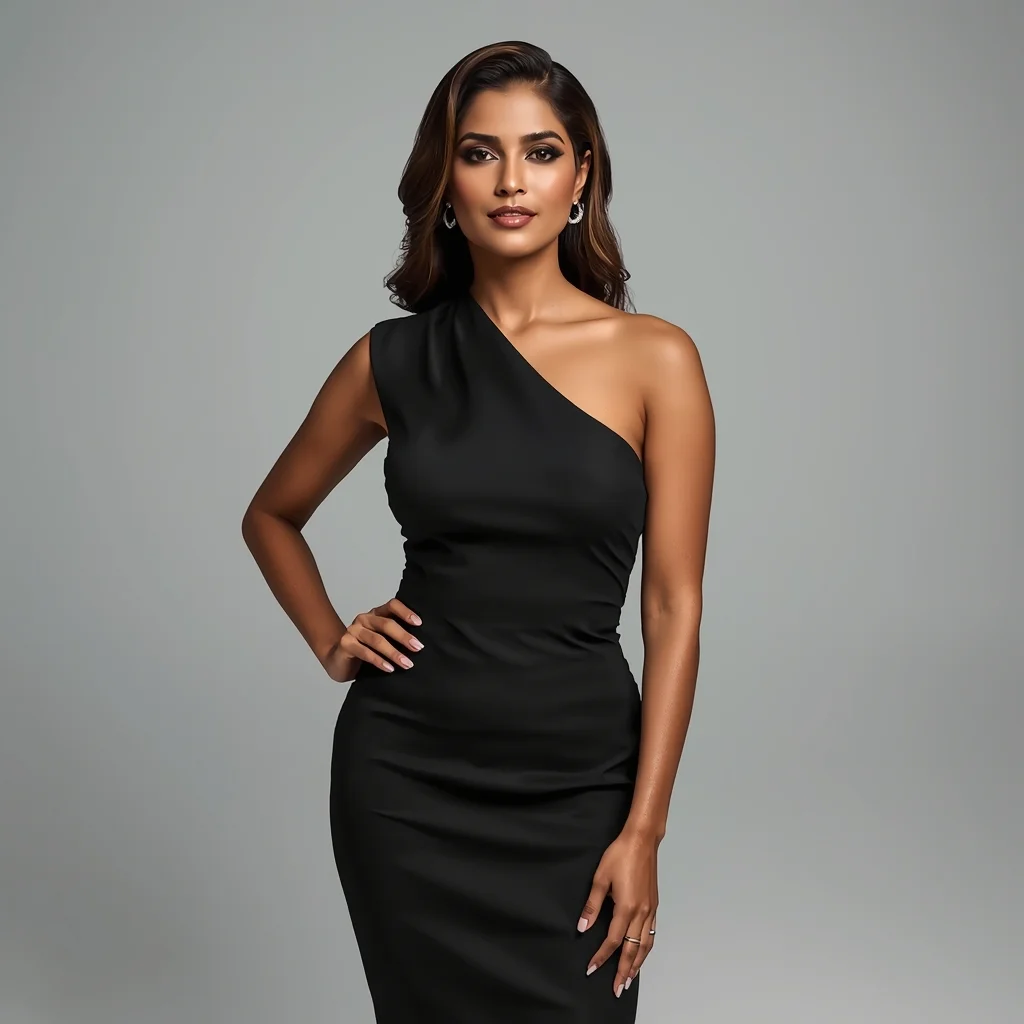
Modern Power Elegance Studio Pose | Ai Prompt Tutorial
3158 mos ago
Prompt: A confident Indian woman wearing a sleek modern designer dress, standing in a minimalist studio, straight posture with one hand softly resting on the waist, subtle head tilt, calm yet powerful facial expression, clean makeup with glossy lips, smooth hair styled in soft waves, soft diffused studio lighting, neutral background, luxury fashion aesthetic, ultra-sharp focus, high-end editorial look, hyper-realistic AI portrait.
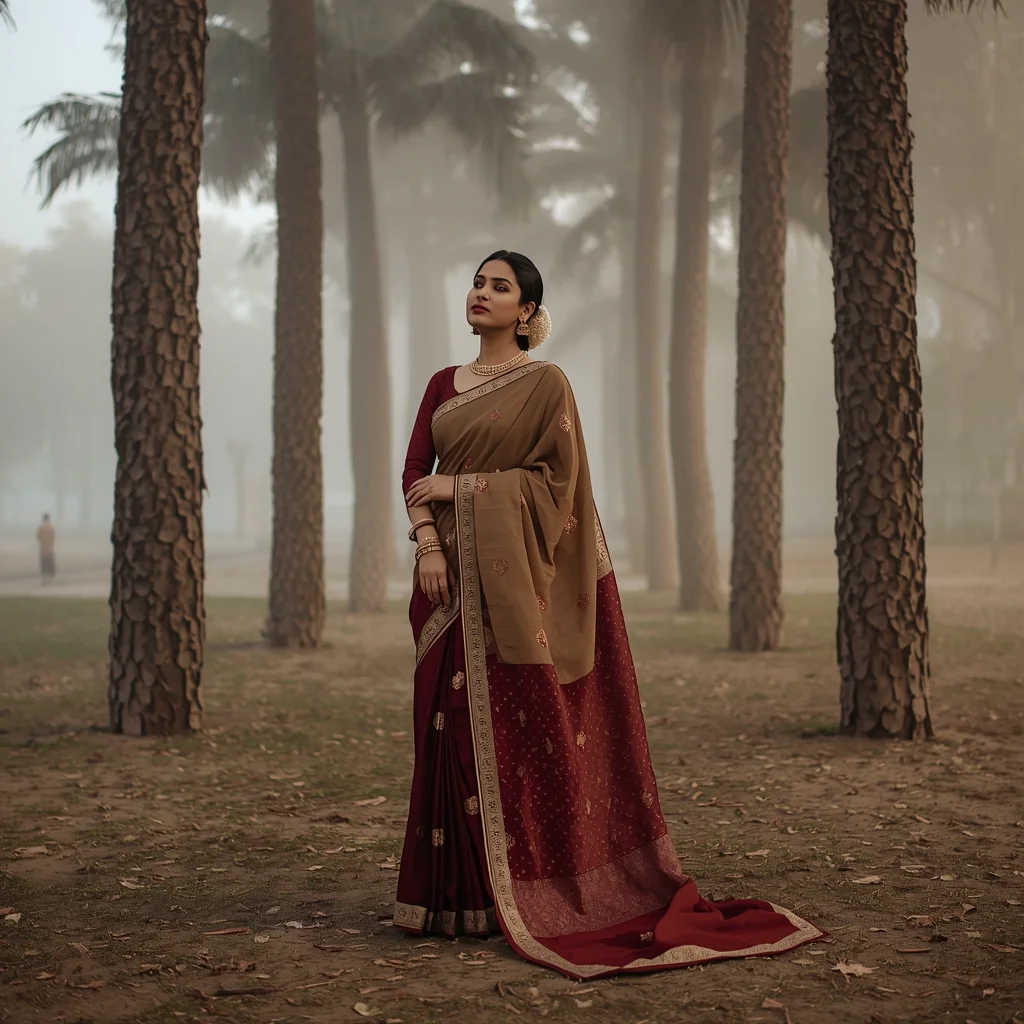
Traditional Saree Pose with Kashmiri Autumn Mood | Viral Image Generator Prompt
3388 mos ago
Prompt: A full-body image of a woman wearing a traditional saree in deep maroon and beige tones, inspired by Kashmiri autumn palettes. She stands beneath tall chinar trees, posture upright and graceful, head slightly tilted. The saree drape flows naturally, reflecting calm cultural beauty. Soft fog in the background, warm earthy colors, realistic fabric folds, professional DSLR photography style, cinematic lighting, high-resolution cultural portrait.
Frequently Asked Questions
Common questions regarding this AI prompt.
Can I make the image look like vintage, degraded film?
Absolutely. To strip away the ultra-modern crispness, inject phrases like 'shot on Kodak Portra 400', 'heavy film grain', 'light leaks', 'chromatic aberration', and 'vintage 1970s polaroid'. This introduces beautiful, nostalgic imperfections into the Man Pose Art scene, making the The Penthouse Power Pose | Ai Prompt Guide generation look like a discovered relic rather than a digital creation.
How do I create a dramatic, low-light version of The Penthouse Power Pose | Ai Prompt Guide?
To plunge the scene into dramatic darkness, modify the prompt to include 'chiaroscuro', 'low-key lighting', 'underexposed', and 'stark shadows'. This tells the AI to plunge the majority of the Man Pose Art environment into darkness while intensely illuminating only the most critical parts of the The Penthouse Power Pose | Ai Prompt Guide subject, creating a moody, cinematic masterpiece.
Is this prompt compatible with the new Flux.1 AI model?
Yes, Flux.1 is incredibly responsive to detailed structural prompts just like this one. Because Flux handles complex spatial relationships and typography better than previous models, the composition instructions embedded in the The Penthouse Power Pose | Ai Prompt Guide prompt will be rendered with astonishing accuracy, making it ideal for high-end Man Pose Art generation.
What if the AI completely ignores a specific detail I added to the The Penthouse Power Pose | Ai Prompt Guide prompt?
If a detail is ignored, it lacks 'weight'. Move that specific word closer to the very beginning of the prompt. Alternatively, if using Midjourney, use the double colon syntax (Keyword::2) to force the AI to pay attention. In Stable Diffusion, wrap the keyword in parentheses like (Keyword:1.5) to boost its importance in the Man Pose Art scene.
Why is this prompt highly effective for generating The Penthouse Power Pose | Ai Prompt Guide?
Its effectiveness lies in the structured syntax. It separates the core subject definition from the style and technical parameters. This 'block structure' prevents AI confusion, ensuring that the details of The Penthouse Power Pose | Ai Prompt Guide remain razor-sharp while the background and artistic medium seamlessly blend to match the Man Pose Art aesthetic without overpowering the main focus.
How can I prevent anatomical distortions or 'extra limbs' when generating characters?
While modern models have improved, complex poses in Man Pose Art can still cause issues. To prevent this, use a strong negative prompt containing 'bad anatomy, extra limbs, mutated hands, deformed structure'. If generating locally via Stable Diffusion, utilizing ControlNet (specifically OpenPose or Depth) alongside this prompt will guarantee flawless anatomical structure.
Can I use Image-to-Image (Img2Img) techniques with the The Penthouse Power Pose | Ai Prompt Guide prompt?
Absolutely. Using a rough sketch or a reference photo alongside this prompt in an Img2Img workflow is highly effective. We recommend setting your Denoising Strength between 0.45 and 0.65. This range is the 'sweet spot' that allows the AI to apply the high-quality textures and lighting of the The Penthouse Power Pose | Ai Prompt Guide prompt while strictly respecting the structural layout of your reference image.
How do I achieve an extreme close-up or macro shot of The Penthouse Power Pose | Ai Prompt Guide?
Modify the perspective by heavily weighting keywords like 'extreme macro photography', '100mm macro lens', 'microscopic detail', and 'extreme close up'. This forces the AI engine to ignore the broader Man Pose Art environment and dedicate all of its rendering power to the microscopic textures, fibers, or surface imperfections of the primary subject.
What rendering engines should I reference to maximize the quality of The Penthouse Power Pose | Ai Prompt Guide?
Modern AI image generators respond incredibly well to 3D software references. By appending terms like 'Unreal Engine 5 render', 'OctaneRender', 'Redshift', 'V-Ray', and 'Global Illumination', you are signaling the AI to utilize its highest quality datasets for lighting physics and material textures within the Man Pose Art image.
How does the prompt simulate physical camera lenses for The Penthouse Power Pose | Ai Prompt Guide?
The prompt acts as a virtual director of photography by explicitly stating lens focal lengths and aperture settings. By including phrases like 'shot on 35mm lens' or 'f/1.4 aperture', the AI mathematically simulates the optical distortion, compression, and background blur (bokeh) characteristic of high-end photography, elevating the Man Pose Art image from a flat digital render to a lifelike photo.