High-quality AI-generated image. Optimized for detailed rendering, perfect for creative projects and inspiration.
247Views
1 Likes
100%Quality
FreeLicense
AI Prompt
Prompt: A high-contrast, avant-garde fashion shot of a woman in a sharp, geometric metallic-silver dress against a minimalist concrete background in a Milanese gallery. | Pose: A 'high-fashion' broken-doll pose; shoulders are shrugged at different heights, elbows pointed outward, and head tilted sharply down with a piercing upward gaze at the camera. Her hands are positioned awkwardly yet artistically near her face. | Technical: High-key studio lighting, sharp shadows, 100mm macro lens for fabric and skin detail, 16k resolution, extreme sharpness, metallic reflections.
Want to create this with your own face? Use this instruction:
The generated image must preserve the reference face with absolute accuracy. Keep the same eyes, nose, lips, jawline, cheekbones, forehead, and overall face shape. No smoothing, no reshaping, no morphing, no artistic variation. Prompt: A high-contrast, avant-garde fashion shot of a woman in a sharp, geometric metallic-silver dress against a minimalist concrete background in a Milanese gallery. | Pose: A 'high-fashion' broken-doll pose; shoulders are shrugged at different heights, elbows pointed outward, and head tilted sharply down with a piercing upward gaze at the camera. Her hands are positioned awkwardly yet artistically near her face. | Technical: High-key studio lighting, sharp shadows, 100mm macro lens for fabric and skin detail, 16k resolution, extreme sharpness, metallic reflections.
About this Prompt
Break the frustrating chains of creative block instantly with the surging inspiration provided by 'Milanese Runway Edge | Ai Creative Prompt'. It elevates standard prompt engineering to an absolute fine art, standing as a highly sophisticated, ultra-powerful dynamo within the incredibly competitive Woman Pose Art generative space. Intense macro details completely reveal a microscopic hidden world of fidelity, radically changing your perspective on what Woman Pose Art generation can achieve. The smooth, pearlescent chromatic aberration at the extreme edges gives it an incredibly premium, high-end, and highly expensive DSLR camera lens feel.
Highly useful for independent musicians, podcast hosts, and digital audio creators needing incredibly striking, professionally rendered Woman Pose Art album cover art or thumbnail graphics that perfectly match the deep, emotional tone of their digital content. Become the absolute, undeniable envy of your entire digital art network. By exclusively utilizing the sheer, raw, and unbridled power of this incredibly specific prompt, you firmly secure your permanent place in the absolute upper echelon of creators.
Prompt: A high-end editorial shot of a woman in a "relaxed-regal" pose, sitting on a vintage teak chair. She is wearing a modern structured silk blazer over a traditional handwoven Banarasi saree, blending Indian heritage with 2026 street style. The lighting is soft, natural morning light coming through a large arched window, casting subtle shadows that highlight the intricate gold zari work of the saree. Photorealistic 8k resolution, capturing every tiny fiber of the silk and the realistic texture of her skin including subtle beauty marks. Shot on 50mm prime lens, cinematic and authentic.
Playing Super Mario Bros in Photorealistic Unreal Engine 5 | Gemini Ai Image Prompt
2286 mos ago
Prompt: A mind-bending gaming thumbnail that blends iconic retro imagery with hyper-realism. A photorealistic rendering of a classic Super Mario level. A realistic Italian plumber character (Mario) in denim overalls is jumping over a hyper-detailed green warp pipe. The "goomba" enemy is a realistic, textured mushroom creature. The background is a stunning, photorealistic landscape of rolling hills and detailed brick structures under a bright sun. The textures of dirt, brick, and denim are incredibly sharp. 8k resolution, cinematic game art style.
Kashmiri Woman Standing in Autumn Breeze | Midjourney Prompt Free
2786 mos ago
Prompt: A full-length cinematic image of a Kashmiri woman standing outdoors as a gentle autumn breeze moves her pheran slightly. She wears a traditional rust-colored Kashmiri pheran with fine woven textures and a soft head covering. Her pose is confident yet calm, one foot slightly forward, hands relaxed. The background features golden chinar trees and a soft cloudy sky. Warm color palette, realistic shadows, lifelike facial details, cultural authenticity, ultra-sharp focus, 8K photorealistic quality.
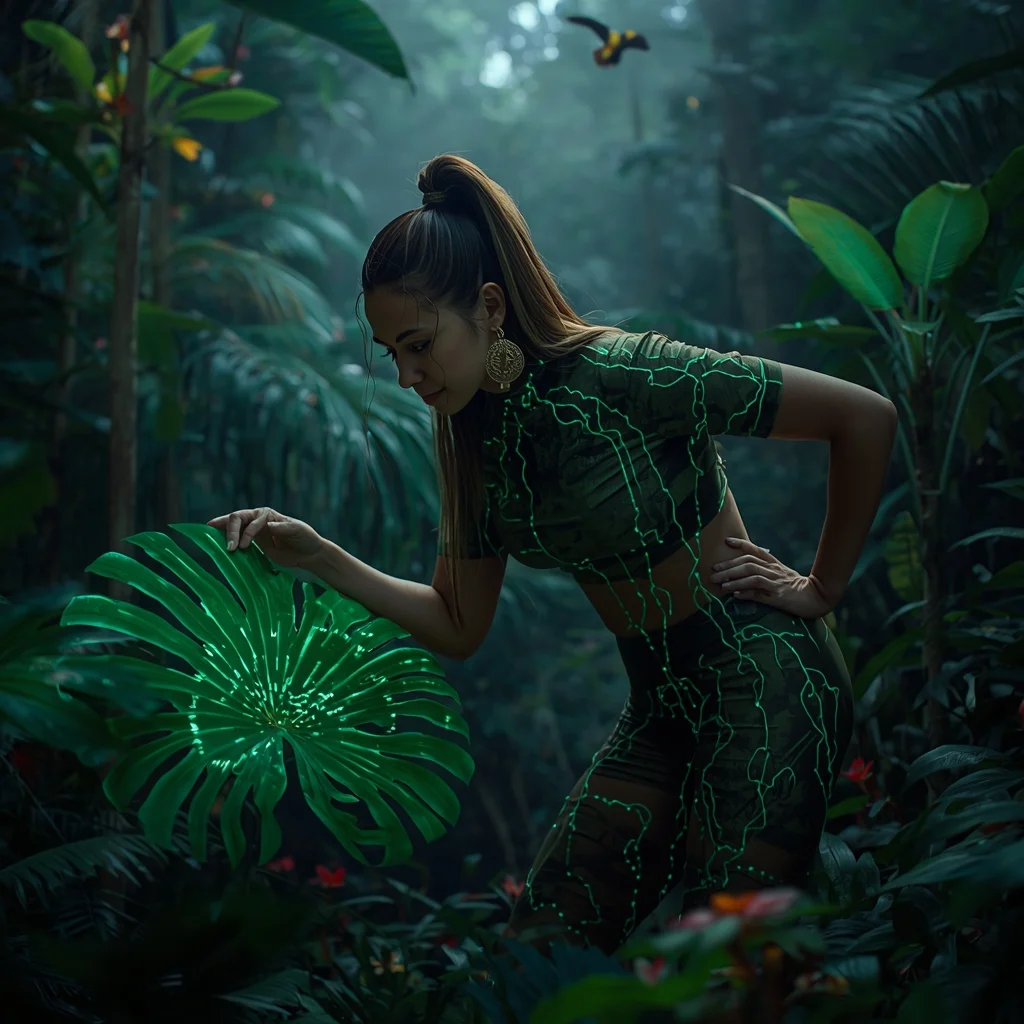
Prompt: A lush, vibrant shot of a woman in tactical jungle-wear integrated with organic glowing vines, standing in the heart of a dense Amazonian rainforest. Tropical birds and bioluminescent insects fill the air. | Pose: An 'Interacting with Nature' pose. She is leaning forward, one hand gently holding a large tropical leaf that is glowing with digital data patterns. Her other hand is resting on her hip. She is looking at the leaf with a look of scientific curiosity. | Technical: Shot with a 100mm macro lens. Focus is incredibly sharp on the woman’s face and the glowing leaf veins. Saturated greens and vibrant floral colors. Volumetric 'God rays' through the canopy. 16k resolution.
The Rugged Nordic Blacksmith in a Traditional Forge | Free Gemini Prompt
3006 mos ago
Prompt: A hyper-realistic, full-body cinematic photograph of a powerful, barrel-chested Nordic blacksmith in his late 40s working in an ancient, dimly lit stone forge. He has a thick, braided ginger beard with streaks of grey and messy, sweat-dampened hair pulled back in a leather tie. He is wearing a heavy, soot-stained dark leather apron over a simple, rough-spun linen tunic with the sleeves rolled up to reveal muscular, vein-popping forearms covered in fine ash and old burn scars. He is captured in a dynamic pose, mid-swing, with a heavy iron hammer about to strike a glowing, molten orange sword blade resting on a massive, weathered steel anvil. Brilliant sparks fly in every direction, illuminating the flying dust motes and the orange glow reflecting off his weathered skin and intense, focused blue eyes. The background is filled with the textures of a working forge: racks of specialized tongs, a glowing coal hearth with bellows, and rough-hewn stone walls. The lighting is dramatic and high-contrast, with the primary light source being the white-hot metal on the anvil. Shot on a Phase One XF with a 100mm lens, 8k resolution, ultra-detailed skin pores, realistic sweat droplets, and intricate metal textures, masterful Chiaroscuro aesthetic.
i Tried This AI Trick and It Changed Everything | Sharp Image Prompt
1946 mos ago
Prompt: Create a highly eye-catching YouTube thumbnail featuring a shocked young creator in the foreground with wide eyes and an open mouth, expressing disbelief and excitement. The character is pointing toward a glowing futuristic hologram labeled “AI SECRET” with neon blue and purple light effects. Background should be a modern tech room with floating digital elements, code symbols, and artificial intelligence graphics. Use cinematic lighting with strong contrast, sharp focus on the face, dramatic shadows, ultra-realistic skin texture, vibrant colors, and exaggerated facial expression. Add depth of field blur to the background, bold composition optimized for mobile viewing, 16:9 ratio, ultra-high resolution, professional YouTube thumbnail style.
Young Woman in Autumn Party Dress with Cultural Mood | Viral Ai Prompt You Must Try
2506 mos ago
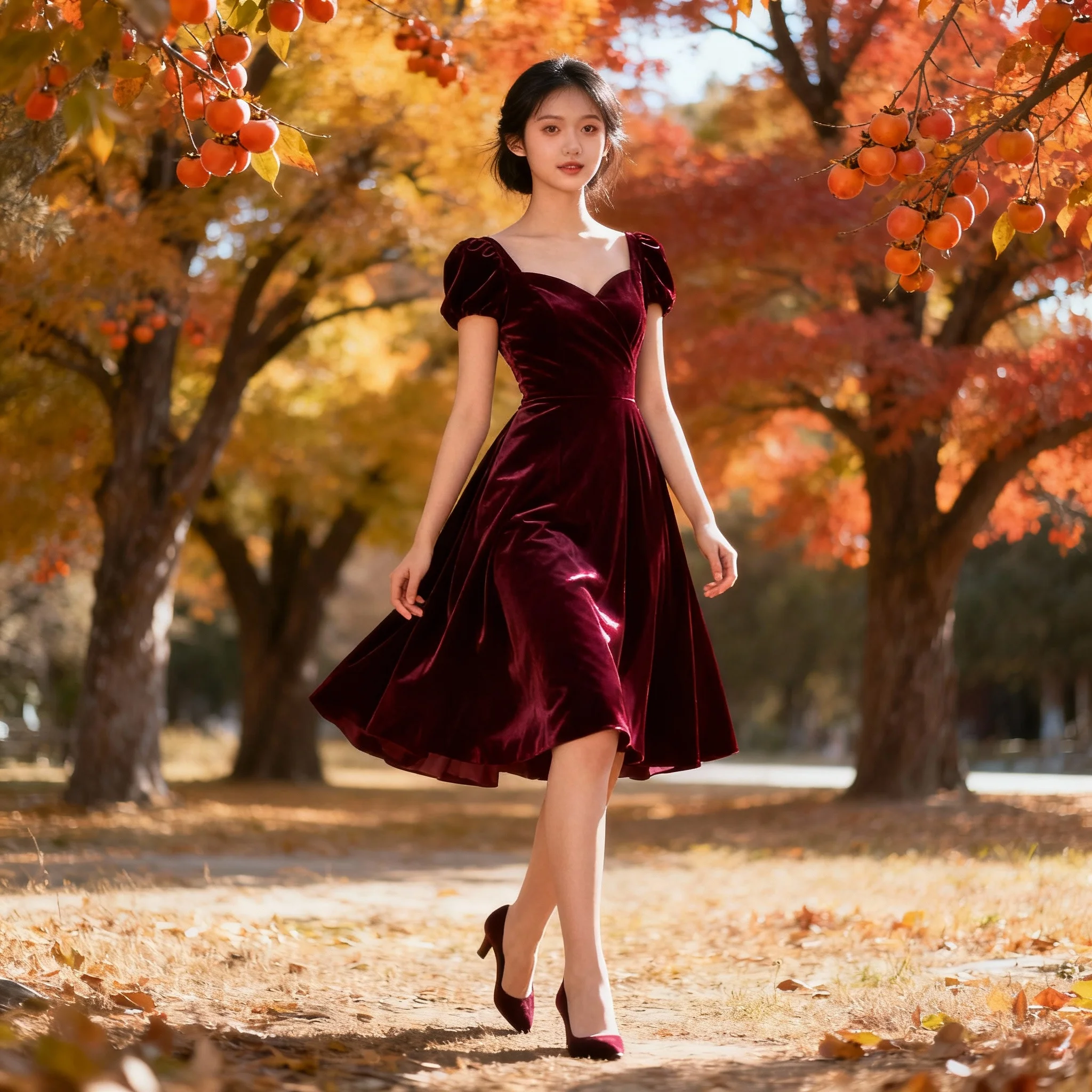
Prompt: A stylish yet tasteful image of a young woman wearing an elegant party dress in deep burgundy tones, standing outdoors during autumn with chinar trees in the background. Her pose is confident and youthful, one foot slightly forward, hands relaxed. Soft glowing autumn light, realistic fabric shine, natural makeup, cinematic color grading, high-end fashion photography, ultra-realistic 8K quality.
THIS ONE CHANGE SAVED ME 🔥 | Daily Updated Ai Prompt
2096 mos ago
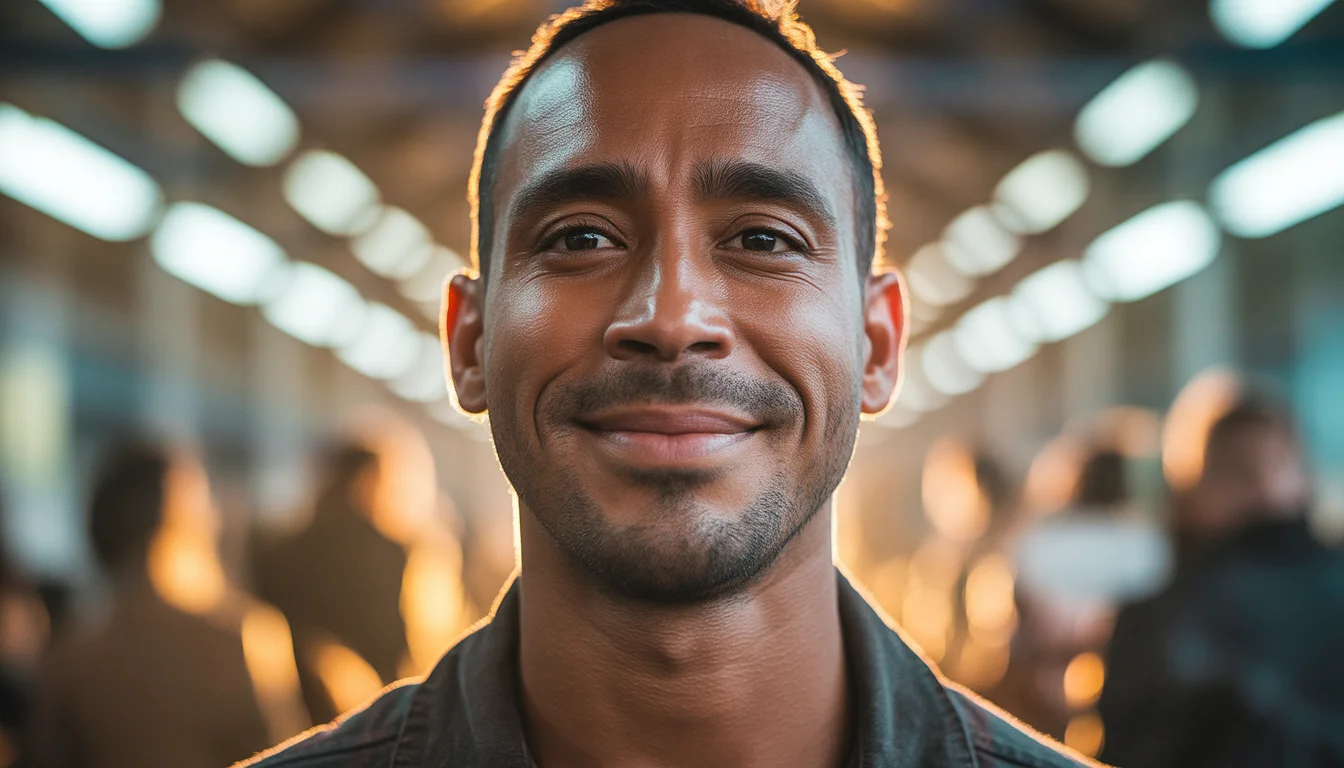
Prompt: Cinematic YouTube thumbnail of a confident creator standing upright with calm but powerful expression, gentle smile of realization, warm golden key light illuminating the face, cool shadows adding depth, blurred background with glowing light beams, ultra-sharp facial details, realistic skin texture, shallow depth of field, professional cinematic color grading, inspirational mood, strong visual hierarchy, bold clean composition, viral YouTube thumbnail style, 4K ultra-HD quality.
Frequently Asked Questions
Common questions regarding this AI prompt.
Can I generate a 3D claymation or toy-like version of Milanese Runway Edge | Ai Creative Prompt?
Yes, you can mimic physical models easily. Add terms such as 'made of polymer clay, tilt-shift photography, miniature diorama, cute 3D render, smooth plasticine, vibrant pastel colors' to the prompt. The AI will instantly convert the Woman Pose Art scene into a charming, tactile 3D object.
Does this prompt work with DALL-E 3 inside ChatGPT?
Yes, it works exceptionally well. DALL-E 3 thrives on conversational, highly descriptive text. Because this prompt for Milanese Runway Edge | Ai Creative Prompt is structured with clear nouns and adjectives, DALL-E 3 will translate it almost perfectly into an image, ensuring that multiple complex elements within the Woman Pose Art scene interact logically.
What rendering engines should I reference to maximize the quality of Milanese Runway Edge | Ai Creative Prompt?
Modern AI image generators respond incredibly well to 3D software references. By appending terms like 'Unreal Engine 5 render', 'OctaneRender', 'Redshift', 'V-Ray', and 'Global Illumination', you are signaling the AI to utilize its highest quality datasets for lighting physics and material textures within the Woman Pose Art image.
What is the optimal workflow for upscaling Milanese Runway Edge | Ai Creative Prompt to print-quality resolution?
Do not generate at massive resolutions directly, as it causes compositional duplication (like two heads). Instead, generate Milanese Runway Edge | Ai Creative Prompt at a native resolution (e.g., 1024x1024), and then use a dedicated AI upscaler. Tools like Topaz Gigapixel AI, Magnific AI, or the '4x-UltraSharp' model in Automatic1111 will enhance the micro-textures of the Woman Pose Art without destroying the original composition.
How customizable are the character and environment details in the Milanese Runway Edge | Ai Creative Prompt prompt?
Highly customizable. The prompt serves as a robust architectural framework. You can easily swap out specific nouns or color palettes while retaining the core Woman Pose Art style. For example, changing the time of day or the primary clothing material will seamlessly adapt the scene while maintaining the high-definition rendering quality originally intended for Milanese Runway Edge | Ai Creative Prompt.
What specific lighting setup is best to highlight the details of Milanese Runway Edge | Ai Creative Prompt?
For maximum texture reveal, a 'three-point studio lighting' or 'Rembrandt lighting' setup works best. By incorporating keywords like 'rim light', 'key light', and 'soft fill', you instruct the AI to sculpt the Woman Pose Art subject out of the background, ensuring that micro-details like skin pores, fabric weaves, or metallic reflections are perfectly visible.
Is it possible to use this static image prompt as a base for AI video animation?
Yes, this is a very popular workflow. Once you generate the perfect still image of Milanese Runway Edge | Ai Creative Prompt, you can import it into cutting-edge AI video generators like Luma Dream Machine, Kling AI, Runway Gen-3, or Pika Labs. The high detail and clear focus provided by this Woman Pose Art prompt make it an ideal initial keyframe, resulting in smooth, artifact-free animations.
What is the best Stylize (--s) value to use in Midjourney for this prompt?
The stylize parameter dictates how strongly Midjourney applies its default aesthetic. For strict adherence to the realistic details of Milanese Runway Edge | Ai Creative Prompt, keep it around --s 100 to --s 250. If you want the AI to take artistic liberties and make the Woman Pose Art scene look more like a digital masterpiece, push the value up to --s 500 or --s 750.
What if the AI completely ignores a specific detail I added to the Milanese Runway Edge | Ai Creative Prompt prompt?
If a detail is ignored, it lacks 'weight'. Move that specific word closer to the very beginning of the prompt. Alternatively, if using Midjourney, use the double colon syntax (Keyword::2) to force the AI to pay attention. In Stable Diffusion, wrap the keyword in parentheses like (Keyword:1.5) to boost its importance in the Woman Pose Art scene.
How do I inject a cyberpunk or dystopian sci-fi feel into Milanese Runway Edge | Ai Creative Prompt?
Add 'cyberpunk metropolis, neon rain, holographic advertisements, high-tech low-life, chrome and cables'. The AI will retain the core shape and intent of the Milanese Runway Edge | Ai Creative Prompt prompt but re-texture everything with futuristic, glowing, and metallic sci-fi elements.
How does the prompt establish the historical or futuristic era of Milanese Runway Edge | Ai Creative Prompt?
Era-specific aesthetics are locked in using targeted chronological keywords. Whether leaning towards a neo-futuristic cyberpunk vibe or a classical Renaissance look, the prompt forces the AI to draw from specific historical datasets. This ensures that the clothing, architecture, and props within the Woman Pose Art scene remain historically or thematically accurate.
How do I add realistic weather effects like rain or snow to the scene?
Weather completely alters the physics of light. If you add 'torrential rain, wet asphalt reflecting neon, water droplets clinging to surfaces', the AI will not just draw rain; it will change the specularity of the Milanese Runway Edge | Ai Creative Prompt subject. For snow, use 'heavy blizzard, frost-covered edges, soft diffused winter light' to change the entire atmosphere of the Woman Pose Art generation.
How do I create a dramatic, low-light version of Milanese Runway Edge | Ai Creative Prompt?
To plunge the scene into dramatic darkness, modify the prompt to include 'chiaroscuro', 'low-key lighting', 'underexposed', and 'stark shadows'. This tells the AI to plunge the majority of the Woman Pose Art environment into darkness while intensely illuminating only the most critical parts of the Milanese Runway Edge | Ai Creative Prompt subject, creating a moody, cinematic masterpiece.
What is the best way to force an ultra-wide or panoramic view?
To force a panoramic composition, you must combine aspect ratio parameters with specific camera descriptors. In Midjourney, use '--ar 21:9'. Within the prompt text itself, include 'ultra-wide panoramic landscape, 14mm lens, expansive horizon, sweeping view'. This ensures the Milanese Runway Edge | Ai Creative Prompt subject matter is distributed correctly across a massive, cinematic canvas.