High-quality AI-generated image. Optimized for detailed rendering, perfect for creative projects and inspiration.
119Views
0 Likes
100%Quality
FreeLicense
AI Prompt
Prompt: Ultra-realistic thumbnail featuring a creator looking surprised and thoughtful, hand on chin, wide eyes, soft but dramatic lighting, glowing question marks floating around, blurred gradient background in purple and blue tones, cinematic depth of field, crisp facial details, realistic skin texture, professional color grading, high contrast, subtle rim light, modern viral YouTube thumbnail style, eye-catching composition, optimized for mobile viewers, 4K resolution.
Want to create this with your own face? Use this instruction:
Keep skin tone, undertones, and natural color variations consistent with the reference. Prompt: Ultra-realistic thumbnail featuring a creator looking surprised and thoughtful, hand on chin, wide eyes, soft but dramatic lighting, glowing question marks floating around, blurred gradient background in purple and blue tones, cinematic depth of field, crisp facial details, realistic skin texture, professional color grading, high contrast, subtle rim light, modern viral YouTube thumbnail style, eye-catching composition, optimized for mobile viewers, 4K resolution.
About this Prompt
Reinvent your entire approach to generative design with the staggering capabilities of 'I WAS WRONG ABOUT THIS 😳 | Design Prompt'. By viewing the YouTube Thumbnail aesthetic from a radical, fresh angle, this prompt allows you to maximize the sheer potential of your AI tools and produce undeniably iconic artwork. By focusing intensely on ultra-realistic digital brushwork and highly dense atmospheric elements like volumetric fog, this prompt adds a massive layer of profound mystery and sheer elegance. The resulting YouTube Thumbnail imagery feels incredibly tactile, authentic, and vividly, breathtakingly alive.
If you are actively building a highly curated, premium aesthetic blog or a luxury lifestyle digital magazine, this prompt provides the exact, flawless visual consistency required to establish deep brand authority and unmatched visual trust. Make this highly stunning, perfectly composed prompt the absolute focal point of your next big digital project. Its immense, highly adaptable versatility is simply perfect for completely mastering the intricacies of the YouTube Thumbnail visual style.
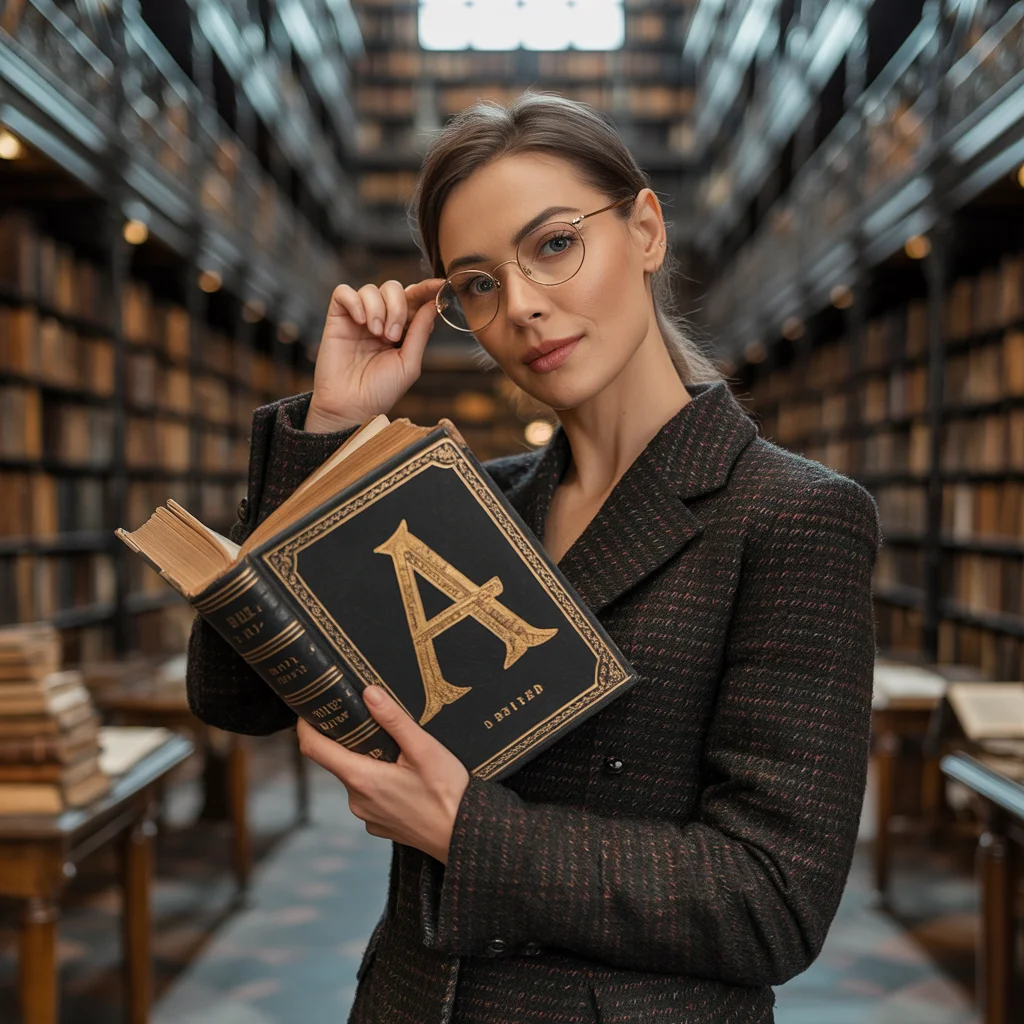
Dark Academia "A" Library Mystery | Ai Prompt Style
1203 mos ago
Prompt: A scholarly woman in a dark brown tweed blazer and glasses, standing in a massive, multi-story old library. She is holding an ancient leather-bound book with a large, ornate golden letter "A" embossed on the cover. The room is filled with the smell of old paper and shadows.
Pose: Leaning against a tall rolling ladder, holding the book open with one hand while the other adjusts her glasses, looking directly into the lens with a curious, intelligent look.
Technical: Chiaroscuro lighting, deep wood tones, 85mm lens, sharp focus on the book's "A" initial, vintage aesthetic, 8k.
Modern Indian Viral Reel Pose – Direct Camera Connect | Best Ai Prompt
933 mos ago
Prompt: An Indian female model in a bold modern Indian dress, captured mid-step while directly engaging the camera. Body posture confident and expressive, shoulders relaxed. Hair styled with texture and light movement. Expression strong, confident, and magnetic. Makeup is bold-glam yet clean. Lighting is bright with controlled contrast. Background minimal to enhance focus. Ultra-realistic textures, cinematic reel composition, influencer-grade polish, designed for viral reach.
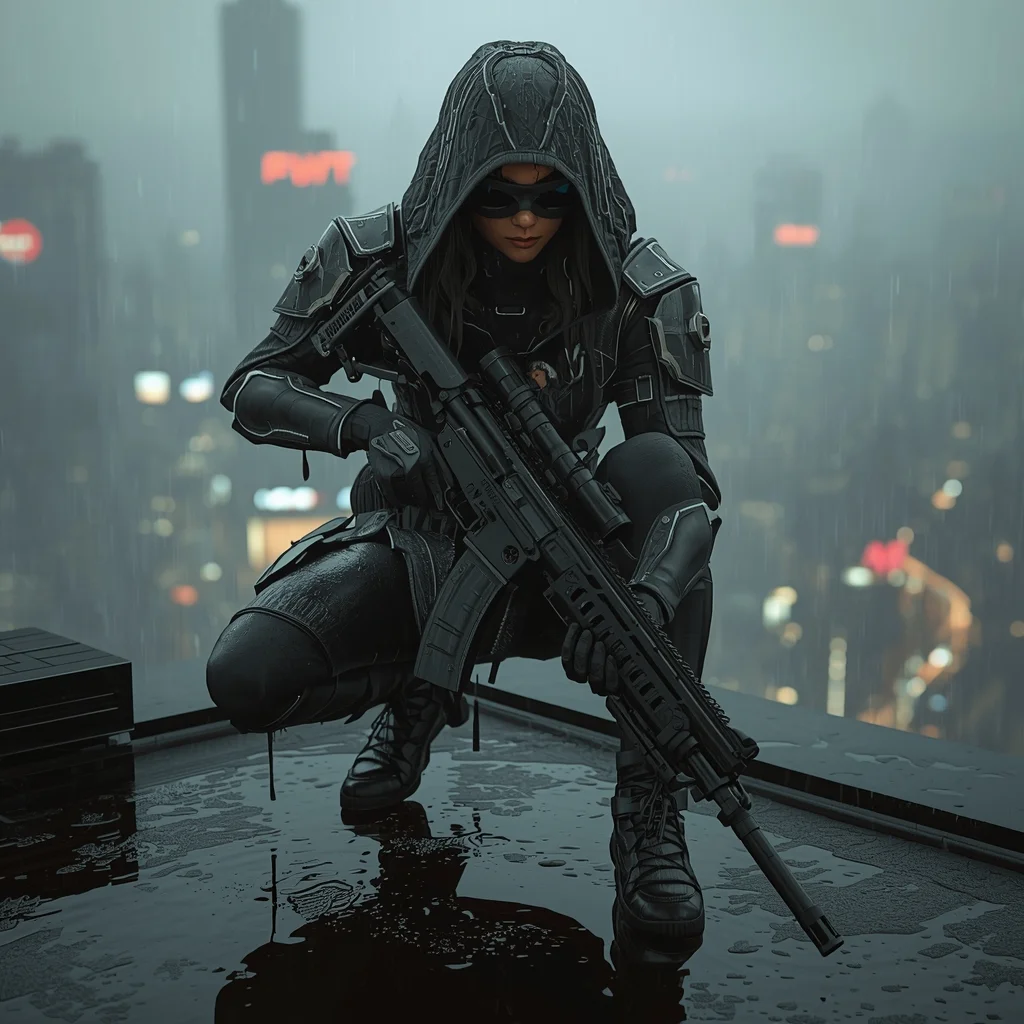
The Rooftop Rain Sentinel | Creative Ai Prompt Idea List
1033 mos ago
A futuristic nomad woman crouched low on a rain-slicked skyscraper rooftop, holding a heavy scoped energy rifle rests on her knee. Water drips from her armored hood and shoulders, splashing onto the reflective surface. Below her, a sprawling cyberpunk city glows with neon signs reflecting in puddles. Her tech-goggles are pushed up, revealing a focused, scarred face. Cinematic lighting, intricate armor details, atmospheric fog, hyper-realistic textures, 8k, Unreal Engine 5 render
Wind-Blown Cinematic Hero Pose | Fantasy Image Prompt
1063 mos ago
Prompt: A man standing on an open rooftop or hill edge, coat flowing slightly in the wind, body facing sideways while head turns toward camera, confident heroic expression, dramatic cloudy sky behind, golden hour sunlight highlighting face contours, cinematic movie still look, ultra-realistic textures, powerful storytelling composition, high dynamic range.
Cinematic Walking Pose Woman Street Style | Trending Gemini Prompt
1033 mos ago
Prompt: A stylish woman captured mid-walk on a city street, one foot stepping forward, coat flowing behind her, natural motion frozen in time. She looks slightly to the side with a thoughtful expression. Street lights, subtle motion blur in the background, cinematic depth, moody color grading, urban fashion styling, realistic lighting, high-end editorial photography, detailed textures, sharp subject focus, professional composition, 8K realism.
Standing with his back slightly turned | Top Searched Ai Prompt
1083 mos ago
Prompt: A rugged man wearing a layered linen outfit and a loose shemagh around his neck, standing in the middle of vast, golden sand dunes. The wind is blowing, creating a light sand mist around his feet. The sun is setting, casting long, dramatic shadows. Pose: Standing with his back slightly turned, looking over his shoulder toward the camera. One hand is shielding his eyes from the setting sun, while the other holds a vintage leather canteen. Technical: 35mm lens, f/2.8, warm sunset hues, high-resolution textures on fabric, cinematic wide shot.
Pose: Standing with his back slightly turned, looking over his shoulder toward the camera. One hand is shielding his eyes from the setting sun, while the other holds a vintage leather canteen. Technical: 35mm lens, f/2.8, warm sunset hues, high-resolution textures on fabric, cinematic wide shot.
Technical: 35mm lens, f/2.8, warm sunset hues, high-resolution textures on fabric, cinematic wide shot.
Cozy Autumn Coffee Shop Aesthetic | Prompt Formula For Ai
1092 mos ago
Prompt: A young woman in a chunky, oversized knit sweater in cream color, paired with plaid wool trousers and a beret. She is sitting by a rain-streaked window in a cozy café, holding a steaming ceramic mug with both hands, looking out thoughtfully. Soft, ambient indoor lighting mixes with the cool blue light from the window. The image has a warm, nostalgic filter. insanely detailed knit textures, steam rising from the cup, cozy atmosphere, depth of field focusing on her face, 8k resolution.
Gym Bodybuilder Front Flex Power Pose | Trending Prompt Idea Worldwide
1063 mos ago
Prompt: A muscular male bodybuilder standing in a gym, front flex pose with arms bent and chest expanded, intense focused expression, sweat highlights on skin, dramatic top lighting, deep shadows, ultra-defined muscles, high-contrast cinematic fitness photography, hyper-realistic.
Frequently Asked Questions
Common questions regarding this AI prompt.
How do I inject a cyberpunk or dystopian sci-fi feel into I WAS WRONG ABOUT THIS ? | Design Prompt?
Add 'cyberpunk metropolis, neon rain, holographic advertisements, high-tech low-life, chrome and cables'. The AI will retain the core shape and intent of the I WAS WRONG ABOUT THIS ? | Design Prompt prompt but re-texture everything with futuristic, glowing, and metallic sci-fi elements.
How do I deal with unwanted text or watermarks appearing in the image?
AI models are trained on stock photos which often contain watermarks. To aggressively filter this out, ensure words like 'text, watermark, signature, username, website url, copyright stamp' are heavily weighted in your negative prompt box. This is especially crucial when generating commercial-grade YouTube Thumbnail content.
What is the best way to force an ultra-wide or panoramic view?
To force a panoramic composition, you must combine aspect ratio parameters with specific camera descriptors. In Midjourney, use '--ar 21:9'. Within the prompt text itself, include 'ultra-wide panoramic landscape, 14mm lens, expansive horizon, sweeping view'. This ensures the I WAS WRONG ABOUT THIS ? | Design Prompt subject matter is distributed correctly across a massive, cinematic canvas.
How can I use Inpainting to fix specific errors in the generated I WAS WRONG ABOUT THIS ? | Design Prompt image?
Inpainting is essential for perfection. If 90% of the I WAS WRONG ABOUT THIS ? | Design Prompt image is flawless but a hand or eye is distorted, send the image to an Inpaint tab. Mask only the flawed area, keep the original prompt, and set the denoising strength high (around 0.7). The AI will regenerate only that specific zone, seamlessly blending the fixed YouTube Thumbnail elements into the surrounding artwork.
How do I achieve an extreme close-up or macro shot of I WAS WRONG ABOUT THIS ? | Design Prompt?
Modify the perspective by heavily weighting keywords like 'extreme macro photography', '100mm macro lens', 'microscopic detail', and 'extreme close up'. This forces the AI engine to ignore the broader YouTube Thumbnail environment and dedicate all of its rendering power to the microscopic textures, fibers, or surface imperfections of the primary subject.
Can I convert the scene into a post-apocalyptic wasteland?
Yes, by adding 'post-apocalyptic, overgrown ruins, rusted metal, decayed urban environment, survival aesthetic, cinematic fallout style'. The AI will take the core structure of I WAS WRONG ABOUT THIS ? | Design Prompt and age it by decades, adding immense weathering and environmental storytelling to the YouTube Thumbnail image.
What are the recommended parameters for generating I WAS WRONG ABOUT THIS ? | Design Prompt in Stable Diffusion XL (SDXL)?
For optimal results in SDXL, we recommend pairing this prompt with a high-quality checkpoint like Juggernaut XL. Use the DPM++ 2M Karras sampler with approximately 35-40 steps and a CFG scale between 6.5 and 8.0. This combination strikes the perfect balance between adhering strictly to the I WAS WRONG ABOUT THIS ? | Design Prompt description and allowing the model's creative freedom.
What should I do if the background of I WAS WRONG ABOUT THIS ? | Design Prompt becomes too cluttered?
If the AI over-complicates the background, you need to assert control over the depth of field. Add strict modifiers like 'clean minimalist background, studio backdrop, heavy bokeh, blurred environment' to the prompt. Additionally, placing the subject-specific keywords at the very front of the prompt ensures the AI prioritizes the main I WAS WRONG ABOUT THIS ? | Design Prompt element.
Is it possible to use this static image prompt as a base for AI video animation?
Yes, this is a very popular workflow. Once you generate the perfect still image of I WAS WRONG ABOUT THIS ? | Design Prompt, you can import it into cutting-edge AI video generators like Luma Dream Machine, Kling AI, Runway Gen-3, or Pika Labs. The high detail and clear focus provided by this YouTube Thumbnail prompt make it an ideal initial keyframe, resulting in smooth, artifact-free animations.
Can I change the material composition of objects in the I WAS WRONG ABOUT THIS ? | Design Prompt prompt?
Yes, AI handles material transformation brilliantly. If you want to change a standard object into something surreal, use explicit material descriptors like 'made of translucent frosted glass', 'brushed anodized aluminum', 'woven carbon fiber', or 'wet shimmering obsidian'. This will completely recalculate the reflections and refractions in the YouTube Thumbnail output.
What is the best Stylize (--s) value to use in Midjourney for this prompt?
The stylize parameter dictates how strongly Midjourney applies its default aesthetic. For strict adherence to the realistic details of I WAS WRONG ABOUT THIS ? | Design Prompt, keep it around --s 100 to --s 250. If you want the AI to take artistic liberties and make the YouTube Thumbnail scene look more like a digital masterpiece, push the value up to --s 500 or --s 750.
Why might the colors in my I WAS WRONG ABOUT THIS ? | Design Prompt generation appear washed out, and how do I fix it?
Washed-out colors typically result from a missing VAE file in local setups, or a lack of color-grading instructions. To immediately fix this within the text prompt itself, append phrases such as 'vibrant technicolor, rich saturation, HDR, cinematic color grading, high contrast'. This forces the AI to map a wider, more dynamic color range to your image.
What specific lighting setup is best to highlight the details of I WAS WRONG ABOUT THIS ? | Design Prompt?
For maximum texture reveal, a 'three-point studio lighting' or 'Rembrandt lighting' setup works best. By incorporating keywords like 'rim light', 'key light', and 'soft fill', you instruct the AI to sculpt the YouTube Thumbnail subject out of the background, ensuring that micro-details like skin pores, fabric weaves, or metallic reflections are perfectly visible.
How customizable are the character and environment details in the I WAS WRONG ABOUT THIS ? | Design Prompt prompt?
Highly customizable. The prompt serves as a robust architectural framework. You can easily swap out specific nouns or color palettes while retaining the core YouTube Thumbnail style. For example, changing the time of day or the primary clothing material will seamlessly adapt the scene while maintaining the high-definition rendering quality originally intended for I WAS WRONG ABOUT THIS ? | Design Prompt.