Royal Traditional Indian Kurta Confidence Pose | Smart Prompt For Better Image
High-quality AI-generated image. Optimized for detailed rendering, perfect for creative projects and inspiration.
455Views
0 Likes
100%Quality
FreeLicense
AI Prompt
Prompt: An Indian man standing tall in a royal embroidered kurta and churidar, hands gently clasped in front, confident calm expression, traditional palace-inspired background, warm golden lighting, detailed fabric texture, cultural elegance, cinematic Indian portrait photography, ultra-realistic, high resolution.
Want to create this with your own face? Use this instruction:
Keep the reference face sharp, realistic, and identical, without exaggeration or artistic interpretation. Prompt: An Indian man standing tall in a royal embroidered kurta and churidar, hands gently clasped in front, confident calm expression, traditional palace-inspired background, warm golden lighting, detailed fabric texture, cultural elegance, cinematic Indian portrait photography, ultra-realistic, high resolution.
About this Prompt
Embrace the bleeding-edge allure of tomorrow's technology today with 'Royal Traditional Indian Kurta Confidence Pose | Smart Prompt For Better Image', a brilliant intersection of modern algorithmic power and classic Man Pose Art beauty. The instant, striking visual impact of this prompt is undeniable, effortlessly pulling viewers directly into its mesmerizing trance. Engineered meticulously for ultimate visual clarity, this prompt highlights hyper-realistic material textures and profoundly atmospheric, moody environments. The brilliant contrast and carefully balanced directional lighting give the resulting image a dramatic, high-stakes cinematic feel that rivals premium Hollywood concept art.
It is a literal goldmine for freelance graphic designers who need to rapidly iterate Man Pose Art concepts for highly demanding corporate clients. You can effortlessly supply them with dozens of flawless, studio-grade variations in a fraction of the time. Command the full, staggering power of modern generative algorithms with absolute confidence. Render this specific prompt right now to rapidly unlock the deepest secrets of professional digital art, aesthetic brilliance, and highly viral visual creation.
Confident Leaning Wall Pose Woman Street Fashion | Studio Photo Prompt
4039 mos ago
Prompt: A confident woman leaning casually against a textured urban wall, one leg bent, shoulders relaxed, conveying effortless style. Her outfit reflects modern street fashion with layered details and natural tones. Directional lighting enhances depth and contrast, highlighting facial features and fabric textures. Shallow depth of field isolates the subject, cinematic framing, ultra-realistic detail, fashion editorial look, high-resolution image quality.
Graceful Turning Woman Pose | Trending Prompt Idea Worldwide
3539 mos ago
Ultra-realistic editorial portrait of a woman captured mid-turn, body slightly angled, soft flowing movement in dress fabric, elegant posture, calm confident expression, professional studio lighting with gentle highlights, neutral seamless background, cinematic depth of field, high-end fashion magazine style, ultra-detailed skin texture, realistic proportions, 8K resolution, no text, no watermark
Kashmiri Saree Style Pose with Chinar Leaf | Clean Ai Prompt
4359 mos ago
Prompt: A close-up cultural portrait of a woman holding a single chinar leaf, dressed in a saree-style outfit with autumn-colored embroidery inspired by Kashmiri pherans. Her expression is calm and reflective, pose gentle and expressive. Background softly blurred with autumn foliage, natural makeup, professional lighting, ultra-detailed skin texture, cinematic color grading, 8K realism.
This Secret Changed Everything Overnight | Ai Prompt For High Engagement
3349 mos ago
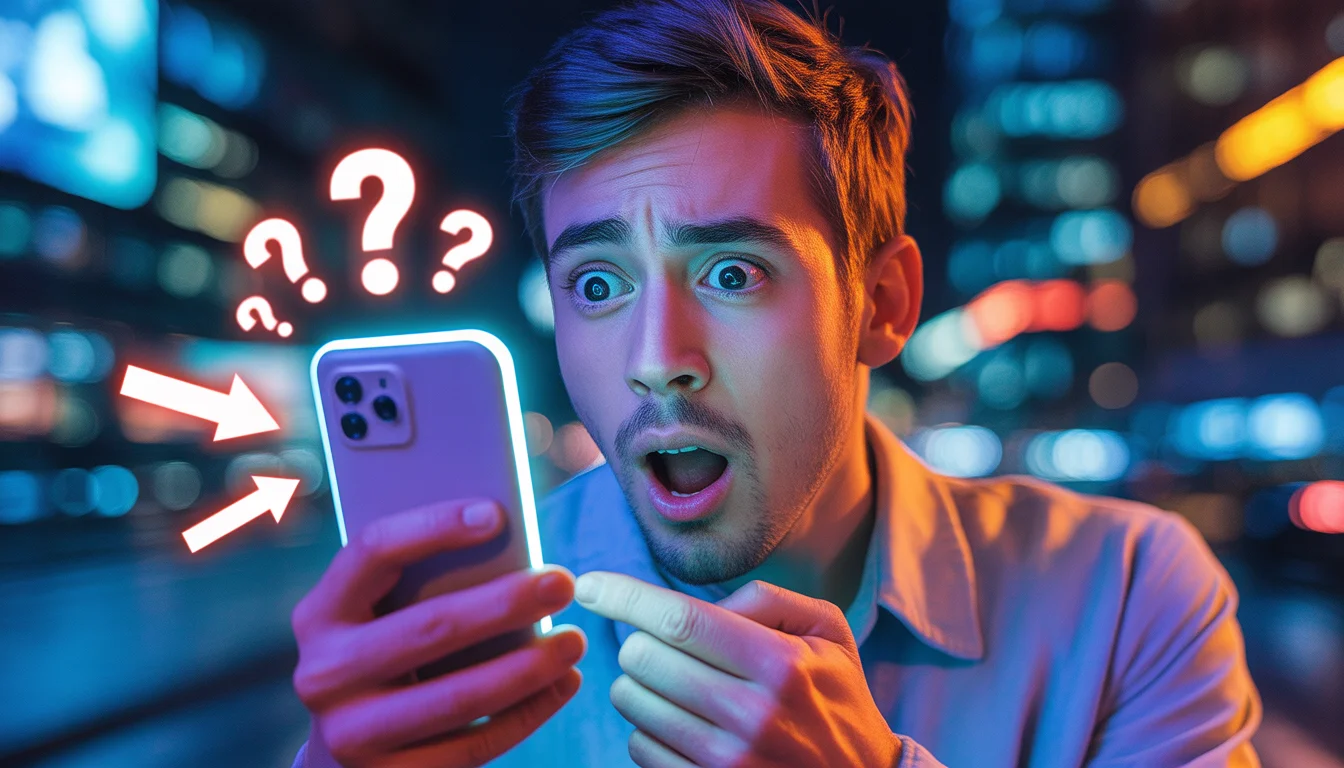
Prompt: Ultra-realistic YouTube thumbnail showing a shocked young man holding a glowing smartphone, eyes wide open, mouth slightly open in disbelief, neon blue and orange lighting, dramatic cinematic shadows, blurred city background at night, floating question marks and glowing arrows pointing toward the phone screen, bold contrast, high saturation, emotional facial expression, sharp focus on face, shallow depth of field, professional studio quality, viral YouTube thumbnail style, 4K resolution, perfect lighting for small-screen visibility, modern digital aesthetic.
Soft Window Light Side Pose Woman Lifestyle Scene | Gemini Image Prompt
4109 mos ago
Prompt: A serene lifestyle portrait of a woman standing beside a large window, body turned slightly sideways to the camera, one arm gently resting on the window frame. Natural daylight flows across her face, creating soft highlights and gentle shadows. Her posture is relaxed and natural, with a peaceful, thoughtful expression. She wears a simple yet elegant outfit with visible fabric texture and realistic folds. The indoor background is minimal and softly blurred, emphasizing the subject. Natural color tones, cinematic softness, realistic skin details, lifestyle photography mood, balanced composition, high clarity, ultra-realistic rendering.
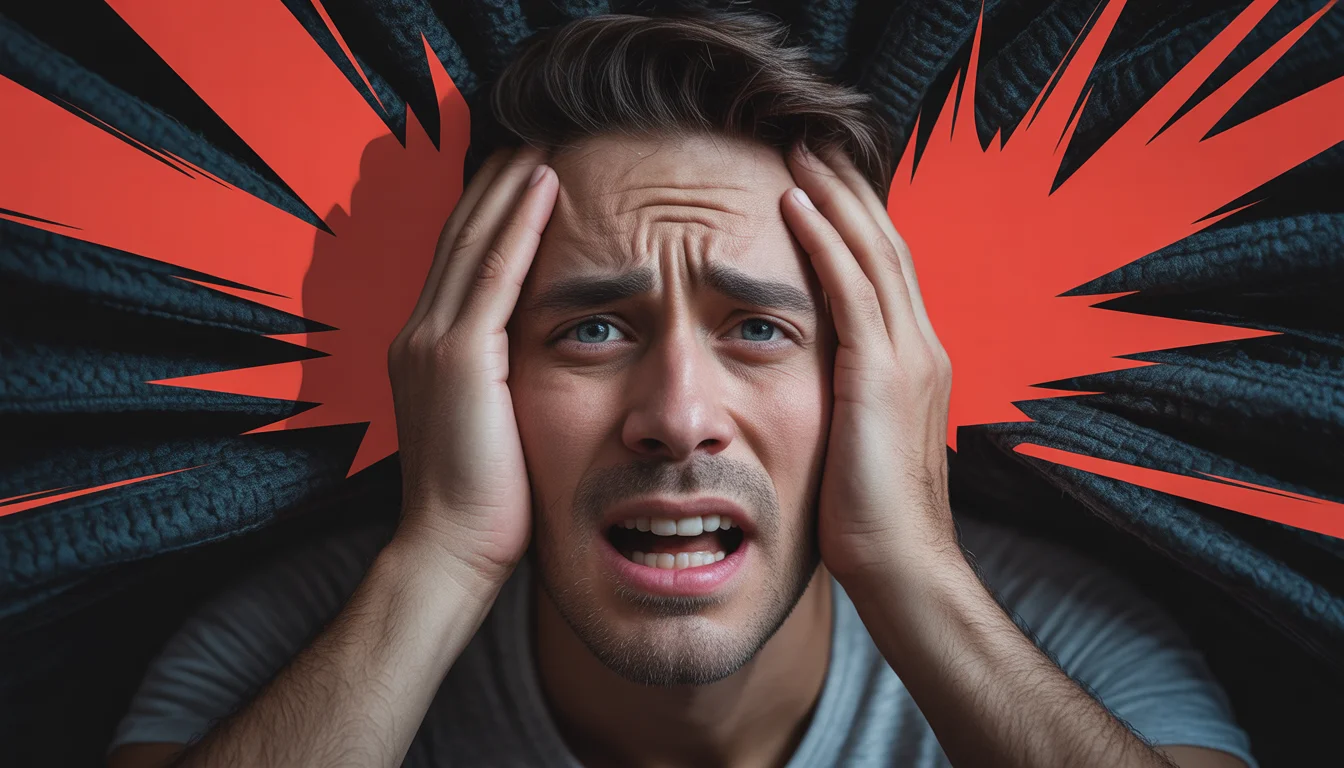
Prompt: Photorealistic YouTube thumbnail showing a worried creator holding their head with both hands, expression of regret and panic, intense top-down dramatic lighting, deep shadows across the face, dark textured background, bold red warning accents, ultra-sharp focus on facial emotions, realistic skin tones, cinematic color grading, professional DSLR quality, high contrast composition, viral YouTube thumbnail style, 4K resolution, designed to instantly grab attention.
The Acoustic Session | Popular Ai Prompt Idea 2026
5779 mos ago
Prompt: A musician with a scruffy beard wearing a worn denim shirt, sitting on a wooden stool on a dimly lit, intimate stage. He is holding an acoustic guitar. Pose: Hunched over the guitar, intensely focused on playing. Head is down, eyes closed in feeling the music, fingers forming a complex chord on the fretboard. A natural, candid moment. Technical: Warm stage spotlight from above, shallow focus on the hands and guitar, 85mm portrait lens, natural grain.
Pose: Hunched over the guitar, intensely focused on playing. Head is down, eyes closed in feeling the music, fingers forming a complex chord on the fretboard. A natural, candid moment. Technical: Warm stage spotlight from above, shallow focus on the hands and guitar, 85mm portrait lens, natural grain.
Technical: Warm stage spotlight from above, shallow focus on the hands and guitar, 85mm portrait lens, natural grain.
The Subtle Watch Flex Editorial | Creative Image Prompt
3969 mos ago
Prompt: A high-fashion studio portrait of a male model posing as a wealthy collector. He is seated in a leather armchair, wearing a dark turtleneck and tailored trousers. The pose is calculated: he is leaning forward, elbows on knees, hands clasped loosely to prominently display a very rare, diamond-encrusted Rolex on his wrist. The lighting is dramatic "Rembrandt" style studio lighting, focusing sharply on his face and the watch. The background is dark and textured.
Frequently Asked Questions
Common questions regarding this AI prompt.
How does Google's Gemini (Imagen 3) respond to the Royal Traditional Indian Kurta Confidence Pose | Smart Prompt For Better Image prompt?
Gemini's Imagen 3 engine is exceptionally strong at adhering to safe, high-quality, photorealistic requests. It reads the descriptive narrative of the Royal Traditional Indian Kurta Confidence Pose | Smart Prompt For Better Image prompt perfectly, ensuring that the subject anatomy and environmental physics are logical, highly detailed, and free from the typical warping artifacts seen in older generation models.
What is the best Stylize (--s) value to use in Midjourney for this prompt?
The stylize parameter dictates how strongly Midjourney applies its default aesthetic. For strict adherence to the realistic details of Royal Traditional Indian Kurta Confidence Pose | Smart Prompt For Better Image, keep it around --s 100 to --s 250. If you want the AI to take artistic liberties and make the Man Pose Art scene look more like a digital masterpiece, push the value up to --s 500 or --s 750.
How do I create a dramatic, low-light version of Royal Traditional Indian Kurta Confidence Pose | Smart Prompt For Better Image?
To plunge the scene into dramatic darkness, modify the prompt to include 'chiaroscuro', 'low-key lighting', 'underexposed', and 'stark shadows'. This tells the AI to plunge the majority of the Man Pose Art environment into darkness while intensely illuminating only the most critical parts of the Royal Traditional Indian Kurta Confidence Pose | Smart Prompt For Better Image subject, creating a moody, cinematic masterpiece.
How can I transform Royal Traditional Indian Kurta Confidence Pose | Smart Prompt For Better Image into a vector graphic or logo style?
To strip away the photorealism, replace the camera keywords with 'flat vector illustration, minimalist design, UI/UX asset, Adobe Illustrator style, solid colors, clean crisp lines, no gradients'. This transforms the Man Pose Art subject into a scalable, graphic-design-ready asset perfect for web design or branding.
Why might the colors in my Royal Traditional Indian Kurta Confidence Pose | Smart Prompt For Better Image generation appear washed out, and how do I fix it?
Washed-out colors typically result from a missing VAE file in local setups, or a lack of color-grading instructions. To immediately fix this within the text prompt itself, append phrases such as 'vibrant technicolor, rich saturation, HDR, cinematic color grading, high contrast'. This forces the AI to map a wider, more dynamic color range to your image.
Can I generate a 3D claymation or toy-like version of Royal Traditional Indian Kurta Confidence Pose | Smart Prompt For Better Image?
Yes, you can mimic physical models easily. Add terms such as 'made of polymer clay, tilt-shift photography, miniature diorama, cute 3D render, smooth plasticine, vibrant pastel colors' to the prompt. The AI will instantly convert the Man Pose Art scene into a charming, tactile 3D object.
What are the recommended parameters for generating Royal Traditional Indian Kurta Confidence Pose | Smart Prompt For Better Image in Stable Diffusion XL (SDXL)?
For optimal results in SDXL, we recommend pairing this prompt with a high-quality checkpoint like Juggernaut XL. Use the DPM++ 2M Karras sampler with approximately 35-40 steps and a CFG scale between 6.5 and 8.0. This combination strikes the perfect balance between adhering strictly to the Royal Traditional Indian Kurta Confidence Pose | Smart Prompt For Better Image description and allowing the model's creative freedom.
What specific lighting setup is best to highlight the details of Royal Traditional Indian Kurta Confidence Pose | Smart Prompt For Better Image?
For maximum texture reveal, a 'three-point studio lighting' or 'Rembrandt lighting' setup works best. By incorporating keywords like 'rim light', 'key light', and 'soft fill', you instruct the AI to sculpt the Man Pose Art subject out of the background, ensuring that micro-details like skin pores, fabric weaves, or metallic reflections are perfectly visible.
What is the best way to force an ultra-wide or panoramic view?
To force a panoramic composition, you must combine aspect ratio parameters with specific camera descriptors. In Midjourney, use '--ar 21:9'. Within the prompt text itself, include 'ultra-wide panoramic landscape, 14mm lens, expansive horizon, sweeping view'. This ensures the Royal Traditional Indian Kurta Confidence Pose | Smart Prompt For Better Image subject matter is distributed correctly across a massive, cinematic canvas.
Can I use Image-to-Image (Img2Img) techniques with the Royal Traditional Indian Kurta Confidence Pose | Smart Prompt For Better Image prompt?
Absolutely. Using a rough sketch or a reference photo alongside this prompt in an Img2Img workflow is highly effective. We recommend setting your Denoising Strength between 0.45 and 0.65. This range is the 'sweet spot' that allows the AI to apply the high-quality textures and lighting of the Royal Traditional Indian Kurta Confidence Pose | Smart Prompt For Better Image prompt while strictly respecting the structural layout of your reference image.
Is it possible to use this static image prompt as a base for AI video animation?
Yes, this is a very popular workflow. Once you generate the perfect still image of Royal Traditional Indian Kurta Confidence Pose | Smart Prompt For Better Image, you can import it into cutting-edge AI video generators like Luma Dream Machine, Kling AI, Runway Gen-3, or Pika Labs. The high detail and clear focus provided by this Man Pose Art prompt make it an ideal initial keyframe, resulting in smooth, artifact-free animations.
How can I prevent anatomical distortions or 'extra limbs' when generating characters?
While modern models have improved, complex poses in Man Pose Art can still cause issues. To prevent this, use a strong negative prompt containing 'bad anatomy, extra limbs, mutated hands, deformed structure'. If generating locally via Stable Diffusion, utilizing ControlNet (specifically OpenPose or Depth) alongside this prompt will guarantee flawless anatomical structure.
How do I deal with unwanted text or watermarks appearing in the image?
AI models are trained on stock photos which often contain watermarks. To aggressively filter this out, ensure words like 'text, watermark, signature, username, website url, copyright stamp' are heavily weighted in your negative prompt box. This is especially crucial when generating commercial-grade Man Pose Art content.