Cyberpunk Noodle Bar (High-Detail 3D Render) | Ready To Use Ai Prompt
High-quality AI-generated image. Optimized for detailed rendering, perfect for creative projects and inspiration.
243Views
0 Likes
100%Quality
FreeLicense
AI Prompt
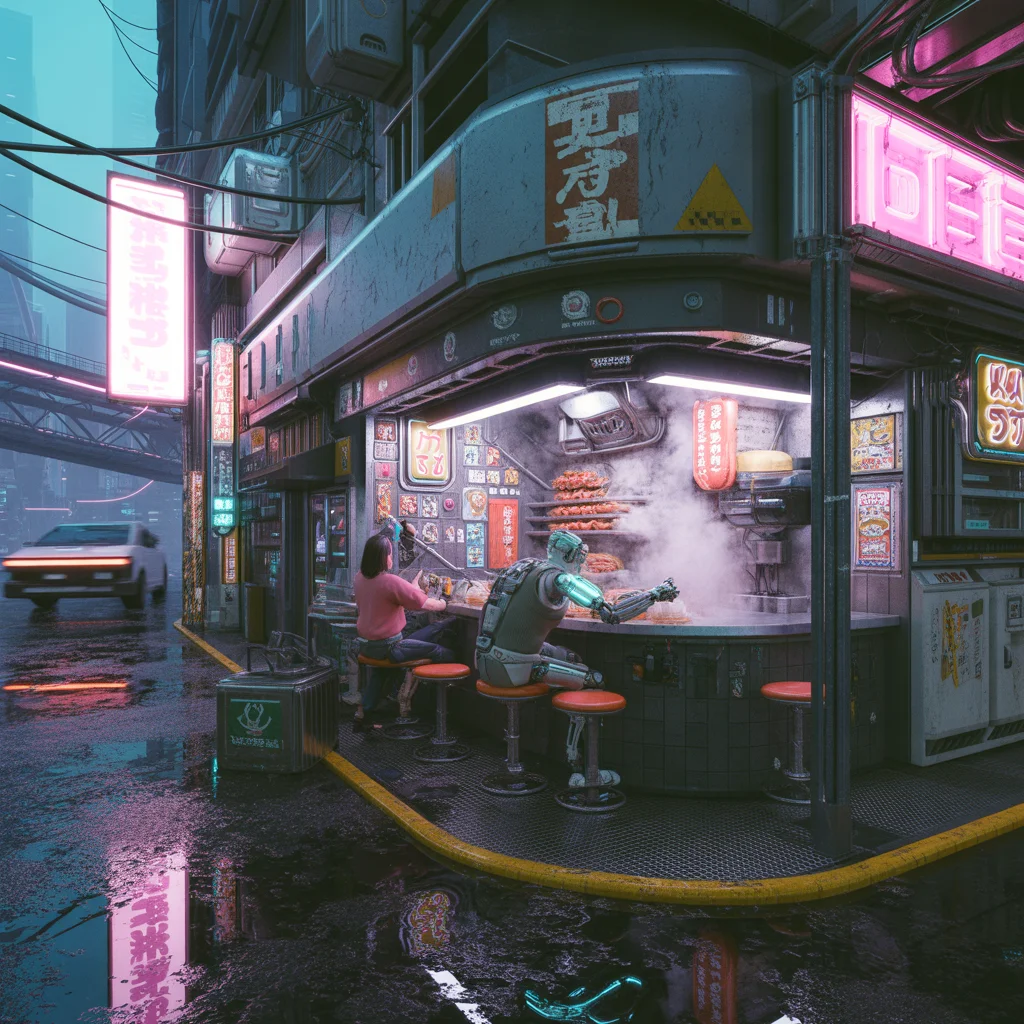
A gritty, futuristic cyberpunk scene rendered in an incredibly detailed 3D style (think Octane Render or Unreal Engine 5). A cramped, bustling noodle bar is built into the side of a grimy skyscraper in Neo-Tokyo. It's raining heavily; neon signs with Japanese kanji reflect vividly in puddles and wet metal surfaces. Steam billows from cooking vents, mixing with volumetric fog. The vendor is an old cyborg with a robotic arm serving customers wearing techwear. Flying vehicles streak past on an overhead highway. The aesthetic is dark, crowded, with intense blue, purple, and pink lighting, chromatic aberration, and lens flares.
Want to create this with your own face? Use this instruction:
No distortion, no smoothing, no reshaping of the face. A gritty, futuristic cyberpunk scene rendered in an incredibly detailed 3D style (think Octane Render or Unreal Engine 5). A cramped, bustling noodle bar is built into the side of a grimy skyscraper in Neo-Tokyo. It's raining heavily; neon signs with Japanese kanji reflect vividly in puddles and wet metal surfaces. Steam billows from cooking vents, mixing with volumetric fog. The vendor is an old cyborg with a robotic arm serving customers wearing techwear. Flying vehicles streak past on an overhead highway. The aesthetic is dark, crowded, with intense blue, purple, and pink lighting, chromatic aberration, and lens flares.
About this Prompt
Experience the visceral power of visionary storytelling through 'Cyberpunk Noodle Bar (High-Detail 3D Render) | Ready To Use Ai Prompt', a conceptual marvel that sets a massive new benchmark in the competitive landscape of AI Art imagery. Every generation acts as a profound exploration of modern art, delivering a striking aesthetic that is impossible to ignore. The impossibly intricate, highly mechanical clicking clockwork and stunning ray-traced refractions show absolute structural genius. The way virtual light bounces, reflects, and bends around this specific piece of AI Art art is nothing short of pure, unadulterated, and flawlessly calculated generative magic.
Whether you are currently working in Midjourney v6, Stable Diffusion XL, or the latest Gemini models, this highly structured prompt heavily optimizes your creative workflow, reliably delivering jaw-dropping, professional-grade outputs on the very first try. Make this highly stunning, perfectly composed prompt the absolute focal point of your next big digital project. Its immense, highly adaptable versatility is simply perfect for completely mastering the intricacies of the AI Art visual style.
Prompt: A woman dressed in a heavy, dark emerald green velvet gown with intricate gold embroidery. She is inside a grand, dimly lit baroque palace with marble floors and tall arched windows. A single shaft of moonlight illuminates her.
Pose: Seated regally on an ornate gold-trimmed throne, leaning slightly forward with her chin resting on the back of her hand, legs crossed elegantly.
Technical: Oil painting texture, dramatic Chiaroscuro lighting (Rembrandt lighting), high-detail fabric textures, elegant, 8k.
Modern Indian Viral Reel Pose – Gentle Spin Moment | Hyper Realistic Prompt
2526 mos ago
Prompt: An Indian woman in a modern Indian elegant dress, captured mid gentle spin as if transitioning into a reel. Dress flares slightly, adding motion and grace. Body posture fluid and balanced. Hair moving naturally with spin. Expression joyful and confident. Makeup soft glam with radiant finish. Lighting cinematic and smooth. Background minimal or pastel. Ultra-realistic textures, influencer elegance, viral-ready cinematic framing.
Walking Fashion Pose | Best Ai Prompt For Beginner
2426 mos ago
A stylish woman walking confidently on a city street, flowing outfit, natural movement, cinematic angle, golden hour lighting, urban fashion background, realistic textures, motion blur effect, professional street fashion photography, ultra-realistic, 8K quality
Modern Indian Viral Reel Pose – Power Confidence Stand | Easy Ai Prompt
2936 mos ago
Prompt: An Indian woman dressed in a bold modern Indian dress, captured standing confidently as if pausing a reel for impact. Feet grounded, shoulders squared, posture strong. Hair neatly styled with subtle volume. Expression bold, fearless, and self-assured. Makeup clean glam with sharp features. Lighting crisp and studio-clean. Background minimal. Ultra-realistic textures, cinematic influencer framing, high-impact viral composition.
The Smartphone of 2030 is Transparent! (Hands-On) | Best Prompt For Realistic Image
2336 mos ago
Prompt: A futuristic tech review thumbnail. A close-up macro shot of a reviewer's hand holding a completely transparent, bezel-less glass smartphone. The phone is projecting a vibrant, floating 3D holographic map of a futuristic city above its surface. The internal components are visible as glowing blue and purple light patterns within the glass body. The background is a blurred, high-tech laboratory with bokeh LED light strips and robotic arms. The lighting is clean and futuristic, highlighting the glass textures and holographic particles. 8k resolution, photorealistic, sci-fi aesthetic.
Intense Athletic Fitness Action | Ai Prompt Idea For Beginner
2466 mos ago
Prompt: A dynamic action shot of a muscular man sprinting on an outdoor urban track. Sweat is glistening on his skin under the midday sun. He is wearing high-performance compression gear. The camera angle is low to the ground, capturing the intensity of his movement and the definition in his leg muscles. Motion blur in the background, sharp focus on the subject, high-speed photography, vivid colors.
Frequently Asked Questions
Common questions regarding this AI prompt.
How do I add realistic weather effects like rain or snow to the scene?
Weather completely alters the physics of light. If you add 'torrential rain, wet asphalt reflecting neon, water droplets clinging to surfaces', the AI will not just draw rain; it will change the specularity of the Cyberpunk Noodle Bar (High-Detail 3D Render) | Ready To Use Ai Prompt subject. For snow, use 'heavy blizzard, frost-covered edges, soft diffused winter light' to change the entire atmosphere of the AI Art generation.
What rendering engines should I reference to maximize the quality of Cyberpunk Noodle Bar (High-Detail 3D Render) | Ready To Use Ai Prompt?
Modern AI image generators respond incredibly well to 3D software references. By appending terms like 'Unreal Engine 5 render', 'OctaneRender', 'Redshift', 'V-Ray', and 'Global Illumination', you are signaling the AI to utilize its highest quality datasets for lighting physics and material textures within the AI Art image.
How does the prompt establish the historical or futuristic era of Cyberpunk Noodle Bar (High-Detail 3D Render) | Ready To Use Ai Prompt?
Era-specific aesthetics are locked in using targeted chronological keywords. Whether leaning towards a neo-futuristic cyberpunk vibe or a classical Renaissance look, the prompt forces the AI to draw from specific historical datasets. This ensures that the clothing, architecture, and props within the AI Art scene remain historically or thematically accurate.
Can I generate a 3D claymation or toy-like version of Cyberpunk Noodle Bar (High-Detail 3D Render) | Ready To Use Ai Prompt?
Yes, you can mimic physical models easily. Add terms such as 'made of polymer clay, tilt-shift photography, miniature diorama, cute 3D render, smooth plasticine, vibrant pastel colors' to the prompt. The AI will instantly convert the AI Art scene into a charming, tactile 3D object.
Can I change the material composition of objects in the Cyberpunk Noodle Bar (High-Detail 3D Render) | Ready To Use Ai Prompt prompt?
Yes, AI handles material transformation brilliantly. If you want to change a standard object into something surreal, use explicit material descriptors like 'made of translucent frosted glass', 'brushed anodized aluminum', 'woven carbon fiber', or 'wet shimmering obsidian'. This will completely recalculate the reflections and refractions in the AI Art output.
Can I make the characters or subjects in Cyberpunk Noodle Bar (High-Detail 3D Render) | Ready To Use Ai Prompt look like cyborgs?
Easily. Append 'cybernetic enhancements, robotic limbs, glowing optical sensors, biomechanical plating, android'. The AI seamlessly blends biological flesh with metallic machinery, maintaining the high-quality rendering of the original AI Art prompt while shifting the character design.
How do I create a dramatic, low-light version of Cyberpunk Noodle Bar (High-Detail 3D Render) | Ready To Use Ai Prompt?
To plunge the scene into dramatic darkness, modify the prompt to include 'chiaroscuro', 'low-key lighting', 'underexposed', and 'stark shadows'. This tells the AI to plunge the majority of the AI Art environment into darkness while intensely illuminating only the most critical parts of the Cyberpunk Noodle Bar (High-Detail 3D Render) | Ready To Use Ai Prompt subject, creating a moody, cinematic masterpiece.
What is the best Stylize (--s) value to use in Midjourney for this prompt?
The stylize parameter dictates how strongly Midjourney applies its default aesthetic. For strict adherence to the realistic details of Cyberpunk Noodle Bar (High-Detail 3D Render) | Ready To Use Ai Prompt, keep it around --s 100 to --s 250. If you want the AI to take artistic liberties and make the AI Art scene look more like a digital masterpiece, push the value up to --s 500 or --s 750.
What if the AI completely ignores a specific detail I added to the Cyberpunk Noodle Bar (High-Detail 3D Render) | Ready To Use Ai Prompt prompt?
If a detail is ignored, it lacks 'weight'. Move that specific word closer to the very beginning of the prompt. Alternatively, if using Midjourney, use the double colon syntax (Keyword::2) to force the AI to pay attention. In Stable Diffusion, wrap the keyword in parentheses like (Keyword:1.5) to boost its importance in the AI Art scene.
Can I make the image look like vintage, degraded film?
Absolutely. To strip away the ultra-modern crispness, inject phrases like 'shot on Kodak Portra 400', 'heavy film grain', 'light leaks', 'chromatic aberration', and 'vintage 1970s polaroid'. This introduces beautiful, nostalgic imperfections into the AI Art scene, making the Cyberpunk Noodle Bar (High-Detail 3D Render) | Ready To Use Ai Prompt generation look like a discovered relic rather than a digital creation.
What are the recommended parameters for generating Cyberpunk Noodle Bar (High-Detail 3D Render) | Ready To Use Ai Prompt in Stable Diffusion XL (SDXL)?
For optimal results in SDXL, we recommend pairing this prompt with a high-quality checkpoint like Juggernaut XL. Use the DPM++ 2M Karras sampler with approximately 35-40 steps and a CFG scale between 6.5 and 8.0. This combination strikes the perfect balance between adhering strictly to the Cyberpunk Noodle Bar (High-Detail 3D Render) | Ready To Use Ai Prompt description and allowing the model's creative freedom.
What specific lighting setup is best to highlight the details of Cyberpunk Noodle Bar (High-Detail 3D Render) | Ready To Use Ai Prompt?
For maximum texture reveal, a 'three-point studio lighting' or 'Rembrandt lighting' setup works best. By incorporating keywords like 'rim light', 'key light', and 'soft fill', you instruct the AI to sculpt the AI Art subject out of the background, ensuring that micro-details like skin pores, fabric weaves, or metallic reflections are perfectly visible.
How does the prompt simulate physical camera lenses for Cyberpunk Noodle Bar (High-Detail 3D Render) | Ready To Use Ai Prompt?
The prompt acts as a virtual director of photography by explicitly stating lens focal lengths and aperture settings. By including phrases like 'shot on 35mm lens' or 'f/1.4 aperture', the AI mathematically simulates the optical distortion, compression, and background blur (bokeh) characteristic of high-end photography, elevating the AI Art image from a flat digital render to a lifelike photo.
How can I adjust the emotional tone or mood of Cyberpunk Noodle Bar (High-Detail 3D Render) | Ready To Use Ai Prompt?
The mood is heavily dictated by lighting and color grading keywords. To make Cyberpunk Noodle Bar (High-Detail 3D Render) | Ready To Use Ai Prompt feel more melancholic, replace warm lighting terms with 'cool blue tones, rainy atmosphere, and dramatic shadows'. Conversely, adding 'vibrant saturation, golden hour sunlight, and joyful expressions' will instantly uplift the emotional resonance of the AI Art scene.
How do I ensure the skin textures in Cyberpunk Noodle Bar (High-Detail 3D Render) | Ready To Use Ai Prompt look photorealistic and not plastic?
AI often defaults to overly smooth, airbrushed skin. To counter this, you must explicitly demand imperfections. Add 'subsurface scattering, visible skin pores, peach fuzz, micro-wrinkles, highly detailed skin texture, raw unedited photograph' to the prompt. This forces the model to render the human elements of the AI Art scene with authentic, biological realism.