High-quality AI-generated image. Optimized for detailed rendering, perfect for creative projects and inspiration.
302Views
0 Likes
100%Quality
FreeLicense
AI Prompt
Intellectual portrait of an Indian woman standing in a narrow library aisle, partially hidden by a bookshelf, peeking through books with a playful smile, soft warm indoor lighting, dust motes dancing in light beams, wearing oversized glasses and a casual sweater, cinematic framing, ultra-sharp focus on eyes, 8K realism
Want to create this with your own face? Use this instruction:
Keep eyes, nose, lips, jawline, and skin exactly as in reference image. Intellectual portrait of an Indian woman standing in a narrow library aisle, partially hidden by a bookshelf, peeking through books with a playful smile, soft warm indoor lighting, dust motes dancing in light beams, wearing oversized glasses and a casual sweater, cinematic framing, ultra-sharp focus on eyes, 8K realism
About this Prompt
Discover the well-kept secret to flawless, ultra-realistic generations with 'Library Aisle Glance | Best Ai Prompt', specifically formulated to bring out the most luxurious, stylish, and deeply captivating aspects of the Indian Woman Pose genre. It is a true generative gem designed for creators who refuse to compromise on quality. It masterfully combines dreamy, soft-focus bokeh effects with razor-sharp, macro-level subject focus. The specific lighting parameters mimic high-budget professional studio environments perfectly, bringing out the intricate fabric details, flawless skin tones, and deeply vibrant colors of the overall Indian Woman Pose composition.
Highly useful for independent musicians, podcast hosts, and digital audio creators needing incredibly striking, professionally rendered Indian Woman Pose album cover art or thumbnail graphics that perfectly match the deep, emotional tone of their digital content. Command the full, staggering power of modern generative algorithms with absolute confidence. Render this specific prompt right now to rapidly unlock the deepest secrets of professional digital art, aesthetic brilliance, and highly viral visual creation.
AI Influencer Luxury Lifestyle Pose | Best Prompt Collection 2026
4078 mos ago
Prompt: A digital AI influencer man leaning against a luxury car, one leg crossed, stylish sunglasses, confident expression, modern urban background, cinematic lighting, premium lifestyle vibe, sharp details, high-end social media branding style, ultra-realistic render.
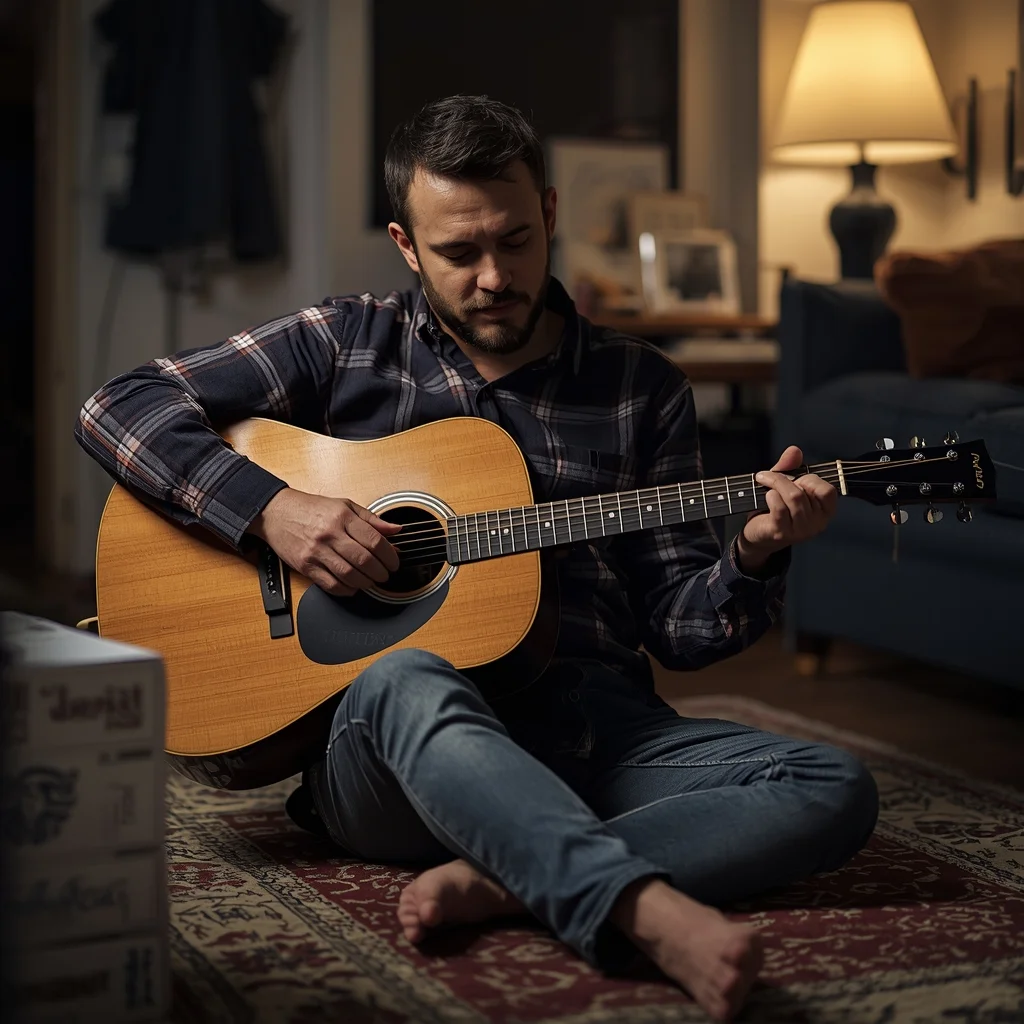
The Relaxed Musician at Home | Ai Prompt For High Engagement
4578 mos ago
Prompt: An intimate, warm photograph of a man with a beard sitting barefoot on a rug in a cluttered living room, gently playing an acoustic guitar. He is wearing a comfortable flannel shirt. His eyes are closed, lost in the music. The room is lit by soft lamp light in the evening, giving a golden glow to the scene. The shot is candid and natural, focusing on the textures of the guitar wood and his hands.
Prompt: Ultra-realistic thumbnail featuring a creator looking surprised and thoughtful, hand on chin, wide eyes, soft but dramatic lighting, glowing question marks floating around, blurred gradient background in purple and blue tones, cinematic depth of field, crisp facial details, realistic skin texture, professional color grading, high contrast, subtle rim light, modern viral YouTube thumbnail style, eye-catching composition, optimized for mobile viewers, 4K resolution.
Dark Neon Cyber Style Thumbnail | Simple Ai Prompt
2678 mos ago
Prompt: A futuristic cyber-style YouTube thumbnail design with neon lighting, dark background, glowing edges, electric blue and purple highlights, cyberpunk atmosphere, dramatic contrast, sharp focus, ultra-modern digital look, high-energy visual impact, clean composition, no text, no letters, no numbers.
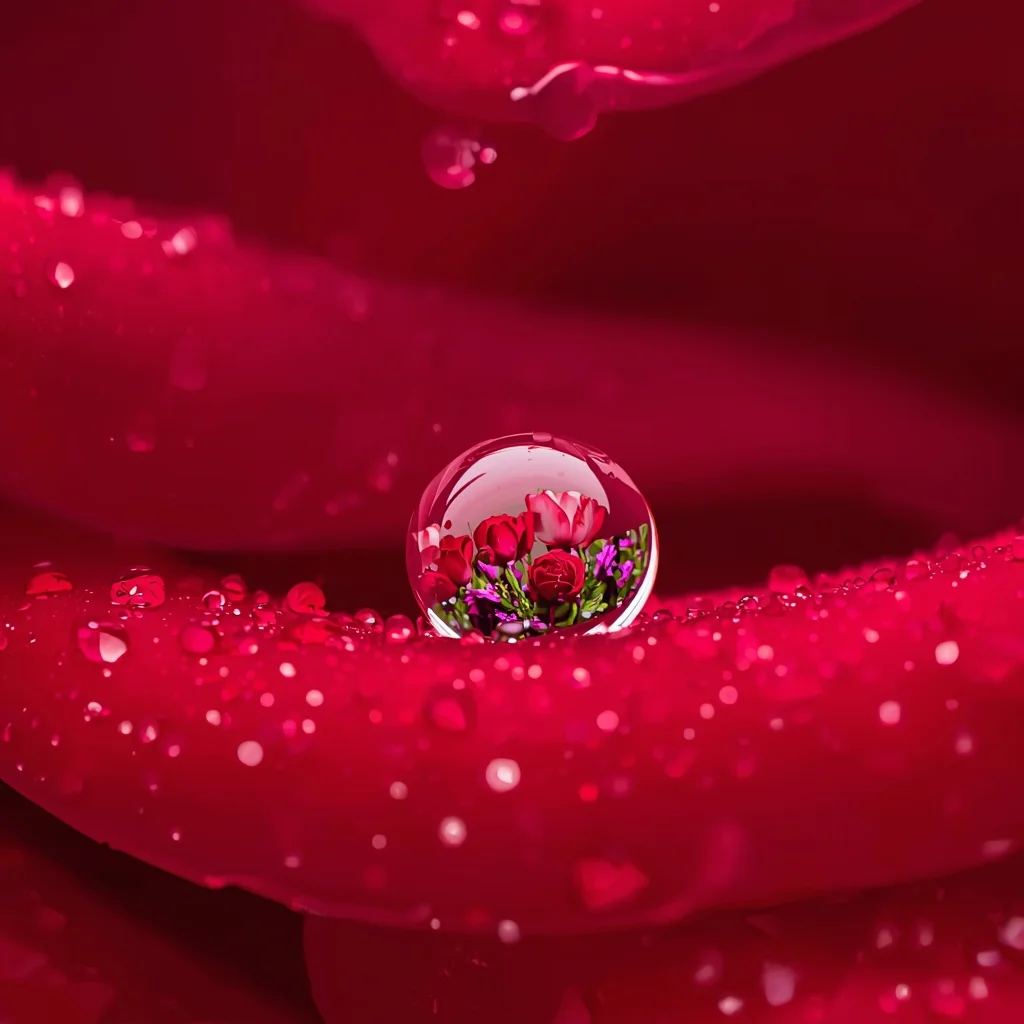
A single dewdrop resting on the petal of a red rose. Inside the dewdrop, a refracted image of the garden behind it is visible. The texture of the rose petal is velvety and microscopic. Soft diffused lighting, macro lens 100mm, f/2.8, intense detail and sharpness.
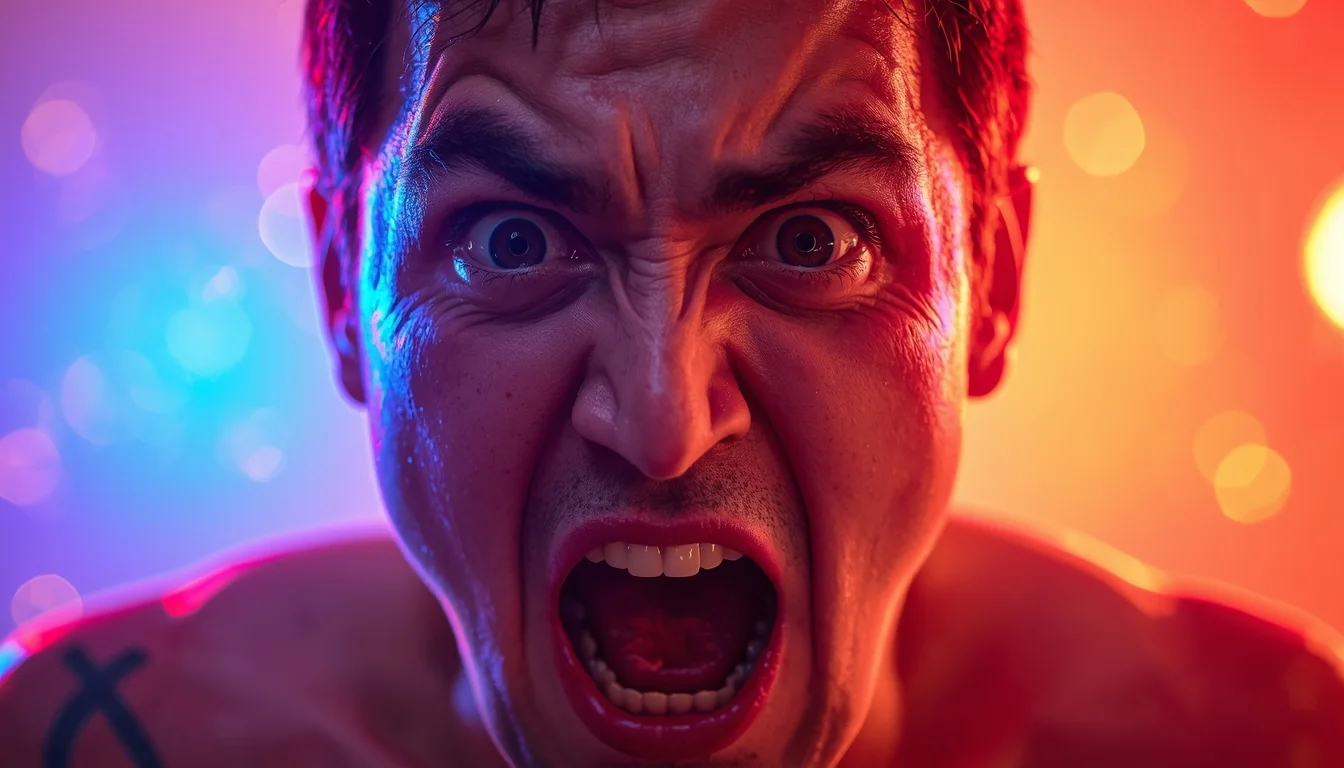
Prompt: A high-impact YouTube thumbnail design featuring a close-up subject with extreme emotional expression such as shock, excitement, or disbelief. Eyes wide open, expressive facial muscles, dramatic pose. Strong cinematic lighting with bright key light and deep shadows for contrast. Colorful background with soft bokeh, light flares, and subtle glow effects. Sharp subject separation, high saturation, punchy contrast, professional studio photography look, viral YouTube aesthetic, ultra-detailed, 8K quality, perfectly framed for thumbnail, no text, no letters
Desert Noire Elegance | Latest Ai Prompt Idea Free
2768 mos ago
Prompt: A fashion photography shot of a woman in the desert during golden hour. She is wearing an intricate black lace blouse, black trousers, and a wide-brimmed black felt hat. She has her arms crossed, looking confidently into the camera. The background is a soft-focus sandy landscape with warm, orange sunset light.
The Clockwork Alchemist's Laboratory (Steampunk Illustration) | Trending Prompt Idea Worldwide
3508 mos ago
An intricate, highly detailed illustration of a cluttered steampunk alchemist's workshop. The style is a blend of Victorian scientific engraving and rich oil painting. The room is filled with brass contraptions, bubbling glass alembics, copper piping, and clockwork automatons. A central figure, an alchemist with leather goggles and a mechanical glove, is transmuting a piece of metal that glows with arcane energy. Charts and blueprints cover the walls. The lighting is warm and golden, coming from gas lamps and a roaring furnace. Textures of polished wood, oxidized copper, and aged parchment are prominent.
Frequently Asked Questions
Common questions regarding this AI prompt.
How can I use Inpainting to fix specific errors in the generated Library Aisle Glance | Best Ai Prompt image?
Inpainting is essential for perfection. If 90% of the Library Aisle Glance | Best Ai Prompt image is flawless but a hand or eye is distorted, send the image to an Inpaint tab. Mask only the flawed area, keep the original prompt, and set the denoising strength high (around 0.7). The AI will regenerate only that specific zone, seamlessly blending the fixed Indian Woman Pose elements into the surrounding artwork.
What is the core conceptual focus of the Library Aisle Glance | Best Ai Prompt prompt?
The Library Aisle Glance | Best Ai Prompt prompt is meticulously engineered to focus on high-fidelity visual storytelling within the Indian Woman Pose genre. By leveraging advanced keyword weighting and specific rendering tokens, it ensures that the AI prioritizes both the primary subject matter and the intricate atmospheric details, resulting in a highly professional and polished final image.
How do I deal with unwanted text or watermarks appearing in the image?
AI models are trained on stock photos which often contain watermarks. To aggressively filter this out, ensure words like 'text, watermark, signature, username, website url, copyright stamp' are heavily weighted in your negative prompt box. This is especially crucial when generating commercial-grade Indian Woman Pose content.
How do I create a surreal, dream-like version of Library Aisle Glance | Best Ai Prompt?
To break the laws of physics, use keywords like 'surrealism, dreamscape, floating objects, defying gravity, Salvador Dali style, mind-bending geometry, ethereal'. The AI will take the familiar elements of Library Aisle Glance | Best Ai Prompt and arrange them in illogical, fascinating ways, creating a truly unique Indian Woman Pose art piece.
How can I transform Library Aisle Glance | Best Ai Prompt into a vector graphic or logo style?
To strip away the photorealism, replace the camera keywords with 'flat vector illustration, minimalist design, UI/UX asset, Adobe Illustrator style, solid colors, clean crisp lines, no gradients'. This transforms the Indian Woman Pose subject into a scalable, graphic-design-ready asset perfect for web design or branding.
What is the optimal workflow for upscaling Library Aisle Glance | Best Ai Prompt to print-quality resolution?
Do not generate at massive resolutions directly, as it causes compositional duplication (like two heads). Instead, generate Library Aisle Glance | Best Ai Prompt at a native resolution (e.g., 1024x1024), and then use a dedicated AI upscaler. Tools like Topaz Gigapixel AI, Magnific AI, or the '4x-UltraSharp' model in Automatic1111 will enhance the micro-textures of the Indian Woman Pose without destroying the original composition.
Can I use Image-to-Image (Img2Img) techniques with the Library Aisle Glance | Best Ai Prompt prompt?
Absolutely. Using a rough sketch or a reference photo alongside this prompt in an Img2Img workflow is highly effective. We recommend setting your Denoising Strength between 0.45 and 0.65. This range is the 'sweet spot' that allows the AI to apply the high-quality textures and lighting of the Library Aisle Glance | Best Ai Prompt prompt while strictly respecting the structural layout of your reference image.
Can I make the characters or subjects in Library Aisle Glance | Best Ai Prompt look like cyborgs?
Easily. Append 'cybernetic enhancements, robotic limbs, glowing optical sensors, biomechanical plating, android'. The AI seamlessly blends biological flesh with metallic machinery, maintaining the high-quality rendering of the original Indian Woman Pose prompt while shifting the character design.
How can I dictate the camera angle to make the subject look more powerful?
Camera angle completely changes the psychological impact. To make the subject of Library Aisle Glance | Best Ai Prompt appear dominant or towering, insert 'low angle shot' or 'worm's-eye view'. Conversely, to make the Indian Woman Pose scene feel vast and the subject small, use 'drone shot', 'bird's-eye view', or 'extreme high angle'.
Can I make the image look like vintage, degraded film?
Absolutely. To strip away the ultra-modern crispness, inject phrases like 'shot on Kodak Portra 400', 'heavy film grain', 'light leaks', 'chromatic aberration', and 'vintage 1970s polaroid'. This introduces beautiful, nostalgic imperfections into the Indian Woman Pose scene, making the Library Aisle Glance | Best Ai Prompt generation look like a discovered relic rather than a digital creation.
What are the recommended parameters for generating Library Aisle Glance | Best Ai Prompt in Stable Diffusion XL (SDXL)?
For optimal results in SDXL, we recommend pairing this prompt with a high-quality checkpoint like Juggernaut XL. Use the DPM++ 2M Karras sampler with approximately 35-40 steps and a CFG scale between 6.5 and 8.0. This combination strikes the perfect balance between adhering strictly to the Library Aisle Glance | Best Ai Prompt description and allowing the model's creative freedom.
How does Google's Gemini (Imagen 3) respond to the Library Aisle Glance | Best Ai Prompt prompt?
Gemini's Imagen 3 engine is exceptionally strong at adhering to safe, high-quality, photorealistic requests. It reads the descriptive narrative of the Library Aisle Glance | Best Ai Prompt prompt perfectly, ensuring that the subject anatomy and environmental physics are logical, highly detailed, and free from the typical warping artifacts seen in older generation models.
How does this prompt handle lighting and atmospheric effects?
This prompt utilizes a sophisticated combination of cinematic lighting descriptors and atmospheric keywords tailored for Indian Woman Pose. By specifying light direction, diffusion, and volumetric properties like 'god rays' or 'softbox lighting', it forces modern AI engines like Midjourney v6 and Flux to calculate highly realistic light bounces, creating a deeply immersive environment.
How can I prevent anatomical distortions or 'extra limbs' when generating characters?
While modern models have improved, complex poses in Indian Woman Pose can still cause issues. To prevent this, use a strong negative prompt containing 'bad anatomy, extra limbs, mutated hands, deformed structure'. If generating locally via Stable Diffusion, utilizing ControlNet (specifically OpenPose or Depth) alongside this prompt will guarantee flawless anatomical structure.